Introduction
Is your Accu-Chek Guide Diabetes Meter out of power? Follow these easy instructions to change the battery and maintain accurate continuous monitoring of your blood glucose.
Changing the battery is a necessary maintenance activity. Maintaining the Accu-Chek Guide Diabetes Meter's power supply is essential for reliable blood sugar readings, as it plays a critical role in tracking your health.
Before you begin this guide, be sure to turn off your device.
Ce dont vous avez besoin
-
-
Press the OK button to make sure the meter is turned off.
-
Turn the device over and look for the latch on the back of the battery compartment.
 Demander à FixBot
-
-
-
Push the latch toward the battery door to release the lock, then lift the battery door to remove it.
-
-
-
-
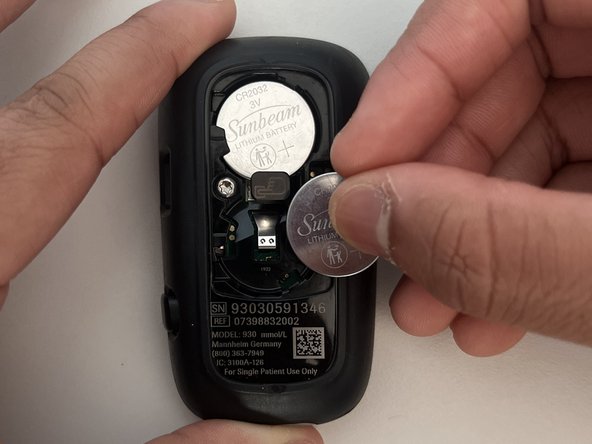
Use a plastic spudger near the middle right side of the top 3V battery to pry it from the battery holder.
-
Press down on the middle of the battery holder to eject the bottom battery.
-
-
-
Slide the new 3V battery in the top slot, then press down to secure it in place.
-
Replace the 3V battery in the bottom slot.
-
-
-
Carefully slide the cover back into place and push it down to lock it securely.
-
-
-
Press and hold the OK button for 5-7 seconds to reactivate the meter.
-
Observe the display to confirm the successful reactivation before using the Accu-Chek Guide Diabetes Meter.
-




With the successful replacement of the batteries and reactivation of the Accu-Chek Guide Meter, the device is fully operational, ready to provide accurate and reliable readings.
Annulation : je n'ai pas terminé ce tutoriel.
4 autres ont terminé cette réparation.

Équipe

York University, Team M-1, Allen Winter 2024 Membre de l'équipe York University, Team M-1, Allen Winter 2024
YORK-ALLEN-W24SMG1
3 membres
1 tutoriel rédigé
2 commentaires de tutoriel
Text says "2016" batteries. Photograph shows 2032 batteries ! ! !
Hi Janet, thank you so much for letting us know about the incorrect batteries in the parts list. We’ve updated it, and we really appreciate your help in keeping the guide accurate.
