Aller au contenu principal
Pour réparer ensemble - Je crée un compte

Astro A20 Battery Replacement

Ce dont vous avez besoin

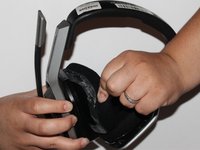
  1. Astro A20 Battery Replacement, Cushion: étape 1, image 1 de 1
    • Place one hand on the hard side of the headset ear portion and on the cushion.

    • Lift the small portion on the edge of the cushion.

    Demander à FixBot

    Ajouter un commentaire

  2. Astro A20 Battery Replacement: étape 2, image 1 de 1
    • Slide the metal spudger underneath the lift part of the ear cushion.

    • Pull the ear cushion while wedging the spudge around the edge of the ear cushion.

    Demander à FixBot

    Ajouter un commentaire

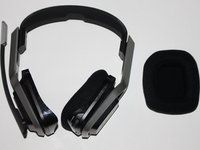
  3. Astro A20 Battery Replacement: étape 3, image 1 de 2 Astro A20 Battery Replacement: étape 3, image 2 de 2
    • Remove the ear cushion from the headset.

    Demander à FixBot

    Ajouter un commentaire

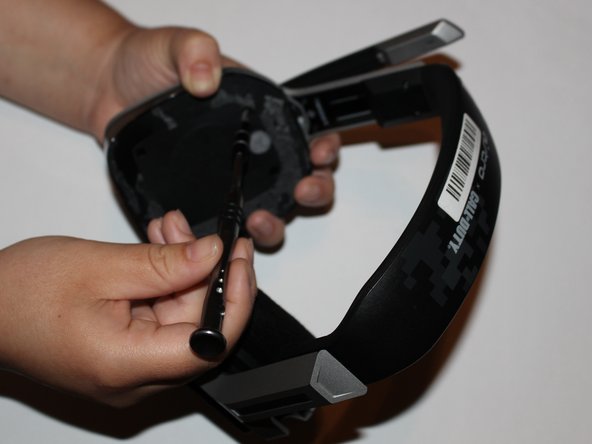
  4. Astro A20 Battery Replacement, Battery: étape 4, image 1 de 1
    • Place hand on the opposite side of the speaker.

    Demander à FixBot

    Ajouter un commentaire

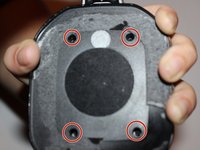
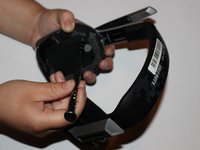
  5. Astro A20 Battery Replacement: étape 5, image 1 de 2 Astro A20 Battery Replacement: étape 5, image 2 de 2
    • Remove the four 7mm screws with a Phillips #1 screwdriver.

    • You may want to use a 60mm screwdriver extension to reach the screws inside of the headset.

    Demander à FixBot

    Ajouter un commentaire

  6. Astro A20 Battery Replacement: étape 6, image 1 de 1
    • Lift and remove the speaker from the headset.

    Demander à FixBot

    Ajouter un commentaire

  7. Astro A20 Battery Replacement: étape 7, image 1 de 1
    • Remove the two 7mm screws with a Phillips #1 screwdriver.

    Demander à FixBot

    Ajouter un commentaire

  8. Astro A20 Battery Replacement: étape 8, image 1 de 1
    • Lift the motherboard to expose the battery.

    Demander à FixBot

    Ajouter un commentaire

  9. Astro A20 Battery Replacement: étape 9, image 1 de 1
    • Remove the battery with a plastic spudger.

    Demander à FixBot

    Ajouter un commentaire

Conclusion

To reassemble your device, follow these instructions in reverse order.

Annulation : je n'ai pas terminé ce tutoriel.

3 autres ont terminé cette réparation.

Jasmine Yarbrough

Membre depuis le 09/10/18

1 017 Réputation

5 tutoriels rédigés

Équipe

University of Alabama, Team S1-G2, Bedsole Fall 2018 Membre de l'équipe University of Alabama, Team S1-G2, Bedsole Fall 2018

UA-BEDSOLE-F18S1G2

4 membres

10 tutoriels rédigés

3 commentaires de tutoriel

Does it work for Astro A20 2nd Gen too?

Charly - Réponse Partager

this guide is so wrong! 1st the battery is on the left side by the charging port (a20 2gen)

Miguel Garcia - Réponse Partager

That head set is A20 gen1 but main board in right side

from 7th pic that is right side

If you have no idea which is left side or right side.

just check where is buttons

Leo Lee - Réponse Partager

Ajouter un commentaire

Nombre de vues :

Dernières 24 heures : 5

7 derniers jours : 33

30 derniers jours : 150

Total : 20,461