Aller au contenu principal
Pour réparer ensemble - Je crée un compte

Kobo Clara BW (P365) Back Cover Replacement

Ce dont vous avez besoin

  1. Kobo Clara BW (P365) Back Cover Replacement, Before you begin: étape 1, image 1 de 3 Kobo Clara BW (P365) Back Cover Replacement, Before you begin: étape 1, image 2 de 3 Kobo Clara BW (P365) Back Cover Replacement, Before you begin: étape 1, image 3 de 3
    • Drain your eReader's battery as much as possible before starting your repair. Ideally, it should be fully discharged.

    • Optionally, to drain the battery faster, navigate to MoreSettingsEnergy saving and privacy and set Automatically go to sleep after and Automatically power off after to Never.

    • When working on or near the battery, don't use sharp metal tools to avoid puncturing and shorting the battery.

    • Unplug all cables and fully shut down your eReader.

    • Your screen should be black and say Powered off.

    Demander à FixBot
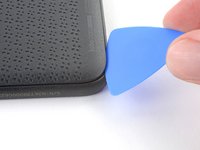
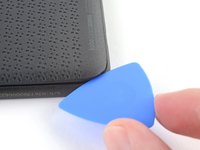
  2. Kobo Clara BW (P365) Back Cover Replacement, Insert an opening pick: étape 2, image 1 de 2 Kobo Clara BW (P365) Back Cover Replacement, Insert an opening pick: étape 2, image 2 de 2
    • Lay your eReader down so the back cover is facing up.

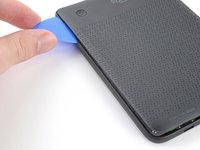
    • Insert the flat edge of an opening pick between the frame and the bottom left corner of the back cover.

    • Push the pick downwards at a slight angle until it slides under the back cover.

    Demander à FixBot
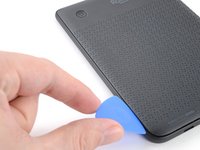
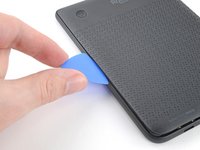
  3. Kobo Clara BW (P365) Back Cover Replacement, Release the bottom clips: étape 3, image 1 de 3 Kobo Clara BW (P365) Back Cover Replacement, Release the bottom clips: étape 3, image 2 de 3 Kobo Clara BW (P365) Back Cover Replacement, Release the bottom clips: étape 3, image 3 de 3
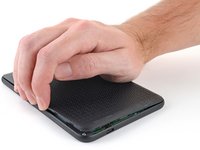
    • Slide the pick toward the bottom right corner to release the clips along the bottom edge.

    Demander à FixBot
  4. Kobo Clara BW (P365) Back Cover Replacement: étape 4, image 1 de 2 Kobo Clara BW (P365) Back Cover Replacement: étape 4, image 2 de 2
    • Remove the pick and reinsert it under the bottom left corner.

    • Angle the pick flat under the back cover and rotate it around the bottom left corner to release its clips.

    • If you're having trouble, try twisting the pick to lift the corner clips out of their slots.

    Demander à FixBot
  5. Kobo Clara BW (P365) Back Cover Replacement, Release the left clips: étape 5, image 1 de 3 Kobo Clara BW (P365) Back Cover Replacement, Release the left clips: étape 5, image 2 de 3 Kobo Clara BW (P365) Back Cover Replacement, Release the left clips: étape 5, image 3 de 3
    • Slide the pick toward the top left corner to release the clips along the left edge.

    Demander à FixBot
  6. Kobo Clara BW (P365) Back Cover Replacement, Remove the back cover: étape 6, image 1 de 3 Kobo Clara BW (P365) Back Cover Replacement, Remove the back cover: étape 6, image 2 de 3 Kobo Clara BW (P365) Back Cover Replacement, Remove the back cover: étape 6, image 3 de 3
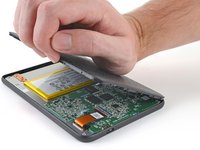
    • At this point, you should be able to grip the back cover and release its remaining clips. If not, slide a pick under the perimeter of the back cover until you can grip an edge.

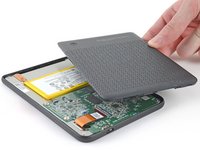
    • Grip the left edge of the back cover and lift it away from the eReader to release the remaining clips.

    • Remove the back cover.

    • During reassembly, align the back cover over the eReader and press along the perimeter until all its clips snap back into place.

    Demander à FixBot
Conclusion

Repair didn’t go as planned? Try some basic troubleshooting, or ask our Answers Community for help.


Carsten Frauenheim

Membre depuis le 03/10/20

164 538 Réputation

439 tutoriels rédigés

Équipe

iFixit Membre de l'équipe iFixit

Staff

123 membres

25 707 tutoriels rédigés

0 commentaires de tutoriel

Ajouter un commentaire

Nombre de vues :

Dernières 24 heures : 0

7 derniers jours : 15

30 derniers jours : 74

Total : 595