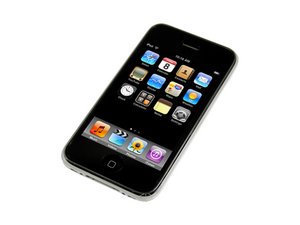
Seconde génération d'iPhone. Modèle A1241 / capacité de 8 ou 16 Go / dos en plastique noir ou blanc. Sa réparation est plus simple que celle du premier iPhone. Nécessite des tournevis, un outil pour ouvrir et des ventouses.
Faites défiler ce fil pour trouver l'endroit approprié pour y placer ce commentaire. Cliquez ensuite sur « Ajouter un commentaire à cette contribution » pour le déplacer.
3 commentaires
I've had this iPhone for 2weeks and just today it just went dead when it was hundred percent battery it just turned off I tried to hold the top boton and it still did not work
IPhone 3g does not full turn on but when I connect to pc then only apple show then after turn off.. We have again the Home button is not working but no power ..
Faites défiler ce fil pour trouver l'endroit approprié pour y placer ce commentaire. Cliquez ensuite sur « Ajouter un commentaire à cette contribution » pour le déplacer.

10 commentaires:
I have tried rebooting my iPhone by holding down the sleep/wake button and home button but it hasn't worked so far. It tries to reboot but then gets hanged.
Hi max it would probably be better if you ask your own question.Click on the link on the right side of this page "Ask a Question" and give as much information as possible. Right now it looks like you are answering an old questions. Good Luck
I've got the same problem with my 8GB 3G. I've replaced the battery and that hasn't changed anything.
Basically, if I plug in a connector cable that is connected to a USB I get a silver Apple logo appear on screen for a minute or so, then the display disappears apart from a very faint Apple logo (almost like screen burn) until I unplug the cable, then it disappears completely.
If I try and put it into DFU mode, it comes up with the Connect to iTunes graphic. I connect to iTunes, iTunes recognizes a device is in DFU mode. I try and restore but it fails instantly with an Error 23. It then disconnects itself.
Does this sound like this an economical thing to try and fix, seeing as I can get a 2nd hand 16GB for £250?
1)I tried plugging into the car charger thinking the battery was dead, but no charge and no charge indication = still dead.
2) I tried my home charger, (thinking it was the car charger) but I got the same symptom = still dead, nothing nada...
ACTION: I checked you tube and found this site
FIX:
1) I checked this site and came across the suggestion above to "by holding down the sleep/wake button and home button simultaneously" and it worked. I entered the security code and all is in order.
Faites défiler ce fil pour trouver l'endroit approprié pour y placer ce commentaire. Cliquez ensuite sur « Ajouter un commentaire à cette contribution » pour le déplacer.
2 commentaires:
I had the same issue when I did plug it into a dock station. Apple offered a free replacement in store (Genuis)
Faites défiler ce fil pour trouver l'endroit approprié pour y placer ce commentaire. Cliquez ensuite sur « Ajouter un commentaire à cette contribution » pour le déplacer.
3 commentaires:
Thanks brother,u saved me today..it worked fine..Thanks again...
Hold the power and the home batten for 10sec then release your hand on the power batten but still keep your hand on the home batten for about 4sec, release ur hand now, your iTunes should detect it now.
Faites défiler ce fil pour trouver l'endroit approprié pour y placer ce commentaire. Cliquez ensuite sur « Ajouter un commentaire à cette contribution » pour le déplacer.
2 commentaires:
holding sleep and wake wont always work because my iphone is used and the top button is broke and works rarely s i could do it nonstop for a week and it might not wrk or it could do it 10 times straight I NEED HELP!!!
I had a similar problem, and mine turned out to be a loose connection from when I replaced the LCD. Once it was properly connected I had no problem turning it on.
Faites défiler ce fil pour trouver l'endroit approprié pour y placer ce commentaire. Cliquez ensuite sur « Ajouter un commentaire à cette contribution » pour le déplacer.
I tryed to turn on the iphone, tryed to recharge and nothing happens.
I seens that the my iphone 3g was dead.
Then I tried the following instructions and it worked:
" Hold the power and the home batten for 10sec then release your hand on the power batten but still keep your hand on the home batten for about 4sec, release ur hand now, your iTunes should detect it now. "
Faites défiler ce fil pour trouver l'endroit approprié pour y placer ce commentaire. Cliquez ensuite sur « Ajouter un commentaire à cette contribution » pour le déplacer.
i have exactly the same problem. i just had my battery changed. everything was working perfectly when all of a sudden it died but i still have 18%. i tried to turn it on but it doesn't go beyond the apple logo, i tried to plug in i was thinking that the battery drained but still got no solution. i tried everything already! help!
Faites défiler ce fil pour trouver l'endroit approprié pour y placer ce commentaire. Cliquez ensuite sur « Ajouter un commentaire à cette contribution » pour le déplacer.
Try to restart it by entering recovery mode. Recover mode is a failsafe for iOS so it may fix your problem. The best and easiest way to enter or exit recovery mode for iOS device is to use the free program ReiBoot, now it is famous across the web. Have a try if needed.
Faites défiler ce fil pour trouver l'endroit approprié pour y placer ce commentaire. Cliquez ensuite sur « Ajouter un commentaire à cette contribution » pour le déplacer.
I had the exact same problem and the problam was the wall plug, the wire AND the charging port being dusty. I cleaned the charging port, changed wires and wall plug and its working.
Faites défiler ce fil pour trouver l'endroit approprié pour y placer ce commentaire. Cliquez ensuite sur « Ajouter un commentaire à cette contribution » pour le déplacer.
my iphone 3g randomly shut off and it keeps saying "connect to itunes" and when i do that it says it disconnected from dfu mode but when i look back at it it still says the same thing. i tried to reinstall the os with reiboot and nothing worked please help
Faites défiler ce fil pour trouver l'endroit approprié pour y placer ce commentaire. Cliquez ensuite sur « Ajouter un commentaire à cette contribution » pour le déplacer.
3 commentaires
I've had this iPhone for 2weeks and just today it just went dead when it was hundred percent battery it just turned off I tried to hold the top boton and it still did not work
par Shayan
IPhone 3g does not full turn on but when I connect to pc then only apple show then after turn off.. We have again the Home button is not working but no power ..
par smshadab8
My iPhone 3G starts up but turns straight back off I don't understand why do u AV any idea please
par Tony Richardson