Aller au contenu principal
Pour réparer ensemble - Je crée un compte

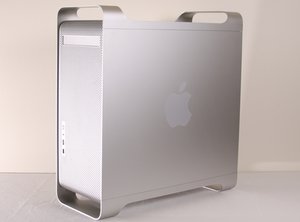
Le Power Mac G5 est un ordinateur de bureau produit pour la première fois en 2003 par Apple Corporation. Ce tutoriel décrit le processus de réparation d'un Apple Power Mac G5, numéro de modèle A1047 EMC 2061 de 2004. Il a été abandonné en 2006 dans le cadre de la transition vers Intel, d'abord pour les développeurs, puis pour le grand public.

Cannot connect (mount) as server for MacBook Pro (new)

We have had a lot of trouble mounting servers between my desktop and laptop computers. Originally we had no problem at all. We could mount and do screen sharing at will. Later, we could not mount the desktop on the laptop. Now we cannot mount either on the other - tho can always see listed in the finder.

I get the following Msg:

The Finder cannot complete the operation because some data in "afp://10.0.1.4/" could not be read or written.

(Error code -36)

Of course I have been over the sharing settings many times.

Anyone have any ideas?

Répondu ! Afficher la réponse J'ai le même problème

Cette question est-elle utile ?

Indice 2
2 commentaires

How are you connected?

par

Sorry folks - I did not realize the the 2 machines would not appear inside my msg. One is a Mac Pro G5, other is a new MBP - All running Leopard: 10.5.8.

Connect via Airport. G5 is wired.

Again, I have triple checked the System Pref settings a dozen times. (tho this still does not preclude the problem being totally obvious.)

Like I said - it all used to work just fine.

par

Ajouter un commentaire

4 Réponses

Solution retenue

Well - the system does not let you answer your own question so I had to make a new account.

----

Answer:

I called Apple Support. WOW that was easy!! I can't believe how easy. Of course I was going to have to pay since the machine is so old (6 years), but since I had upgraded the OS to Leopard, it was FREE!

- First call:

They said run "Fix Permissions" from the Disk Utility app. Then in Sys Prefs>Sharing turn OFF all sharing - do a restart - then turn them back on.

This was a good idea but did not work.

- Second call:

So I went back online and got an immediate slot - no waiting!

Solution:

SysPrefs>Security: Firewall tab:

There are 3 Options:

- Allow all incoming connections

- Allow only essential services

- Set access for specific services and applications.

The problem is that the list box is visible even when #2 is selected so it looks like the items are available. But they are not.

So I set to option #3 and was able to connect.

---------------

Not sure when my machine got changed, the other was probably changed at wife's work.

Hope this can help others.

---

BTW - Screen Sharing is awesome. Allows me to do a lot of compute intensive jobs on the faster machine while still on my main old G5.

Cette réponse est-elle utile ?

Indice 1

1 commentaire:

You should be able to answer your own question; the site just warns you about it before you submit. Also, thanks for posting your solution!

par

Ajouter un commentaire

Do each of these computers have assigned Static IP Address's? it not 10.0.1.4 may not be the computer you think it is..

if you don't like the idea of static, the next best thing would be to setup a DHCP reservation in your router. that way the router always assigns the correct IP address based on MAC address.

Cette réponse est-elle utile ?

Indice 0

4 commentaires:

Can you make this easier to understand for a layman?

par

NO - I did check the IP first. That - of course - was trying to connect via the Finder "Connect to..." command. But if I try to connect by clicking on a Finder Window Sidebar (i.e. the icon for the other computer) then I get even less feedback - only "Failed."

But thanks for the idea.

par

Are they Both Macs?

par

--------

Well - I finally got off my duff and put in a call to Apple on it. It has been a pain for a while - but never got up the energy to deal with it :)

Thanks to you all- now I have.

par

Ajouter un commentaire

This page will explain to you how to fix your problem.

Cette réponse est-elle utile ?

Indice 0

4 commentaires:

He wouldn't be using AFP if it was a windows computer.. or perhaps thats the issue?

par

Thanks again - but did not.

That was for connecting to a Windows server with SMB. Mine was an attempted AFP connection.

par

Both are Macs - used to be able to connect no prob, even screen share. NOw nothing.

par

My bad for not catching that detail, but it's the same error message so it'd be a similar cause. Have you by any chance changed the password on the computer?

par

Ajouter un commentaire

I'm just a regular computer user who doesn't know the difference between AFP and SMB. I usually connected to a shared network at work through AFP. However, I recently couldn't connect to the network and got error code 36. BUT when I tried changing from AFP to SMB, I was enable to connect to my network once again Yay!!!....just so you know....hope this helps

........POP.........

Cette réponse est-elle utile ?

Indice 0
Ajouter un commentaire

Ajouter une réponse

jmmx sera éternellement reconnaissant.
Nombre de vues :

Dernières 24 heures : 3

7 derniers jours : 10

30 derniers jours : 23

Total : 3,739