Aller au contenu principal
Pour réparer ensemble - Je crée un compte

Amazon Fire Phone Battery Replacement

Ce dont vous avez besoin

    1. Amazon Fire Phone Battery Replacement, Tape the screen: étape 1, image 1 de 1
      • If the display is damaged, use clear packing tape to contain any glass shards.

      • Make sure the entire surface of the display is covered with tape.

      • Wear safety glasses to protect your eyes.

      Demander à FixBot

      Ajouter un commentaire

    2. Amazon Fire Phone Battery Replacement, Power off, remove SIM card, remove screws: étape 2, image 1 de 3 Amazon Fire Phone Battery Replacement, Power off, remove SIM card, remove screws: étape 2, image 2 de 3 Amazon Fire Phone Battery Replacement, Power off, remove SIM card, remove screws: étape 2, image 3 de 3
      • Power off your phone.

      • Remove the SIM card from the left side of the phone by pressing the small hole and allowing it to eject using the 0.8 screwdriver head.

      • Remove the two 4mm screws on the bottom of the phone using the Torx T3 screwdriver.

      Demander à FixBot

      Ajouter un commentaire

    3. Amazon Fire Phone Battery Replacement: étape 3, image 1 de 3 Amazon Fire Phone Battery Replacement: étape 3, image 2 de 3 Amazon Fire Phone Battery Replacement: étape 3, image 3 de 3
      • Press the small suction cup just above the home button.

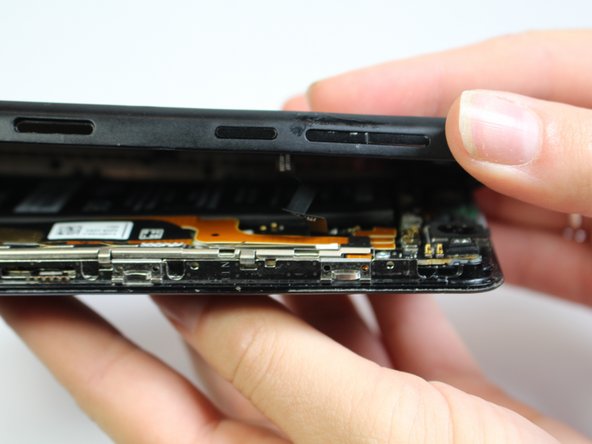
      • While lifting up on the suction cup insert an opening pick into the crevice between the screen and back casing to pry the screen off carefully.

      • Carefully separate the two halves to avoid tearing the volume rocker ribbon cable.

      • Using the opening tool, disconnect the volume rocker ribbon cable from the base of the phone freeing the two halves of the phone.

      Demander à FixBot

      Ajouter un commentaire

    4. Amazon Fire Phone Battery Replacement, Remove Bracket: étape 4, image 1 de 1
      • Using the J000 screwdriver head, remove the three 3mm screws holding the bracket in place.

      • Remove the silver bracket that was held into place by the three screws just removed.

      Demander à FixBot

      Ajouter un commentaire

    5. Amazon Fire Phone Battery Replacement, Disconnect Battery: étape 5, image 1 de 1
      • Disconnect the battery connection cable by using the plastic opening tool and applying light pressure upwards on the cable.

      Demander à FixBot

      Ajouter un commentaire

Conclusion

To reassemble your device, follow these instructions in reverse order.

Annulation : je n'ai pas terminé ce tutoriel.

23 autres ont terminé cette réparation.

Lissandra Ilcyn

Membre depuis le 10/05/15

910 Réputation

2 tutoriels rédigés

Équipe

Cal Poly, Team 5-7, Maness Fall 2015 Membre de l'équipe Cal Poly, Team 5-7, Maness Fall 2015

CPSU-MANESS-F15S5G7

5 membres

60 tutoriels rédigés

14 commentaires de tutoriel

Tolle Anleitung DANKE!!

Leo Henn - Réponse Partager

The replacement went exactly as presented. My stock battery had pull tabs to release the adhesive, making removal very easy. Thanks for a clear step-by-step guide.

John - Réponse Partager

How to bay amazone fire fone battry in pakistan

Manzoor Khan - Réponse Partager

where can i get fire phone battery in india

Shiva Sai - Réponse Partager

where can i get fire phone battery in UAE Abu Dhabi. It's urgent..

Asheesh Barna - Réponse Partager

Ajouter un commentaire

Nombre de vues :

Dernières 24 heures : 1

7 derniers jours : 14

30 derniers jours : 79

Total : 14,514