Aller au contenu principal
Pour réparer ensemble - Je crée un compte

Brother PT-110 Print Roller Lever Replacement

Ce dont vous avez besoin

    1. Brother PT-110 Print Roller Lever Replacement, Batteries: étape 1, image 1 de 2 Brother PT-110 Print Roller Lever Replacement, Batteries: étape 1, image 2 de 2
      • Push on the side of the cover, and remove it.

      Demander à FixBot

      Ajouter un commentaire

    2. Brother PT-110 Print Roller Lever Replacement: étape 2, image 1 de 1
      • Remove the batteries.

      Demander à FixBot

      Ajouter un commentaire

    1. Brother PT-110 Print Roller Lever Replacement, Back Plate: étape 3, image 1 de 2 Brother PT-110 Print Roller Lever Replacement, Back Plate: étape 3, image 2 de 2
      • Unscrew the two 9 mm Phillips #1 screws from the top and bottom.

      • Total: 2 x Screws

      Demander à FixBot

      Ajouter un commentaire

    2. Brother PT-110 Print Roller Lever Replacement: étape 4, image 1 de 1
      • First: To separate the top cover from the body, insert a spudger between the two halves.

      • Gently twist the spudger until the two halves separate. Do this in multiple spots around the perimeter of the cover to distribute the pressure.

      • DO NOT PULL HALVES APART. There are wired connections inside that must be disconnected before halves can be fully separated.

      Demander à FixBot

      Ajouter un commentaire

    3. Brother PT-110 Print Roller Lever Replacement: étape 5, image 1 de 1
      • Gently separate the two covers, ensuring wires are not taut.

      Demander à FixBot

      Ajouter un commentaire

    4. Brother PT-110 Print Roller Lever Replacement: étape 6, image 1 de 1
      • Gently grasp the ribbon wire and top cover, then gently pull the ribbon wire out of its connection.

      Demander à FixBot

      Ajouter un commentaire

    5. Brother PT-110 Print Roller Lever Replacement: étape 7, image 1 de 2 Brother PT-110 Print Roller Lever Replacement: étape 7, image 2 de 2
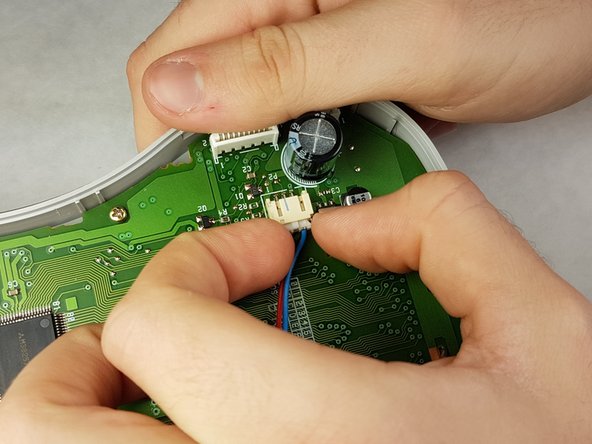
      • Carefully pinch the top of the connector.

      • Pull perpendicular to the device until the wire is disconnected.

      • It may require more force than expected to disconnect the wires.

      Demander à FixBot

      Ajouter un commentaire

    6. Brother PT-110 Print Roller Lever Replacement: étape 8, image 1 de 3 Brother PT-110 Print Roller Lever Replacement: étape 8, image 2 de 3 Brother PT-110 Print Roller Lever Replacement: étape 8, image 3 de 3
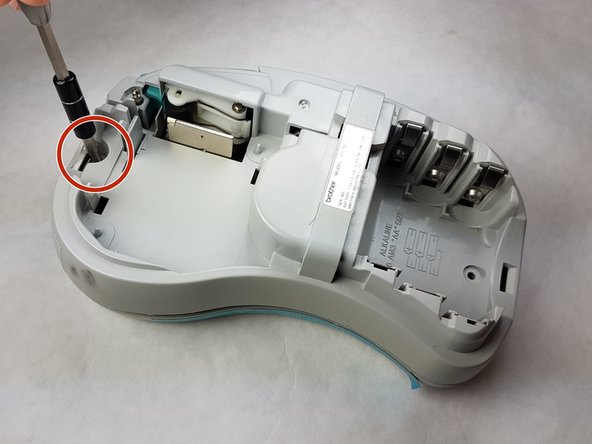
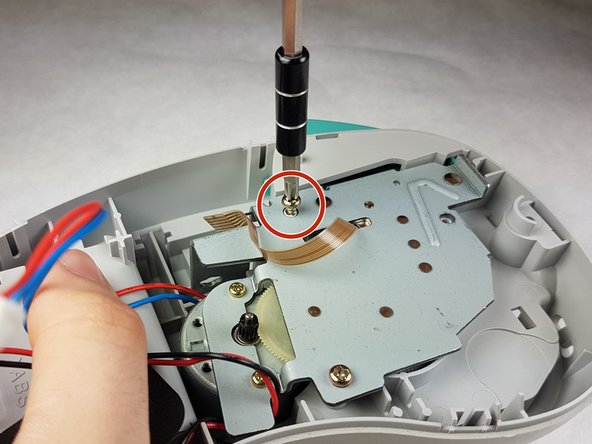
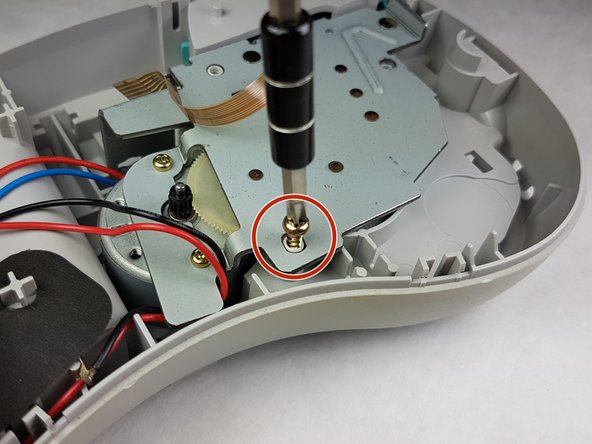
      • Unscrew the three 9 mm Phillips #1 screws shown.

      • Total: 3 x Screws

      Demander à FixBot

      Ajouter un commentaire

    1. Brother PT-110 Print Roller Lever Replacement, Print Roller Lever: étape 9, image 1 de 1
      • Using the metal spudger, swivel the pin so that the print roller lever loosens.

      Demander à FixBot

      Ajouter un commentaire

    2. Brother PT-110 Print Roller Lever Replacement: étape 10, image 1 de 1
      • Gently pull the print roller lever out.

      Demander à FixBot

      Ajouter un commentaire

Conclusion

To reassemble your device, follow these instructions in reverse order.

Annulation : je n'ai pas terminé ce tutoriel.

4 autres ont terminé cette réparation.

Kimberly Larsen

Membre depuis le 09/28/16

279 Réputation

5 tutoriels rédigés

Équipe

IUPUI, Team 1-1, Harley Fall 2016 Membre de l'équipe IUPUI, Team 1-1, Harley Fall 2016

IUPUI-HARLEY-F16S1G1

3 membres

21 tutoriels rédigés

6 commentaires de tutoriel

Hi everybody ,does anyone knows were I can by such a lever ?

TBH

Daniel Verkest - Réponse Partager

BONJOUR, (I’m French)

Same question: does anyone knows were I can by such a lever ?

Pegase M - Réponse Partager

Did anyone find a source for this part?

Erik Carlson - Réponse Partager

Unfortunately very discontinued. Until someone adds it to thingverse there's not much that can be done.

UN8026001 ROLLER HOLDER ASSY PT100/110

UN8031001 ROLLER HOLDER SPRING PT100

UN8032000 ROLLER RELEASE LEVER PT100/110

Michael Krieger - Réponse Partager

I can fix these by using plastic weld to rebuild the edging. I was totally successful.

George Pede - Réponse Partager

Ajouter un commentaire

Nombre de vues :

Dernières 24 heures : 2

7 derniers jours : 6

30 derniers jours : 32

Total : 2,362