Aller au contenu principal
Pour réparer ensemble - Je crée un compte

How to Fix Analog Drift for the SCUF IMPACT

Ce dont vous avez besoin

  1. How to Fix Analog Drift for the SCUF IMPACT, How to Fix Analog Drift for the SCUF IMPACT: étape 1, image 1 de 3 How to Fix Analog Drift for the SCUF IMPACT, How to Fix Analog Drift for the SCUF IMPACT: étape 1, image 2 de 3 How to Fix Analog Drift for the SCUF IMPACT, How to Fix Analog Drift for the SCUF IMPACT: étape 1, image 3 de 3
    • Unlock the L3 or R3 ring by turning it counter clockwise.

    • Remove the L3 or R3 ring.

    Demander à FixBot

    Ajouter un commentaire

  2. How to Fix Analog Drift for the SCUF IMPACT: étape 2, image 1 de 3 How to Fix Analog Drift for the SCUF IMPACT: étape 2, image 2 de 3 How to Fix Analog Drift for the SCUF IMPACT: étape 2, image 3 de 3
    • Pull the analog gently in order to get it out.

    Demander à FixBot

    Ajouter un commentaire

  3. How to Fix Analog Drift for the SCUF IMPACT: étape 3, image 1 de 3 How to Fix Analog Drift for the SCUF IMPACT: étape 3, image 2 de 3 How to Fix Analog Drift for the SCUF IMPACT: étape 3, image 3 de 3
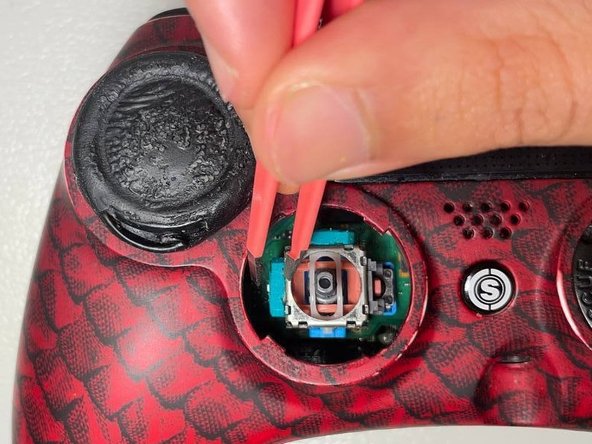
    • Use a tweezer tip to gently open the green box.

    Demander à FixBot

    Ajouter un commentaire

  4. How to Fix Analog Drift for the SCUF IMPACT: étape 4, image 1 de 3 How to Fix Analog Drift for the SCUF IMPACT: étape 4, image 2 de 3 How to Fix Analog Drift for the SCUF IMPACT: étape 4, image 3 de 3
    • Locate the sensor in the green box and take it out slowly.

    Demander à FixBot

    Ajouter un commentaire

  5. How to Fix Analog Drift for the SCUF IMPACT: étape 5, image 1 de 3 How to Fix Analog Drift for the SCUF IMPACT: étape 5, image 2 de 3 How to Fix Analog Drift for the SCUF IMPACT: étape 5, image 3 de 3
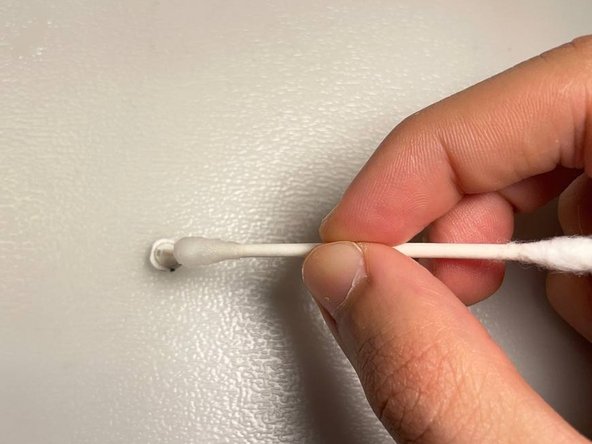
    • Dip the q-tip in rubbing alcohol to clean the sensor and inside the green box for any dust or dirt.

    Demander à FixBot

    Ajouter un commentaire

  6. How to Fix Analog Drift for the SCUF IMPACT: étape 6, image 1 de 3 How to Fix Analog Drift for the SCUF IMPACT: étape 6, image 2 de 3 How to Fix Analog Drift for the SCUF IMPACT: étape 6, image 3 de 3
    • Place the sensor back in the box. To reassemble your controller, follow the instructions 1-4 in reverse order.

    Demander à FixBot

    Ajouter un commentaire

Conclusion

To reassemble your device, follow these instructions in reverse order.

Annulation : je n'ai pas terminé ce tutoriel.

2 autres ont terminé cette réparation.

Amirparsa Monshi

Membre depuis le 09/27/21

181 Réputation

1 tutoriel rédigé

Équipe

York University, Team 1-15, O'Regan Fall 2021 Membre de l'équipe York University, Team 1-15, O'Regan Fall 2021

YORK-O'REGAN-F21S1G15

1 membre

3 tutoriels rédigés

3 commentaires de tutoriel

HIGHLY RECOMMENDED! You saved my life. I have a lot of stick drift in my left analog that ruined my gaming experience through running movement in most of my games (Warzone, Apex, Fortnite) and this tutorial fix it ! I had some black crap on the sensor when I take them off and rubbing it with alcohol and a fine needle solve it. Thanks so much!!!

Alexandre Beauregard - Réponse Partager

My green caps will not pop back on!!!

luke-froeba - Réponse Partager

Did this and got the boxes back on but now my stick is broke. Just get stuck whenever moving it up or down and cannot be pressed down any more..

Treyben Funderburg - Réponse Partager

Ajouter un commentaire

Nombre de vues :

Dernières 24 heures : 4

7 derniers jours : 36

30 derniers jours : 141

Total : 27,259