Introduction
I am a technician who previously worked for samsung. I have seen many people asking about improper sim extraction, and this is the way samsung technicians do the procedure in canada. This procedure is much longer than shoving something in, and trying to pry the sim card out, but it is a guarenteed fix, while being less susceptible to damageing the device. it is the professional way to do the repair
Ce dont vous avez besoin
-
-
Set your hot air gun to your adhesive melting temperature. (I use 250)
-
heat up the four sides of the back glass to a decent temperature.
-
use a suction cup to apply upwards pressure. this begins to lift the glass when warm.
-
apply Ethyl Alcohal (99%) to the seam, to help break down the adhesive.
-
-
-
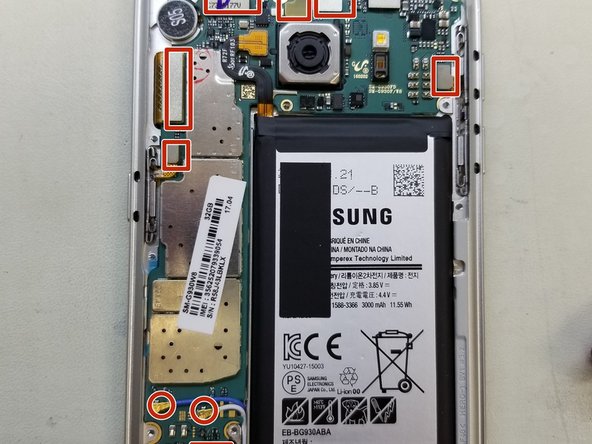
Once the back glass is removed, Begin removing the screws from the three housing panels
-
After removing all of the screws, the panels are clipped into the frame. A little bit of pressure with a spudger/pick will remove them with ease
-
remove the three panels to gain full acces to the motherboard.
-
-
-
-
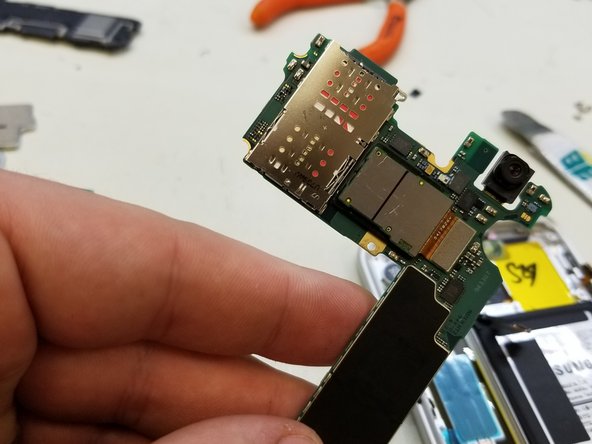
The SIM tray is located on the other side of the motherboard.
-
In order to get there, lifr all of the connectors attached to the board. (Camera, Screen, Power button, Network Coaxials, Fingerprint Sensor, Earspeaker, Prox/Light Sensors, Volume Buttons)
-
When Lifting board, be sure to lift at the top, as the Charge port is connected at the bottom. As you lift the board out, disconnect the Charge flex
-
-
-
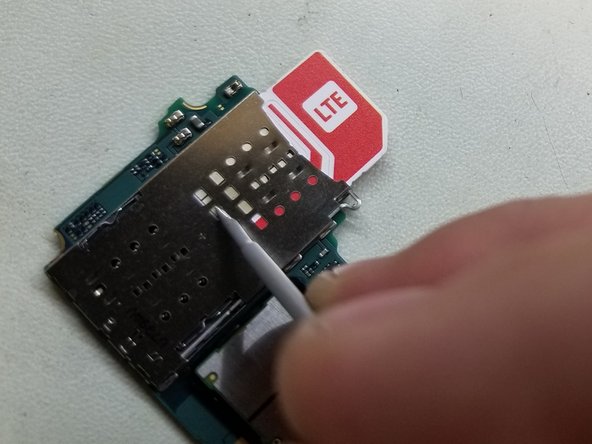
Use small Slot Screwdriver, to access openings in reader, and slowly glide sim outwards.
-
Get the sim card out enough to comforably grab hold, and remove sim from device.
-
while using metal tools to operate on board, be sure there is no power to board, Destatic each tool, and BE GENTLE
-
-
-
Follow the steps bacwards to reassemble the device
-
you may encounter a situation where replacement adhesive is needed to re-apply the back housing
-



To reassemble your device, follow these instructions in reverse order.
To reassemble your device, follow these instructions in reverse order.
Annulation : je n'ai pas terminé ce tutoriel.
8 autres ont terminé cette réparation.



2 commentaires
would i use this method to remove broken sim tray piece stuck in the slot? in my s7 the sim card tray broke near the bottom so now i have the bottom of the tray stuck inside the phone and didnt want to shove anything in it before doing research.
Is there a way to maybe fish it out without opening the phone? (sim card isnt in the phone. only bottom part of tray broke off for no reason, especially that in 2 years it got opened 3 times total and closed very carefully.)
