Aller au contenu principal
Pour réparer ensemble - Je crée un compte

Kobo Arc K107 Screen Replacement

Ce dont vous avez besoin

    1. Kobo Arc K107 Screen Replacement, Battery: étape 1, image 1 de 1
      • Peel the back cover off of the Kobo Arc by finding the lip in the cover and pulling back on it.

      Demander à FixBot

      Ajouter un commentaire

    2. Kobo Arc K107 Screen Replacement: étape 2, image 1 de 1
      • Remove the screws from the midframe.

      Demander à FixBot

      Ajouter un commentaire

    3. Kobo Arc K107 Screen Replacement: étape 3, image 1 de 1
      • Use a nylon spudger to pry up the battery from the device.

      • It will give some resistance as it is glued down.

      • Always use plastic or nylon prying tools around the battery. Metal tools can puncture a battery, potentially causing a fire.

      Demander à FixBot

      Ajouter un commentaire

    4. Kobo Arc K107 Screen Replacement: étape 4, image 1 de 1
      • Unplug the battery connector from the rest of the tablet.

      • Remove the battery from the tablet.

      Demander à FixBot

      Ajouter un commentaire

    1. Kobo Arc K107 Screen Replacement, Speaker: étape 5, image 1 de 2 Kobo Arc K107 Screen Replacement, Speaker: étape 5, image 2 de 2
      • Remove the screws that are attached to the grey plastic layer.

      • Remove the gray plastic layer.

      Demander à FixBot

      Ajouter un commentaire

    2. Kobo Arc K107 Screen Replacement: étape 6, image 1 de 1
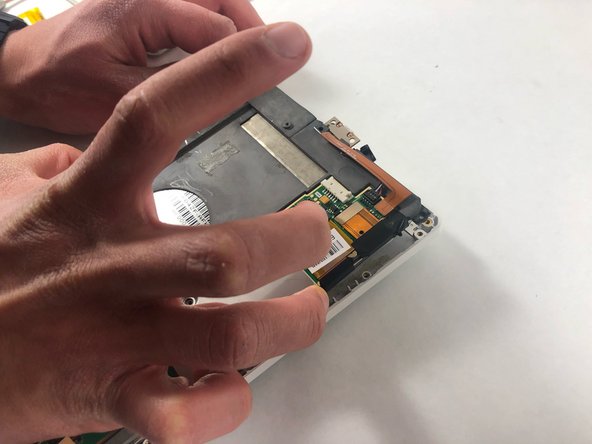
      • Disconnect the speakers from the tablet.

      Demander à FixBot

      Ajouter un commentaire

    1. Kobo Arc K107 Screen Replacement, Screen: étape 7, image 1 de 2 Kobo Arc K107 Screen Replacement, Screen: étape 7, image 2 de 2
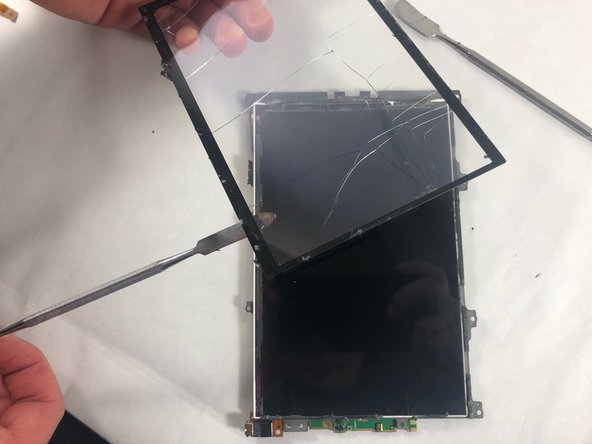
      • Wedge a nylon spudger between the screen and the tablet.

      • Slide the spudger around the edges of the screen and remove it from the device.

      Demander à FixBot

      Ajouter un commentaire

Conclusion

To reassemble your device, follow these instructions in reverse order.

Annulation : je n'ai pas terminé ce tutoriel.

Stephen Pehl

Membre depuis le 10/28/21

303 Réputation

2 tutoriels rédigés

Équipe

UMass Dartmouth, Team 4-3, Gulbrandsen Fall 2021 Membre de l'équipe UMass Dartmouth, Team 4-3, Gulbrandsen Fall 2021

UMASSD-GULBRANDSEN-F21S4G3

3 membres

20 tutoriels rédigés

3 commentaires de tutoriel

Hi, what is the part number for the screen?

Toryy - Réponse Partager

is there any the software reset boot looking error not Wi-Fi, type doing manual software relish, software find on the kobo, page on the way back machine, but version same old the I think coursing all the problems Have already?

D H - Réponse Partager

Where did you find the replacement screen? I've been looking all over the internet for a replacement and the ones I fixit has arent for the arc??? Someone help a poor guy out I'm lost

Devilman86 - Réponse Partager

Ajouter un commentaire

Nombre de vues :

Dernières 24 heures : 1

7 derniers jours : 6

30 derniers jours : 38

Total : 887