Aller au contenu principal
Pour réparer ensemble - Je crée un compte

Lenovo 300e Chromebook USB and Charging Ports Replacement

Ce dont vous avez besoin

  1. Lenovo 300e Chromebook USB and Charging Ports Replacement, Back Cover: étape 1, image 1 de 3 Lenovo 300e Chromebook USB and Charging Ports Replacement, Back Cover: étape 1, image 2 de 3 Lenovo 300e Chromebook USB and Charging Ports Replacement, Back Cover: étape 1, image 3 de 3
    • Remove eleven 5 mm screws from the back of the computer using a Phillips #2 screwdriver.

    Demander à FixBot

    Ajouter un commentaire

  2. Lenovo 300e Chromebook USB and Charging Ports Replacement: étape 2, image 1 de 3 Lenovo 300e Chromebook USB and Charging Ports Replacement: étape 2, image 2 de 3 Lenovo 300e Chromebook USB and Charging Ports Replacement: étape 2, image 3 de 3
    • Use a spudger along the edge of the Chromebook to gently remove the back cover of the laptop.

    Demander à FixBot

    Ajouter un commentaire

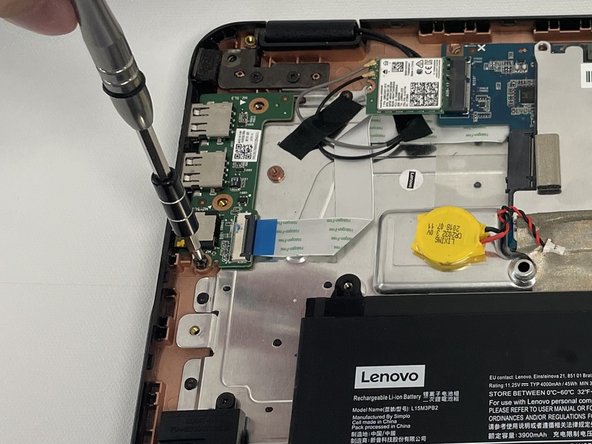
  3. Lenovo 300e Chromebook USB and Charging Ports Replacement, USB and Charging Ports: étape 3, image 1 de 3 Lenovo 300e Chromebook USB and Charging Ports Replacement, USB and Charging Ports: étape 3, image 2 de 3 Lenovo 300e Chromebook USB and Charging Ports Replacement, USB and Charging Ports: étape 3, image 3 de 3
    • Remove three 5 mm screws from the USB board using a Phillips #2 screwdriver.

    Demander à FixBot

    Ajouter un commentaire

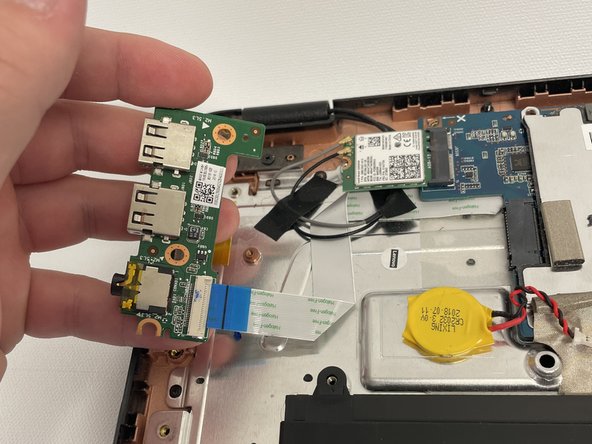
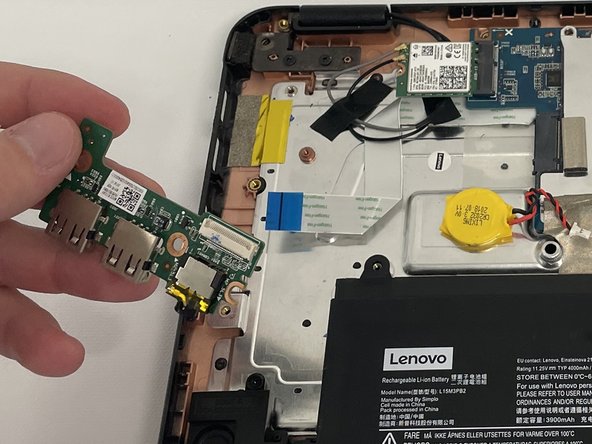
  4. Lenovo 300e Chromebook USB and Charging Ports Replacement: étape 4, image 1 de 3 Lenovo 300e Chromebook USB and Charging Ports Replacement: étape 4, image 2 de 3 Lenovo 300e Chromebook USB and Charging Ports Replacement: étape 4, image 3 de 3
    • Detach the white and blue ribbon cable from its cable connector on the USB board.

    • Remove the USB board from the laptop.

    Demander à FixBot

    Ajouter un commentaire

Conclusion

To reassemble your device, follow these instructions in reverse order.

Annulation : je n'ai pas terminé ce tutoriel.

Une autre personne a terminé cette réparation.

Merit Kuykendall

Membre depuis le 09/17/21

547 Réputation

5 tutoriels rédigés

Équipe

1 commentaire de tutoriel

Do you have same instructions for Lenovo 300e Gen2, I opened and usb ports are soldered with the motherboard, I am having some troubles to replace the usb c, any recommendation?

Juan Raul Hernandez - Réponse Partager

Ajouter un commentaire

Nombre de vues :

Dernières 24 heures : 1

7 derniers jours : 13

30 derniers jours : 49

Total : 2,386