Aller au contenu principal
Pour réparer ensemble - Je crée un compte

Lenovo ThinkPad Yoga 14 20FY Fan Replacement

Ce dont vous avez besoin

  1. Lenovo ThinkPad Yoga 14 20FY  Fan  Replacement, Back Cover: étape 1, image 1 de 2 Lenovo ThinkPad Yoga 14 20FY  Fan  Replacement, Back Cover: étape 1, image 2 de 2
    • Remove the indicated nine M2 x 6 mm nylon-coated screws using a Phillips head screwdriver.

    • The screws do not come all the way out. Do not force them out.

    Demander à FixBot

    Ajouter un commentaire

  2. Lenovo ThinkPad Yoga 14 20FY  Fan  Replacement: étape 2, image 1 de 2 Lenovo ThinkPad Yoga 14 20FY  Fan  Replacement: étape 2, image 2 de 2
    • After removing all of the screws, gently lift up on all covers to remove the back plate and reveal the interior of the device.

    Demander à FixBot

    Ajouter un commentaire

  3. Lenovo ThinkPad Yoga 14 20FY  Fan  Replacement, Fan: étape 3, image 1 de 2 Lenovo ThinkPad Yoga 14 20FY  Fan  Replacement, Fan: étape 3, image 2 de 2
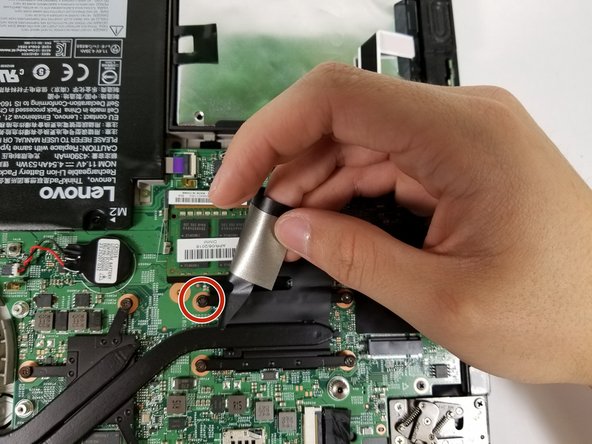
    • Remove all 7 screws.

    • One of the screws is behind a black piece of the plastic.

    Demander à FixBot

    Ajouter un commentaire

  4. Lenovo ThinkPad Yoga 14 20FY  Fan  Replacement: étape 4, image 1 de 2 Lenovo ThinkPad Yoga 14 20FY  Fan  Replacement: étape 4, image 2 de 2
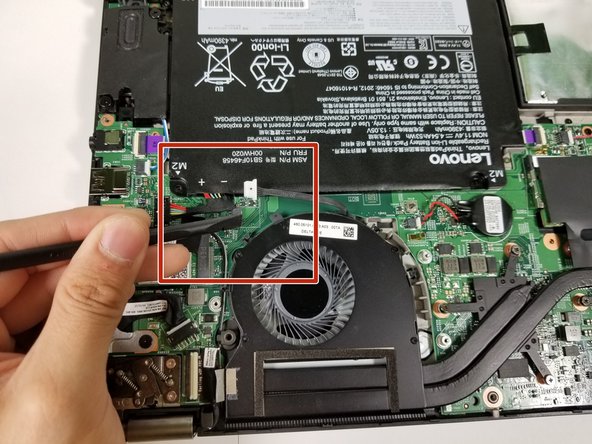
    • Use the flat end of the spudger to push the connector out of its socket .

    • Do not use the wire to pull the connector out!

    Demander à FixBot

    Ajouter un commentaire

  5. Lenovo ThinkPad Yoga 14 20FY  Fan  Replacement: étape 5, image 1 de 2 Lenovo ThinkPad Yoga 14 20FY  Fan  Replacement: étape 5, image 2 de 2
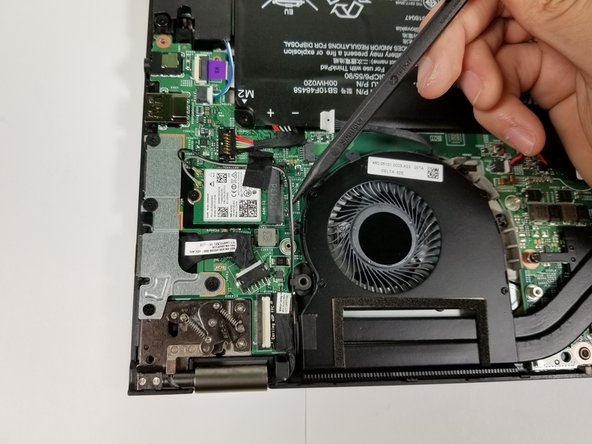
    • There is a wire looped around the fan. Use the spudger to pull the wires out of the loop.

    Demander à FixBot

    Ajouter un commentaire

  6. Lenovo ThinkPad Yoga 14 20FY  Fan  Replacement: étape 6, image 1 de 1
    • Gently peel back a piece of tape in the bottom left corner of the fan.

    Demander à FixBot

    Ajouter un commentaire

  7. Lenovo ThinkPad Yoga 14 20FY  Fan  Replacement: étape 7, image 1 de 1
    • Gently lift out the fan.

    Demander à FixBot

    Ajouter un commentaire

Conclusion

To reassemble your device, follow these instructions in reverse order.

Annulation : je n'ai pas terminé ce tutoriel.

jose aguirre

Membre depuis le 04/19/17

264 Réputation

2 tutoriels rédigés

Équipe

Cal Poly, Team S14-G2, Banghart Spring 2017 Membre de l'équipe Cal Poly, Team S14-G2, Banghart Spring 2017

CPSU-BANGHART-S17S14G2

5 membres

6 tutoriels rédigés

0 commentaires de tutoriel

Ajouter un commentaire

Nombre de vues :

Dernières 24 heures : 0

7 derniers jours : 2

30 derniers jours : 15

Total : 1,743