Aller au contenu principal
Pour réparer ensemble - Je crée un compte

Lenovo Yoga 3 14 USB Port Replacement

Ce dont vous avez besoin

    1. Lenovo Yoga 3 14 USB Port Replacement, Back Case: étape 1, image 1 de 1
      • Remove the eleven 6mm T5 Torx screws from the back case.

      Demander à FixBot

      Ajouter un commentaire

    2. Lenovo Yoga 3 14 USB Port Replacement: étape 2, image 1 de 3 Lenovo Yoga 3 14 USB Port Replacement: étape 2, image 2 de 3 Lenovo Yoga 3 14 USB Port Replacement: étape 2, image 3 de 3
      • Insert the plastic opening tool into the long side of the case backing and slide it the entire length of the laptop.

      • Gently lift the backing off the laptop.

      Demander à FixBot

      Ajouter un commentaire

    1. Lenovo Yoga 3 14 USB Port Replacement, Battery: étape 3, image 1 de 1
      • Remove the four 3mm PH#0 screws surrounding the battery.

      Demander à FixBot

      Ajouter un commentaire

    2. Lenovo Yoga 3 14 USB Port Replacement: étape 4, image 1 de 3 Lenovo Yoga 3 14 USB Port Replacement: étape 4, image 2 de 3 Lenovo Yoga 3 14 USB Port Replacement: étape 4, image 3 de 3
      • Gently lift the battery and use the plastic opening tool to remove the battery's connection to the laptop.

      Demander à FixBot

      Ajouter un commentaire

    1. Lenovo Yoga 3 14 USB Port Replacement, USB Port: étape 5, image 1 de 2 Lenovo Yoga 3 14 USB Port Replacement, USB Port: étape 5, image 2 de 2
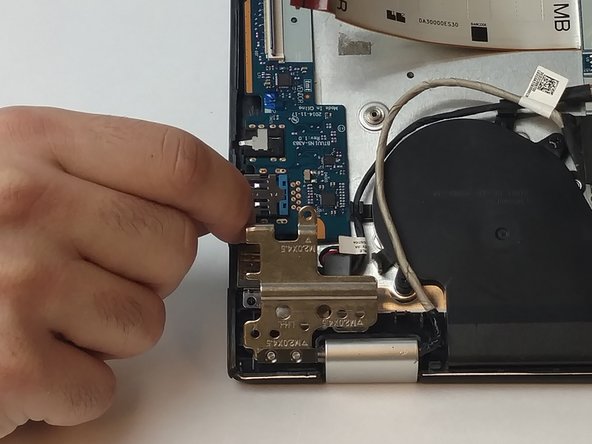
      • Take out the 3, 3mm screws from the left hinge using the PH0 head.

      • Remove the 1, 4mm screw that connects the hinge to the USB port.

      • Carefully lift the hinge enough to separate it from the USB port.

      Demander à FixBot

      Ajouter un commentaire

    2. Lenovo Yoga 3 14 USB Port Replacement: étape 6, image 1 de 2 Lenovo Yoga 3 14 USB Port Replacement: étape 6, image 2 de 2
      Outil utilisé dans cette étape :
      Tweezers
      $4.99
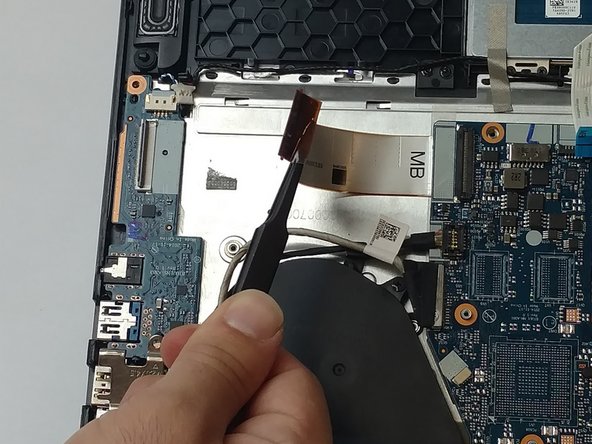
      • Using the tweezers, carefully lift the black clip and remove the electrical ribbon.

      Demander à FixBot

      Ajouter un commentaire

    3. Lenovo Yoga 3 14 USB Port Replacement: étape 7, image 1 de 1
      • The USB port is held in place by plastic pegs. Gently lift up to remove the USB port from the laptop.

      Demander à FixBot

      Ajouter un commentaire

Conclusion

To reassemble your device, follow these instructions in reverse order.

Annulation : je n'ai pas terminé ce tutoriel.

2 autres ont terminé cette réparation.

Matthew Victores

Membre depuis le 09/28/16

602 Réputation

5 tutoriels rédigés

Équipe

USF Tampa, Team 3-2, Passmore Fall 2016 Membre de l'équipe USF Tampa, Team 3-2, Passmore Fall 2016

USFT-PASSMORE-F16S3G2

4 membres

84 tutoriels rédigés

2 commentaires de tutoriel

Anyone know where I can buy this part? Cannot find it anywhere…

Nicolas Petersen - Réponse Partager

Ajouter un commentaire

Nombre de vues :

Dernières 24 heures : 4

7 derniers jours : 26

30 derniers jours : 107

Total : 2,672