Aller au contenu principal
Pour réparer ensemble - Je crée un compte

Lenovo Yoga C930-13IKB Coolant Fan Replacement

Ce dont vous avez besoin

    1. Lenovo Yoga C930-13IKB Coolant Fan Replacement, Back Cover: étape 1, image 1 de 1
      • Flip the device over so that the underside is facing up.

      • Remove the six 3.5 mm T5 Torx screws.

      Demander à FixBot

      Ajouter un commentaire

    2. Lenovo Yoga C930-13IKB Coolant Fan Replacement: étape 2, image 1 de 2 Lenovo Yoga C930-13IKB Coolant Fan Replacement: étape 2, image 2 de 2
      • Pry off the back cover using the plastic opening tool.

      • Loosen the back cover in multiple spots using the opening tool, then remove the whole back.

      • You may have to run the plastic tool along the edges until you find a small gap to separate the back cover from the laptop.

      • Do not use a metal tool when working with your device.

      Demander à FixBot

      Ajouter un commentaire

    3. Lenovo Yoga C930-13IKB Coolant Fan Replacement: étape 3, image 1 de 2 Lenovo Yoga C930-13IKB Coolant Fan Replacement: étape 3, image 2 de 2
      • Carefully lift the cover off with your hands.

      Demander à FixBot

      Ajouter un commentaire

    1. Lenovo Yoga C930-13IKB Coolant Fan Replacement, Coolant Fans: étape 4, image 1 de 1
      • Remove the four 3 mm Phillips #0 screws from the fan assembly.

      Demander à FixBot

      Ajouter un commentaire

    2. Lenovo Yoga C930-13IKB Coolant Fan Replacement: étape 5, image 1 de 1
      • Remove the four 2 mm Phillips #00 screws from the fans themselves.

      Demander à FixBot

      Ajouter un commentaire

    3. Lenovo Yoga C930-13IKB Coolant Fan Replacement: étape 6, image 1 de 1
      • Unscrew the three 3 mm Phillips #0 screws on the heatsink.

      Demander à FixBot

      Ajouter un commentaire

    4. Lenovo Yoga C930-13IKB Coolant Fan Replacement: étape 7, image 1 de 2 Lenovo Yoga C930-13IKB Coolant Fan Replacement: étape 7, image 2 de 2
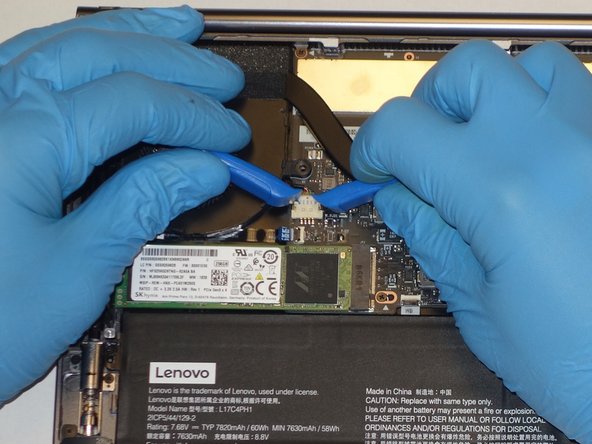
      • Use a plastic opening tool to remove the two small, white power cable connectors for each of the two fans.

      Demander à FixBot

      Ajouter un commentaire

    5. Lenovo Yoga C930-13IKB Coolant Fan Replacement: étape 8, image 1 de 1
      • Gently lift the fan assembly out of the laptop.

      • Be sure to clean and reapply thermal paste to the heatsink during reassembly.

      Demander à FixBot

      Ajouter un commentaire

Conclusion

To reassemble your device, follow these instructions in reverse order. Remember to apply fresh thermal paste to the heatsink during reassembly.

Annulation : je n'ai pas terminé ce tutoriel.

Une autre personne a terminé cette réparation.

0 commentaires de tutoriel

Ajouter un commentaire

Nombre de vues :

Dernières 24 heures : 1

7 derniers jours : 9

30 derniers jours : 50

Total : 2,431