Aller au contenu principal

Nokia 5310b XpressMusic LCD Screen Replacement

Ce dont vous avez besoin

  1. Nokia 5310b XpressMusic LCD Screen Replacement, Battery: étape 1, image 1 de 1
    • Slide the black battery cover down and off the phone with your thumb to remove it.

    • The battery cover is not shown in this picture

  2. Nokia 5310b XpressMusic LCD Screen Replacement: étape 2, image 1 de 2 Nokia 5310b XpressMusic LCD Screen Replacement: étape 2, image 2 de 2
    • Gently lift the battery with a fingernail to remove it from the back of the phone.

    • Keep the battery removed for the next steps

    • The battery may be replaced or repaired at this step.

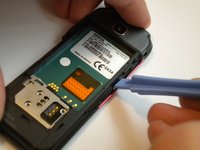
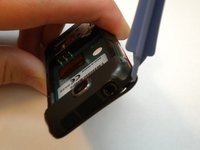
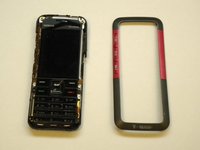
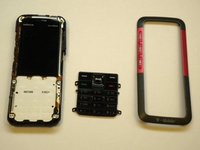
  3. Nokia 5310b XpressMusic LCD Screen Replacement, Keypad: étape 3, image 1 de 3 Nokia 5310b XpressMusic LCD Screen Replacement, Keypad: étape 3, image 2 de 3 Nokia 5310b XpressMusic LCD Screen Replacement, Keypad: étape 3, image 3 de 3
    • On some models, the front case is screwed down from the back. Follow steps 5 and 6 first to remove the camera cover and two T6 screws, BEFORE removing the faceplate.

    • Find a small latch under the music keys and in the middle of each side of the faceplate.

    • Gently lift the edges of the front faceplate off the phone using a spudger.

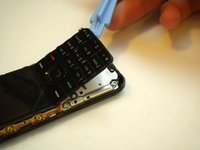
  4. Nokia 5310b XpressMusic LCD Screen Replacement: étape 4, image 1 de 2 Nokia 5310b XpressMusic LCD Screen Replacement: étape 4, image 2 de 2
    • Flip the phone over to the front side.

    • Lift up the keypad from the bottom with either a spudger or your finger.

    • At this time the keypad can be removed and replaced.

  5. Nokia 5310b XpressMusic LCD Screen Replacement, Motherboard: étape 5, image 1 de 1
    • Flip the phone over to the back side.

    • Unsnap the back camera cover from the phone.

    • Lift to remove the back camera cover from the phone after it has been unsnapped.

  6. Nokia 5310b XpressMusic LCD Screen Replacement: étape 6, image 1 de 2 Nokia 5310b XpressMusic LCD Screen Replacement: étape 6, image 2 de 2
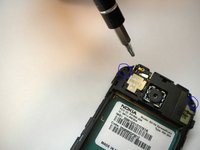
    • Unscrew and remove the two screws on either side of the camera with the T6 Torx Screwdriver head.

    • Flip the phone over to the front side.

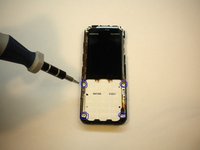
    • Unscrew and remove the 4 screws located at each corner of the white keypad base using the T6 Torx Screwdriver head.

  7. Nokia 5310b XpressMusic LCD Screen Replacement: étape 7, image 1 de 1
    • Flip the phone over to the back side.

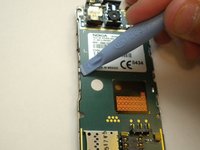
    • Unclip the faceplate plug (ribbon) located in the lower left corner of the motherboard.

  8. Nokia 5310b XpressMusic LCD Screen Replacement: étape 8, image 1 de 2 Nokia 5310b XpressMusic LCD Screen Replacement: étape 8, image 2 de 2
    • Find the 2 metal clips located in the middle of the left and right sides of the motherboard.

    • Pry the 2 metal clips open up by using a spudger.

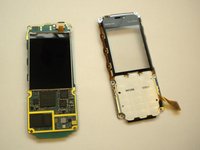
    • At this point the phone should come apart into 2 pieces (the motherboard/LCD screen and the faceplate).

  9. Nokia 5310b XpressMusic LCD Screen Replacement, LCD Screen: étape 9, image 1 de 1
    • Unclip the ribbon plug located on the top of the LCD screen that connects it to the motherboard.

Conclusion

To reassemble your device, follow these instructions in reverse order.

6 autres ont terminé cette réparation.

Max Kirby

Membre depuis le 05/01/11

518 Réputation

4 tutoriels rédigés

Équipe

Cal Poly, Team 15-14, Regan Spring 2011 Membre de l'équipe Cal Poly, Team 15-14, Regan Spring 2011

CPSU-REGAN-S11S15G14

3 membres

8 tutoriels rédigés

1 commentaire de tutoriel

Thank you much! As efficient & thorough as it gets!

REDACTED FREE PRESS - Réponse

Ajouter un commentaire

Nombre de vues :

Dernières 24 heures : 1

7 derniers jours : 5

30 derniers jours : 26

Total : 9,421