Aller au contenu principal
Pour réparer ensemble - Je crée un compte

Nokia Lumia 2520 Charging connection Replacement

Ce dont vous avez besoin

    1. Nokia Lumia 2520 Charging connection  Replacement, Display Assembly: étape 1, image 1 de 1
      • Apply heat pad to each side of the device.

      • When using any heat pad please use some form of padded gloves so you don't burn you fingers.

      • Microwave the pad for 30 seconds so an ample amount of heat is given on all four sides. Do not microwave more than once every two minutes.

      Demander à FixBot

      Ajouter un commentaire

    2. Nokia Lumia 2520 Charging connection  Replacement: étape 2, image 1 de 3 Nokia Lumia 2520 Charging connection  Replacement: étape 2, image 2 de 3 Nokia Lumia 2520 Charging connection  Replacement: étape 2, image 3 de 3
      • Insert the pick between the glass to separate the glass from the device. You can also use the suction cups to help lift the glass.

      • When pulling the screen off the chassis, be careful not to cut the ribbon cable that connects the screen to the logic board.

      • Take your time to pry open the screen from the chassis as you can easily break the screen or crack it.

      Demander à FixBot

      Ajouter un commentaire

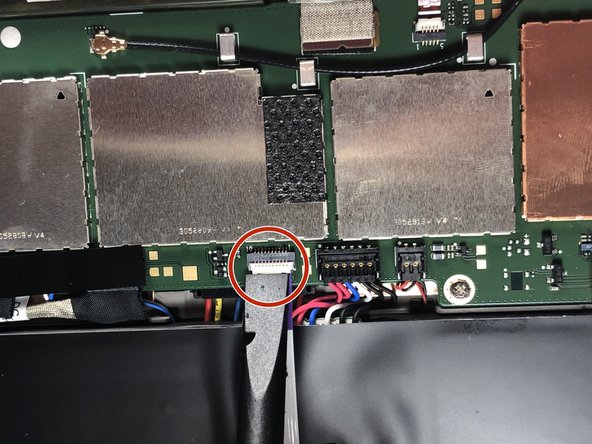
    3. Nokia Lumia 2520 Charging connection  Replacement: étape 3, image 1 de 2 Nokia Lumia 2520 Charging connection  Replacement: étape 3, image 2 de 2
      • Pull the ribbon cable out from the connection port on the board.

      • Move on the step 4 to remove the ribbon connection from the screen.

      Demander à FixBot

      Ajouter un commentaire

    4. Nokia Lumia 2520 Charging connection  Replacement: étape 4, image 1 de 3 Nokia Lumia 2520 Charging connection  Replacement: étape 4, image 2 de 3 Nokia Lumia 2520 Charging connection  Replacement: étape 4, image 3 de 3
      • Use the plastic pry tool to remove both of the connections.

      Demander à FixBot

      Ajouter un commentaire

    5. Nokia Lumia 2520 Charging connection  Replacement: étape 5, image 1 de 1
      • Set aside the screen and the display assembly for repair.

      Demander à FixBot

      Ajouter un commentaire

    1. Nokia Lumia 2520 Charging connection  Replacement, Battery: étape 6, image 1 de 3 Nokia Lumia 2520 Charging connection  Replacement, Battery: étape 6, image 2 de 3 Nokia Lumia 2520 Charging connection  Replacement, Battery: étape 6, image 3 de 3
      • Before removing the battery from the device be sure not to puncture the battery. Since the battery is a form of acid.

      • Using a plastic pry tool is better than a metal tool when working with wire and soft case battery case.

      • Use a plastic pry tool to remove the battery connector from the logic board.

      Demander à FixBot

      Ajouter un commentaire

    2. Nokia Lumia 2520 Charging connection  Replacement: étape 7, image 1 de 2 Nokia Lumia 2520 Charging connection  Replacement: étape 7, image 2 de 2
      • Remove the ribbon located over the battery.

      Demander à FixBot

      Ajouter un commentaire

    3. Nokia Lumia 2520 Charging connection  Replacement: étape 8, image 1 de 1
      • Theres four screws that attach the battery to the chassis. Use a PH0 Phillips head screwdriver to loosen the screw.

      • Since the tool using is sharp please use with caution, so that you don't puncture the battery.

      Demander à FixBot

      Ajouter un commentaire

    4. Nokia Lumia 2520 Charging connection  Replacement: étape 9, image 1 de 3 Nokia Lumia 2520 Charging connection  Replacement: étape 9, image 2 de 3 Nokia Lumia 2520 Charging connection  Replacement: étape 9, image 3 de 3
      • Take a plastic pry to to pry out the battery from its casing.

      • The bottom of the battery has adhesive to hold the battery in place. So using enough pressure to pry the battery is ok .

      • Using two tool different plastic pry to can help give you leverage on areas that are hard to get up.

      Demander à FixBot

      Ajouter un commentaire

    1. Nokia Lumia 2520 Charging connection  Replacement, Charging connection: étape 10, image 1 de 3 Nokia Lumia 2520 Charging connection  Replacement, Charging connection: étape 10, image 2 de 3 Nokia Lumia 2520 Charging connection  Replacement, Charging connection: étape 10, image 3 de 3
      • Take a pry tool and remove the connection.

      • Take a pry tool and push away the charing connector from its housing.

      • The adhesive is very strong so use a lot of force.

      Demander à FixBot

      Ajouter un commentaire

Conclusion

To reassemble your device, follow these instructions in reverse order.

Annulation : je n'ai pas terminé ce tutoriel.

Une autre personne a terminé cette réparation.

Degan Berhe

Membre depuis le 08/29/18

614 Réputation

4 tutoriels rédigés

Équipe

Gateway, Team S1-G4, Luster Fall 2018 Membre de l'équipe Gateway, Team S1-G4, Luster Fall 2018

GCC-LUSTER-F18S1G4

5 membres

60 tutoriels rédigés

0 commentaires de tutoriel

Ajouter un commentaire

Nombre de vues :

Dernières 24 heures : 1

7 derniers jours : 13

30 derniers jours : 55

Total : 1,251