Aller au contenu principal
Pour réparer ensemble - Je crée un compte

Nokia Lumia 2520 Display Assembly Replacement

Ce dont vous avez besoin
  1. Nokia Lumia 2520 Display Assembly Replacement, Display Assembly: étape 1, image 1 de 1
    • Apply heat pad to each side of the device.

    • When using any heat pad please use some form of padded gloves so you don't burn you fingers.

    • Microwave the pad for 30 seconds so an ample amount of heat is given on all four sides. Do not microwave more than once every two minutes.

    Demander à FixBot
  2. Nokia Lumia 2520 Display Assembly Replacement: étape 2, image 1 de 3 Nokia Lumia 2520 Display Assembly Replacement: étape 2, image 2 de 3 Nokia Lumia 2520 Display Assembly Replacement: étape 2, image 3 de 3
    • Insert the pick between the glass to separate the glass from the device. You can also use the suction cups to help lift the glass.

    • When pulling the screen off the chassis, be careful not to cut the ribbon cable that connects the screen to the logic board.

    • Take your time to pry open the screen from the chassis as you can easily break the screen or crack it.

    Demander à FixBot
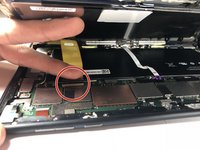
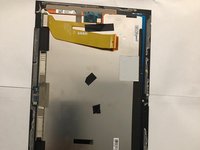
  3. Nokia Lumia 2520 Display Assembly Replacement: étape 3, image 1 de 2 Nokia Lumia 2520 Display Assembly Replacement: étape 3, image 2 de 2
    • Pull the ribbon cable out from the connection port on the board.

    • Move on the step 4 to remove the ribbon connection from the screen.

    Demander à FixBot
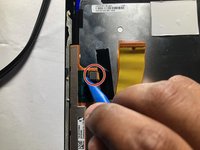
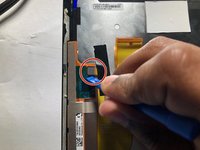
  4. Nokia Lumia 2520 Display Assembly Replacement: étape 4, image 1 de 3 Nokia Lumia 2520 Display Assembly Replacement: étape 4, image 2 de 3 Nokia Lumia 2520 Display Assembly Replacement: étape 4, image 3 de 3
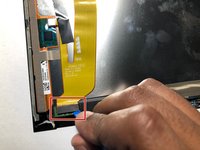
    • Use the plastic pry tool to remove both of the connections.

    Demander à FixBot
  5. Nokia Lumia 2520 Display Assembly Replacement: étape 5, image 1 de 1
    • Set aside the screen and the display assembly for repair.

    Demander à FixBot
Conclusion

To reassemble your device, follow these instructions in reverse order.

Daniel Chevalier

Membre depuis le 09/05/18

121 Réputation

1 tutoriel rédigé

Équipe

Gateway, Team S1-G4, Luster Fall 2018 Membre de l'équipe Gateway, Team S1-G4, Luster Fall 2018

GCC-LUSTER-F18S1G4

5 membres

5 tutoriels rédigés

1 commentaire de tutoriel

What if i clipped the ribbon cable step 2 told me not to... like in half? Springging for a new screen i assume. Ive repaired ribbons before and it doesnt look like theres enough cable left to splice.

Hunter - Réponse Partager

Ajouter un commentaire

Nombre de vues :

Dernières 24 heures : 2

7 derniers jours : 11

30 derniers jours : 51

Total : 1,358