Aller au contenu principal
Pour réparer ensemble - Je crée un compte

Remove the Screen

Ce dont vous avez besoin

  1. Remove the Screen, Remove Screws: étape 1, image 1 de 3 Remove the Screen, Remove Screws: étape 1, image 2 de 3 Remove the Screen, Remove Screws: étape 1, image 3 de 3
    • Remove the screws from the bottom, right, and left side of camera.

  2. Remove the Screen, Remove back: étape 2, image 1 de 1
    • Remove the back of the camera, this may require force.

  3. Remove the Screen, Remove Metal Bracket: étape 3, image 1 de 1
    • Unscrew the right metal bracket of the viewing lens

  4. Remove the Screen, Remove front of camera: étape 4, image 1 de 2 Remove the Screen, Remove front of camera: étape 4, image 2 de 2
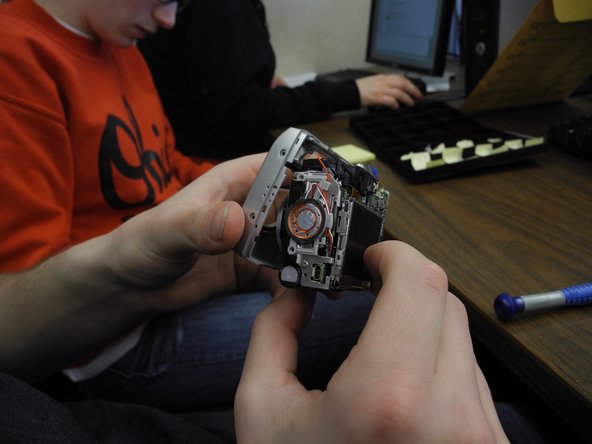
    • Hello! Today you are going to be learning how to disassemble the front camera of a Nikon Coolpix 5600. You will need a Nikon Coolpix, Ifixit opening tool and a Phillips Screwdriver #00. The first step is to pull the front of the camera off of the mother board. To do this you must pull at each side of front and back on the camera.

  5. Remove the Screen: étape 5, image 1 de 2 Remove the Screen: étape 5, image 2 de 2
    • Next, pull the grey circular facet that sits on the bottom outside of the camera off by using blue Ifixit opening tool. It is okay to use force if needed.

  6. Remove the Screen: étape 6, image 1 de 1
    • Now take your Phillips #00 screwdriver and unscrew the bottom right corner screw. Once the screw is out just place it on the table.

  7. Remove the Screen: étape 7, image 1 de 1
    • Finally, take the same Phillips screwdriver and unscrew the top right corner screw. Place the top screw on the table as well. Now you have accurately disassembled the front camera of a Nikon Coolpix 5600.

  8. Remove the Screen, Remove the Screen: étape 8, image 1 de 1
    • Unhinge the outer case of the screen from the back of the camera. The screen should still be hanging by wires.

  9. Remove the Screen: étape 9, image 1 de 1
    • Remove outer case/rim of screen from the back of the camera. The screen should still be hanging by the red wire and white wire.

  10. Remove the Screen: étape 10, image 1 de 1
    • Pull out the red wire and white wire attaching the screen to the motherboard.

  11. Remove the Screen: étape 11, image 1 de 1
    • Flip up black lever holding data cable to motherboard, and remove data cable from motherboard.

Conclusion

To reassemble your device, follow these instructions in reverse order.

Une autre personne a terminé cette réparation.

Melissa

Membre depuis le 02/12/13

246 Réputation

2 tutoriels rédigés

Équipe

Ohio State, Team 1-2, Buehl Spring 2013 Membre de l'équipe Ohio State, Team 1-2, Buehl Spring 2013

OSU-BUEHL-S13S1G2

2 membres

7 tutoriels rédigés

0 commentaires de tutoriel

Ajouter un commentaire

Nombre de vues :

Dernières 24 heures : 0

7 derniers jours : 0

30 derniers jours : 16

Total : 599