Aller au contenu principal
Pour réparer ensemble - Je crée un compte

Samsung Admire Screen Replacement

Ce dont vous avez besoin

  1. Samsung Admire Screen Replacement, Screen: étape 1, image 1 de 1
    • Slide your fingernail or plastic opening tool under the slit and pull the cover up.

    Demander à FixBot

    Ajouter un commentaire

  2. Samsung Admire Screen Replacement: étape 2, image 1 de 1
    • Place your fingernail or plastic tool into the hole beneath the camera and carefully lift out the battery.

    Demander à FixBot

    Ajouter un commentaire

  3. Samsung Admire Screen Replacement: étape 3, image 1 de 3 Samsung Admire Screen Replacement: étape 3, image 2 de 3 Samsung Admire Screen Replacement: étape 3, image 3 de 3
    • Use a Phillips #00 precision screwdriver to remove the six screws from the back of the phone.

    Demander à FixBot

    Ajouter un commentaire

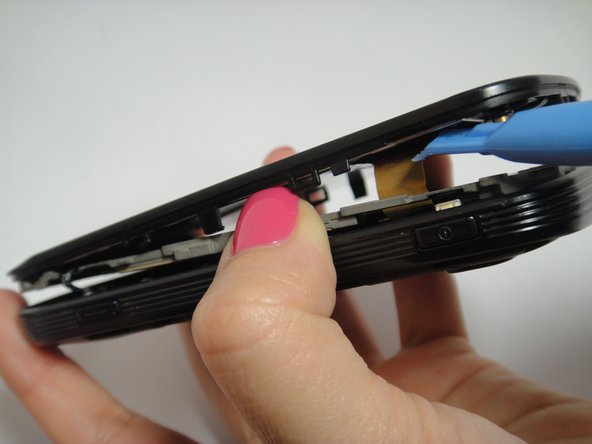
  4. Samsung Admire Screen Replacement: étape 4, image 1 de 3 Samsung Admire Screen Replacement: étape 4, image 2 de 3 Samsung Admire Screen Replacement: étape 4, image 3 de 3
    • Use the plastic opening tool to remove the inside back cover.

    • Use the plastic opening to pry the front and the back case apart.

    • As you lift the cover, move the plastic tool around the phone to pry up all of the screen.

    • Carefully disconnect the ribbon cables and slowly lift the inside back cover to remove it.

    Demander à FixBot

    Ajouter un commentaire

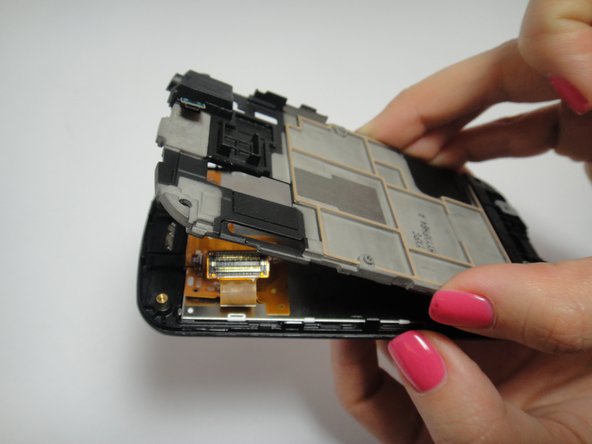
  5. Samsung Admire Screen Replacement: étape 5, image 1 de 3 Samsung Admire Screen Replacement: étape 5, image 2 de 3 Samsung Admire Screen Replacement: étape 5, image 3 de 3
    • Lift the motherboard slowly.

    • Carefully disconnect the volume button from the motherboard.

    • Disconnect the two ribbon cables from the back of the motherboard.

    Demander à FixBot

    Ajouter un commentaire

  6. Samsung Admire Screen Replacement: étape 6, image 1 de 3 Samsung Admire Screen Replacement: étape 6, image 2 de 3 Samsung Admire Screen Replacement: étape 6, image 3 de 3
    • Pull back on the five clips on the sides of the phone to remove the shield.

    • Be careful not to break the ribbon cables.

    Demander à FixBot

    Ajouter un commentaire

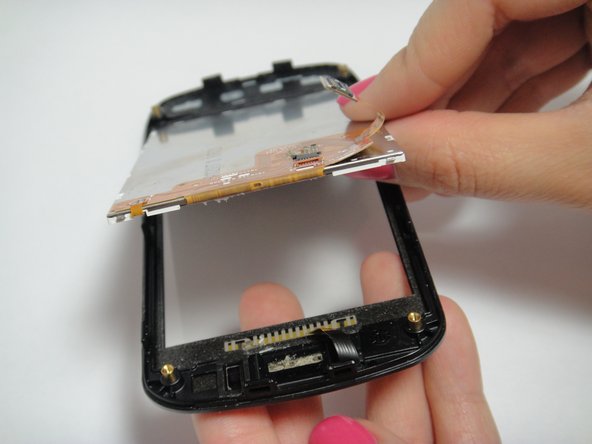
  7. Samsung Admire Screen Replacement: étape 7, image 1 de 3 Samsung Admire Screen Replacement: étape 7, image 2 de 3 Samsung Admire Screen Replacement: étape 7, image 3 de 3
    • Use the plastic opening tool to unlatch the ribbon cable to disconnect it.

    • Place the plastic opening tool under the edge of the screen and lift the screen up carefully.

    Demander à FixBot

    Ajouter un commentaire

  8. Samsung Admire Screen Replacement: étape 8, image 1 de 1
    • Insert new screen into the phone frame and reconnect the ribbon cable.

    • Follow steps in reverse order (omitting step eight) to reassemble the phone.

    Demander à FixBot

    Ajouter un commentaire

Conclusion

To reassemble your device, follow these instructions in reverse order.

Annulation : je n'ai pas terminé ce tutoriel.

12 autres ont terminé cette réparation.

Thao Uyen Do

Membre depuis le 01/20/15

944 Réputation

4 tutoriels rédigés

Équipe

USF Tampa, Team 7-5, Remmell Winter 2015 Membre de l'équipe USF Tampa, Team 7-5, Remmell Winter 2015

USFT-REMMELL-W15S7G5

4 membres

8 tutoriels rédigés

0 commentaires de tutoriel

Ajouter un commentaire

Nombre de vues :

Dernières 24 heures : 3

7 derniers jours : 7

30 derniers jours : 34

Total : 2,150