Aller au contenu principal
Pour réparer ensemble - Je crée un compte

Samsung Captivate Glide Speaker Replacement

Ce dont vous avez besoin

  1. Samsung Captivate Glide Speaker Replacement, Motherboard: étape 1, image 1 de 3 Samsung Captivate Glide Speaker Replacement, Motherboard: étape 1, image 2 de 3 Samsung Captivate Glide Speaker Replacement, Motherboard: étape 1, image 3 de 3
    • Remove back cover using fingernail or plastic opening tool. The cover pulls up and off.

    Demander à FixBot

    Ajouter un commentaire

  2. Samsung Captivate Glide Speaker Replacement: étape 2, image 1 de 2 Samsung Captivate Glide Speaker Replacement: étape 2, image 2 de 2
    • Remove battery with plastic opening tool or finger.

    Demander à FixBot

    Ajouter un commentaire

  3. Samsung Captivate Glide Speaker Replacement: étape 3, image 1 de 2 Samsung Captivate Glide Speaker Replacement: étape 3, image 2 de 2
    • Remove the seven screws from backplate using the #00 screwdriver.

    Demander à FixBot

    Ajouter un commentaire

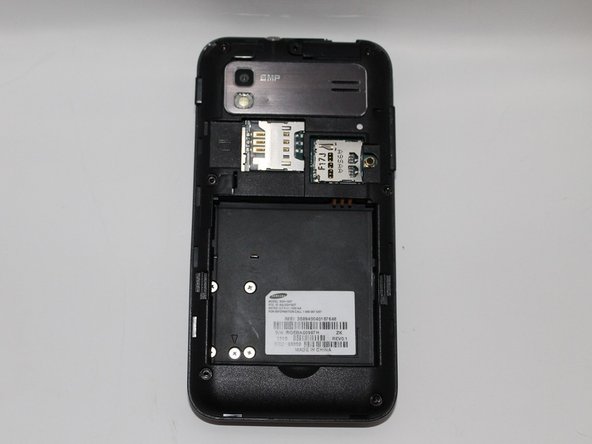
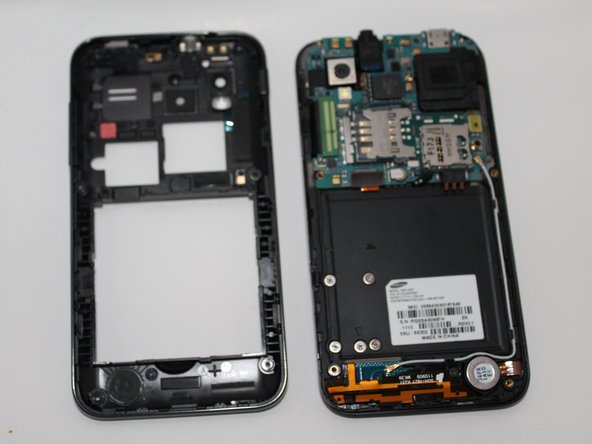
  4. Samsung Captivate Glide Speaker Replacement: étape 4, image 1 de 3 Samsung Captivate Glide Speaker Replacement: étape 4, image 2 de 3 Samsung Captivate Glide Speaker Replacement: étape 4, image 3 de 3
    • Remove the back plate using the plastic opening tool.

    • There is a lip on each side, and both must be pried up.

    • You can work your way around the edges after prying the two sides.

    Demander à FixBot

    Ajouter un commentaire

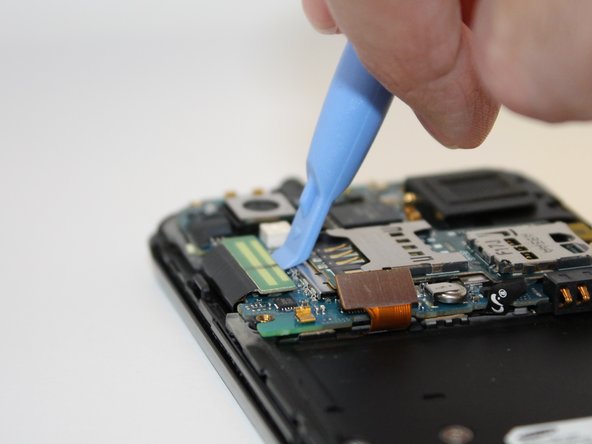
  5. Samsung Captivate Glide Speaker Replacement: étape 5, image 1 de 2 Samsung Captivate Glide Speaker Replacement: étape 5, image 2 de 2
    • Use the plastic opening tool to detach the two tabs connecting the motherboard to the base of the phone.

    Demander à FixBot

    Ajouter un commentaire

  6. Samsung Captivate Glide Speaker Replacement: étape 6, image 1 de 1
    Outil utilisé dans cette étape :
    Tweezers
    $4.99
    • Disconnect the antenna cable from the motherboard using tweezers.

    Demander à FixBot

    Ajouter un commentaire

  7. Samsung Captivate Glide Speaker Replacement: étape 7, image 1 de 1
    • Remove the single screw connecting the motherboard to the base of the phone by using the #00 Phillips screwdriver.

    Demander à FixBot

    Ajouter un commentaire

  8. Samsung Captivate Glide Speaker Replacement: étape 8, image 1 de 2 Samsung Captivate Glide Speaker Replacement: étape 8, image 2 de 2
    • Lift the motherboard out of the base of the phone.

    Demander à FixBot

    Ajouter un commentaire

  9. Samsung Captivate Glide Speaker Replacement, Speaker: étape 9, image 1 de 1
    • Using the plastic opening tool, detach the tab connecting the speaker to the motherboard.

    Demander à FixBot

    Ajouter un commentaire

  10. Samsung Captivate Glide Speaker Replacement: étape 10, image 1 de 1
    • Remove speaker manually.

    • There is nothing connecting it to the motherboard, so just pull.

    Demander à FixBot

    Ajouter un commentaire

Conclusion

To reassemble your device, follow these instructions in reverse order.

Annulation : je n'ai pas terminé ce tutoriel.

Une autre personne a terminé cette réparation.

Nicholas Mira

Membre depuis le 09/23/14

292 Réputation

2 tutoriels rédigés

Équipe

USF Tampa, Team 5-3, Mcgee Fall 2014 Membre de l'équipe USF Tampa, Team 5-3, Mcgee Fall 2014

USFT-MCGEE-F14S5G3

4 membres

15 tutoriels rédigés

0 commentaires de tutoriel

Ajouter un commentaire

Nombre de vues :

Dernières 24 heures : 1

7 derniers jours : 9

30 derniers jours : 26

Total : 757