Aller au contenu principal
Pour réparer ensemble - Je crée un compte

Samsung Captivate Speaker Replacement

Ce dont vous avez besoin

  1. Samsung Captivate Speaker Replacement, Battery: étape 1, image 1 de 1
    • Remove the back cover by pressing on the bottom section of the phone and sliding the bottom piece downward.

    • Lift up the back cover.

    Demander à FixBot

    Ajouter un commentaire

  2. Samsung Captivate Speaker Replacement: étape 2, image 1 de 1
    • Place your finger on the bottom of the battery and lift to remove.

    Demander à FixBot

    Ajouter un commentaire

  3. Samsung Captivate Speaker Replacement: étape 3, image 1 de 1
    • Replace the old battery with the new one.

    Demander à FixBot

    Ajouter un commentaire

  4. Samsung Captivate Speaker Replacement, Rear Case: étape 4, image 1 de 1
    • Insert the spudger underneath the bottom section of the phone.

    • Gently lift and push the spudger to slide the bottom section down to reveal two hidden screws.

    Demander à FixBot

    Ajouter un commentaire

  5. Samsung Captivate Speaker Replacement: étape 5, image 1 de 1
    • Remove the six 4.5mm #000 Phillips screws.

    Demander à FixBot

    Ajouter un commentaire

  6. Samsung Captivate Speaker Replacement: étape 6, image 1 de 3 Samsung Captivate Speaker Replacement: étape 6, image 2 de 3 Samsung Captivate Speaker Replacement: étape 6, image 3 de 3
    • Starting at a bottom corner, use the spudger to separate the rear case from the front display.

    • Move the spudger towards the top on both sides. The plastic opening tool is easier to use for this step.

    • Be careful when detaching the top. Free each side, stopping short of the center of the cover. Apply backward pressure on both corners with a finger applying pressure on the center, and slide the whole back cover toward the bottom of the device. Note: forcing the cover can result in cracked plastic.

    Demander à FixBot

    Ajouter un commentaire

  7. Samsung Captivate Speaker Replacement: étape 7, image 1 de 1
    • Separate the rear case from the phone.

    Demander à FixBot

    Ajouter un commentaire

  8. Samsung Captivate Speaker Replacement, Speaker: étape 8, image 1 de 1
    • Use the Phillips 00 screwdriver to remove the single screw holding the speaker assembly to the LCD.

    Demander à FixBot

    Ajouter un commentaire

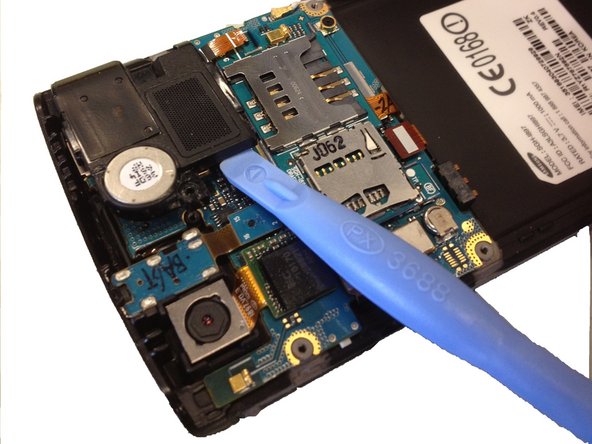
  9. Samsung Captivate Speaker Replacement: étape 9, image 1 de 2 Samsung Captivate Speaker Replacement: étape 9, image 2 de 2
    • Use the plastic opening tool to lift the bottom tab of the plastic ribbon cable connector. Be careful not to use excessive force, you are only releasing the tab that holds the cable in.

    • Pull out the ribbon cable.

    • Use a spudger or plastic opening tool to lift up the speaker, and use your hands to remove it.

    Demander à FixBot

    Ajouter un commentaire

Conclusion

To reassemble your device, follow these instructions in reverse order.

Annulation : je n'ai pas terminé ce tutoriel.

11 autres ont terminé cette réparation.

Drew Bentz

Membre depuis le 09/22/11

565 Réputation

5 tutoriels rédigés

Équipe

Cal Poly, Team 20-25, Maness Fall 2011 Membre de l'équipe Cal Poly, Team 20-25, Maness Fall 2011

CPSU-MANESS-F11S20G25

3 membres

18 tutoriels rédigés

1 commentaire de tutoriel

It was clear enough to follow, don't know why it got the incorrect text caveat.

I gotta get one of those spudger sets.

Also it did not say where to get the actual replacement speaker.

G Trieste - Réponse Partager

Ajouter un commentaire

Nombre de vues :

Dernières 24 heures : 0

7 derniers jours : 8

30 derniers jours : 58

Total : 9,313