Aller au contenu principal
Pour réparer ensemble - Je crée un compte

Samsung Galaxy J3V Power Button Replacement

Ce dont vous avez besoin

  1. Samsung Galaxy J3V Power Button Replacement, Power Button: étape 1, image 1 de 3 Samsung Galaxy J3V Power Button Replacement, Power Button: étape 1, image 2 de 3 Samsung Galaxy J3V Power Button Replacement, Power Button: étape 1, image 3 de 3
    • Place your thumb on the top left corner and pry the tab open and lift off the back cover.

    Demander à FixBot

    Ajouter un commentaire

  2. Samsung Galaxy J3V Power Button Replacement: étape 2, image 1 de 3 Samsung Galaxy J3V Power Button Replacement: étape 2, image 2 de 3 Samsung Galaxy J3V Power Button Replacement: étape 2, image 3 de 3
    • Remove the ten 2.0 mm screws with the Phillips #J000 screwdriver.

    Demander à FixBot

    Ajouter un commentaire

  3. Samsung Galaxy J3V Power Button Replacement: étape 3, image 1 de 3 Samsung Galaxy J3V Power Button Replacement: étape 3, image 2 de 3 Samsung Galaxy J3V Power Button Replacement: étape 3, image 3 de 3
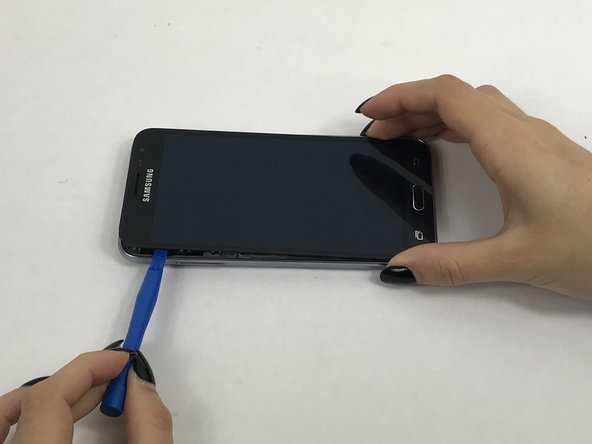
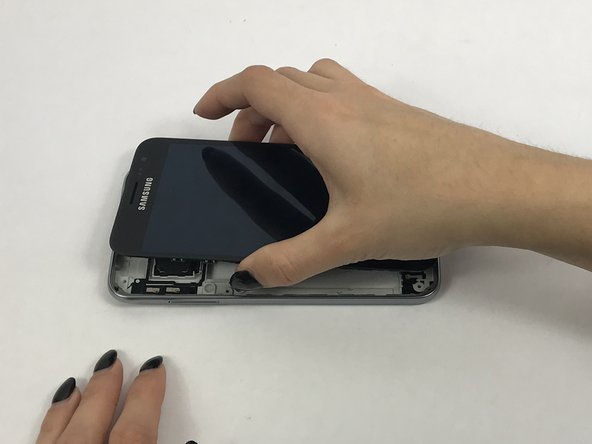
    • Use a small suction cup to pull the screen up. Then slip a small plastic opening tool under the screen to pry it upwards.

    • If this is the first time the screen is being removed then there will be adhesive around the edges of the screen. It may be difficult to remove the screen because of this adhesive seal and it is going to take a few tries and some force to pry the entire screen off.

    Demander à FixBot

    Ajouter un commentaire

  4. Samsung Galaxy J3V Power Button Replacement: étape 4, image 1 de 2 Samsung Galaxy J3V Power Button Replacement: étape 4, image 2 de 2
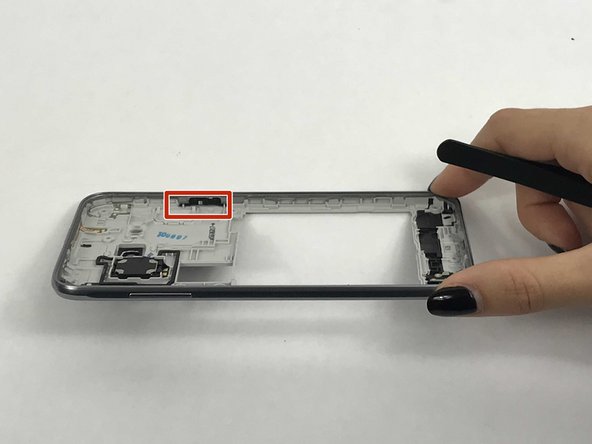
    • After opening the phone, locate the power button on the back frame of the phone.

    Demander à FixBot

    Ajouter un commentaire

  5. Samsung Galaxy J3V Power Button Replacement: étape 5, image 1 de 3 Samsung Galaxy J3V Power Button Replacement: étape 5, image 2 de 3 Samsung Galaxy J3V Power Button Replacement: étape 5, image 3 de 3
    Outil utilisé dans cette étape :
    Tweezers
    $4.99
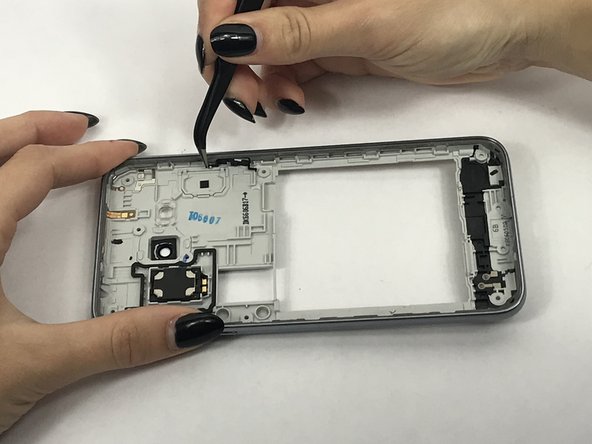
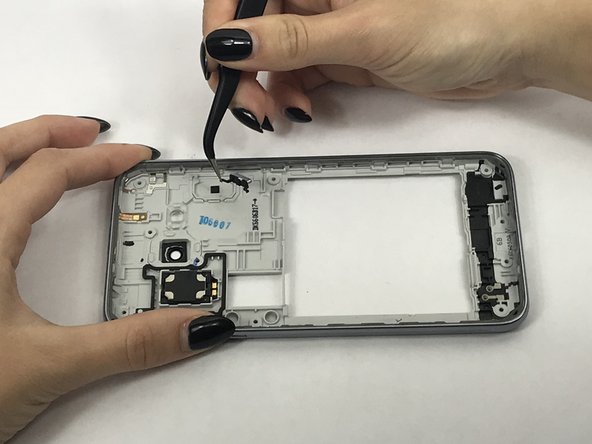
    • Using tweezers, remove the power button's rubber tabs from the clips holding them.

    • Gently remove the entire button

    Demander à FixBot

    Ajouter un commentaire

Conclusion

To reassemble your device, follow these instructions in reverse order.

Annulation : je n'ai pas terminé ce tutoriel.

Une autre personne a terminé cette réparation.

Carry Corrales

Membre depuis le 09/28/17

792 Réputation

5 tutoriels rédigés

Équipe

USF Tampa, Team S3-G3, Nance Fall 2017 Membre de l'équipe USF Tampa, Team S3-G3, Nance Fall 2017

USFT-NANCE-F17S3G3

4 membres

10 tutoriels rédigés

0 commentaires de tutoriel

Ajouter un commentaire

Nombre de vues :

Dernières 24 heures : 0

7 derniers jours : 6

30 derniers jours : 27

Total : 1,536