Aller au contenu principal
Pour réparer ensemble - Je crée un compte

Samsung Galaxy S Blaze Motherboard Replacement

Ce dont vous avez besoin

  1. Samsung Galaxy S Blaze Motherboard Replacement, Motherboard: étape 1, image 1 de 1
    • Remove the battery cover from the device.

    Demander à FixBot

    Ajouter un commentaire

  2. Samsung Galaxy S Blaze Motherboard Replacement: étape 2, image 1 de 1
    • Remove the battery from the device.

    Demander à FixBot

    Ajouter un commentaire

  3. Samsung Galaxy S Blaze Motherboard Replacement: étape 3, image 1 de 2 Samsung Galaxy S Blaze Motherboard Replacement: étape 3, image 2 de 2
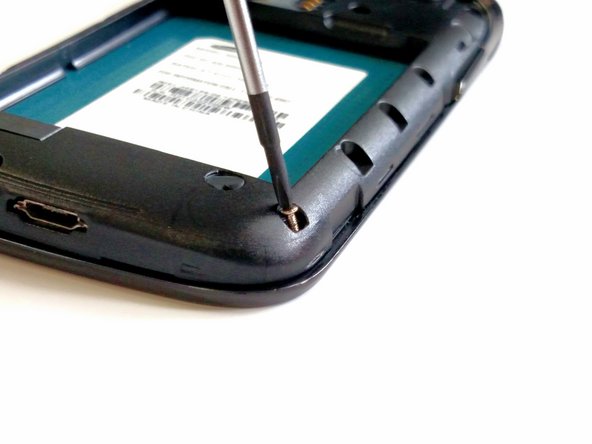
    • Use a Phillips head screwdriver size 00.

    • Remove the 4mm screws from the frame. The screws can be removed in any order.

    • The eight screws are all the same size.

    Demander à FixBot

    Ajouter un commentaire

  4. Samsung Galaxy S Blaze Motherboard Replacement: étape 4, image 1 de 1
    • Use the blue plastic opening tool to remove the frame from the device.

    • Work around the device with the opening tool until the frame is completely off the device.

    • You may need to use some force to pry the frame off of the device.

    Demander à FixBot

    Ajouter un commentaire

  5. Samsung Galaxy S Blaze Motherboard Replacement: étape 5, image 1 de 3 Samsung Galaxy S Blaze Motherboard Replacement: étape 5, image 2 de 3 Samsung Galaxy S Blaze Motherboard Replacement: étape 5, image 3 de 3
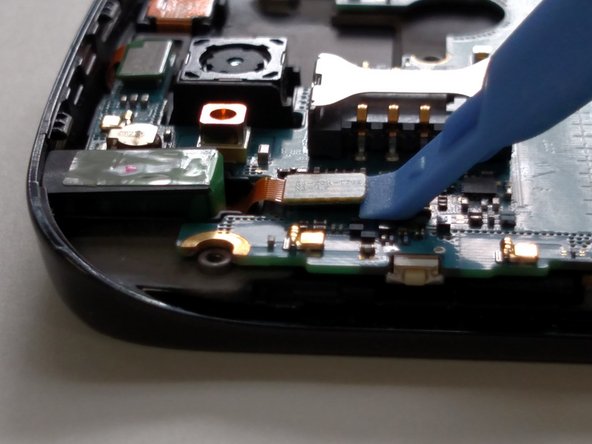
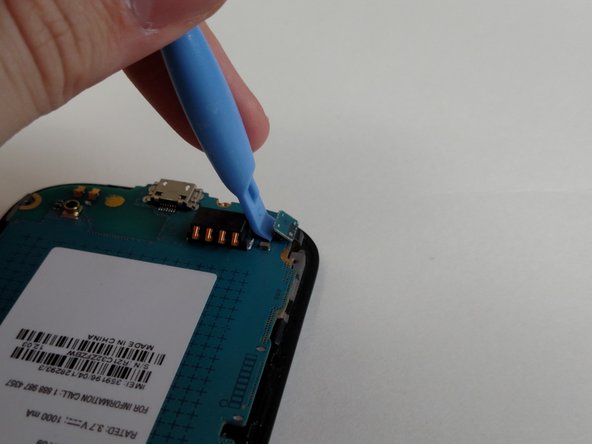
    • The motherboard is held onto the device by 4 ribbon cable connectors.

    • The first 3 ribbon cable connectors are on the same side.

    • Unlatch the first 3 ribbon cable connectors with the blue plastic opening tool.

    Demander à FixBot

    Ajouter un commentaire

  6. Samsung Galaxy S Blaze Motherboard Replacement: étape 6, image 1 de 1
    • Turn the motherboard over to reveal the last ribbon cable connector.

    • Unlatch the final ribbon cable connector with the blue plastic opening tool.

    • Remove the motherboard from the device.

    Demander à FixBot

    Ajouter un commentaire

Conclusion

To reassemble your device, follow these instructions in reverse order.

If there is something wrong with your device, try this: Samsung Galaxy S Blaze 4G Troubleshooting

Annulation : je n'ai pas terminé ce tutoriel.

4 autres ont terminé cette réparation.

Rene Bolanos

Membre depuis le 03/05/15

453 Réputation

2 tutoriels rédigés

Équipe

Sam Houston State, Team 11-1, Blackburne Winter 2015 Membre de l'équipe Sam Houston State, Team 11-1, Blackburne Winter 2015

SHSU-BLACKBURNE-W15S11G1

3 membres

21 tutoriels rédigés

0 commentaires de tutoriel

Ajouter un commentaire

Nombre de vues :

Dernières 24 heures : 0

7 derniers jours : 8

30 derniers jours : 24

Total : 1,125