Aller au contenu principal
Pour réparer ensemble - Je crée un compte

Sony Xperia Z3 Compact Rear Camera Replacement

Vues: 17 k

Afficher les statistiques :

Dernières 24 heures :
5
Sept derniers jours :
26
Trente derniers jours :
103
Total :
16 607
Commentaires: 5

1 commentaire d'étapes, 4 commentaires de tutoriel.

Aller aux commentaires de tutoriel
Terminé: 17

17 personnes ont marqué ce tutoriel comme « terminé ». Serez-vous la prochaine ?

Favoris: 4

4 personnes ont mis ce tutoriel en favori (et s'y sont abonnées). Serez-vous la prochaine ?

Temps nécessaire: 15 - 35 minutes
Difficulté: Modérée
Tutoriel réalisé par la communauté

Un membre tout à fait remarquable de notre communauté a réalisé ce tutoriel. Il n'a pas été créé par l'équipe iFixit.

Sony Xperia Z3 Compact Rear Camera Replacement

Use this guide to remove the rear-facing camera in your Sony Xperia Z3 Compact.

Ce dont vous avez besoin

Pièces

Outils

    1. Sony Xperia Z3 Compact Rear Camera Replacement, Heat the cover glue: étape 1, image 1 de 1
      • Heat up along the edges of the cover to soften the glue.

      • Ideal temperature is around 120 - 150 °C for 60 seconds.

      Demander à FixBot

      Ajouter un commentaire

    2. Sony Xperia Z3 Compact Rear Camera Replacement: étape 2, image 1 de 1
      • Place a suction cup on the back cover and pull to open a gap.

      • Insert a guitar pick into the gap and slide it around the corner of the back cover to cut the adhesive sticker.

      Demander à FixBot

      Ajouter un commentaire

    3. Sony Xperia Z3 Compact Rear Camera Replacement: étape 3, image 1 de 1
      • Finally, remove the back cover.

      • Be careful, the back cover is fragile and can break.

      • It can be a good idea to wear protective glasses. If the glass shatters, it could enter your eye.

      Demander à FixBot

      Ajouter un commentaire

    1. Sony Xperia Z3 Compact Rear Camera Replacement, Rear Camera: étape 4, image 1 de 3 Sony Xperia Z3 Compact Rear Camera Replacement, Rear Camera: étape 4, image 2 de 3 Sony Xperia Z3 Compact Rear Camera Replacement, Rear Camera: étape 4, image 3 de 3
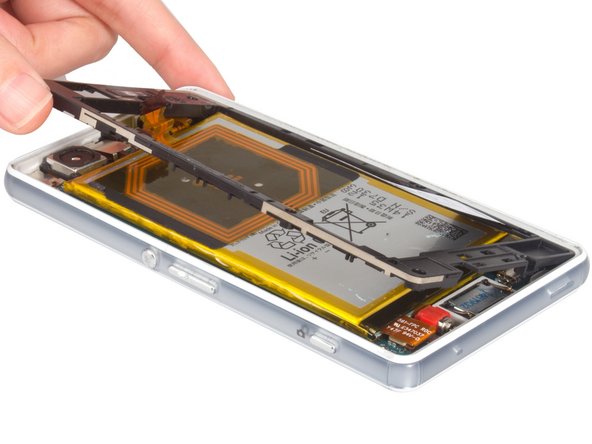
      • Disconnect the NFC antenna.

      • Unscrew the screws holding the black midframe in place.

      • Remove midframe.

      Demander à FixBot

      Ajouter un commentaire

    2. Sony Xperia Z3 Compact Rear Camera Replacement: étape 5, image 1 de 3 Sony Xperia Z3 Compact Rear Camera Replacement: étape 5, image 2 de 3 Sony Xperia Z3 Compact Rear Camera Replacement: étape 5, image 3 de 3
      • Disconnect the battery flex connector.

      • Remove rear camera bracket.

      Demander à FixBot

      Ajouter un commentaire

    3. Sony Xperia Z3 Compact Rear Camera Replacement: étape 6, image 1 de 3 Sony Xperia Z3 Compact Rear Camera Replacement: étape 6, image 2 de 3 Sony Xperia Z3 Compact Rear Camera Replacement: étape 6, image 3 de 3
      • components on the mainboard are fragile, be careful in the next step.

      • disconnect the flat top cable with a spudger

      • Remove rear camera

      Demander à FixBot

      Ajouter un commentaire

Conclusion

To reassemble your device, follow these instructions in reverse order.

Annulation : je n'ai pas terminé ce tutoriel.

17 autres ont terminé cette réparation.

Sophia

Membre depuis le 03/25/14

43 911 Réputation

62 tutoriels rédigés

4 commentaires de tutoriel

Hi i just replaced myxperia z3 compact camera using your Step by step guide. ( Great job on this by the way!) but unfortunately my rear camera is still showing a black screen. What else could be causing this, either hardware or software related?

Atiyeh - Réponse Partager

Same - however Sony seem to be aware of the issue and are not honoring warranty on the device despite being less than 2 years old which is why I am trying this.. Rather annoying. An otherwise usable phone is resigned to the parts box due to an issue with the rear facing camera.

gary mckie - Réponse Partager

Do I need additional adhesive to reassemble the phone, or the old one will work just fine?

Giacomo Ciani - Réponse Partager

You'll need a new adhesive pad.

gary mckie - Réponse Partager

Ajouter un commentaire

Nombre de vues :

Dernières 24 heures : 5

7 derniers jours : 26

30 derniers jours : 103

Total : 16,607