Aller au contenu principal
Pour réparer ensemble - Je crée un compte

Television Coaxial Connector Replacement

Ce dont vous avez besoin

  1. Television Coaxial Connector Replacement, Coaxial Connector: étape 1, image 1 de 1
    • Kids pulled the cable connector off the back of the hello kitty TV

    Demander à FixBot

    Ajouter un commentaire

  2. Television Coaxial Connector Replacement: étape 2, image 1 de 1
    • Remove screws from back, there's 5 in this case circled in red.

    • Notice the parts container highlighted in orange always a good idea for screws.

    • Cookie circled in pink for good measure.

    Demander à FixBot

    Ajouter un commentaire

  3. Television Coaxial Connector Replacement: étape 3, image 1 de 1
    • asess damaged area once cover is off.

    Demander à FixBot

    Ajouter un commentaire

  4. Television Coaxial Connector Replacement: étape 4, image 1 de 1
    • Beware the danger areas, Capacitors (especially big ones) can hold a charge for months, enough to throw you across the room and melt tools.

    • High voltage areas are outlined in red.

    • Delicate sensitive areas outlined in blue.

    Demander à FixBot

    Ajouter un commentaire

  5. Television Coaxial Connector Replacement: étape 5, image 1 de 1
    • remove both covers on video input box, use a small prying tool if necessary, but you should be able to remove them by hand as seen here.

    Demander à FixBot

    Ajouter un commentaire

  6. Television Coaxial Connector Replacement: étape 6, image 1 de 1
    Outil utilisé dans cette étape :
    Desoldering Pump
    $3.99
    • Use a soldering iron, and solder sucker to remove excess solder from the connector area. You can also use solder-absorbing braided wick.

    Demander à FixBot

    Ajouter un commentaire

  7. Television Coaxial Connector Replacement: étape 7, image 1 de 1
    • identify, where the centre pin connector was ripped from the board.

    • Use needle-nose pliers to straighten out the tin bracket as much as possible. It does not need to be perfect, but this helps with the alignment of the connector to the back of the tv cover.

    Demander à FixBot

    Ajouter un commentaire

  8. Television Coaxial Connector Replacement: étape 8, image 1 de 1
    • Align the connector, ensuring the center pin can reach the the spot on the board where it needs to be re-connected.

    • Solder the barrel of the connector to the metal bracket first, try not to let it get too hot. You may want to use a solder gun with dual heat of at least 50 watts for this part.

    • When that's done don't forget to solder the center pin to the board using as little solder as possible, to ensure there's no grounding to the metal cover.

    Demander à FixBot

    Ajouter un commentaire

  9. Television Coaxial Connector Replacement: étape 9, image 1 de 1
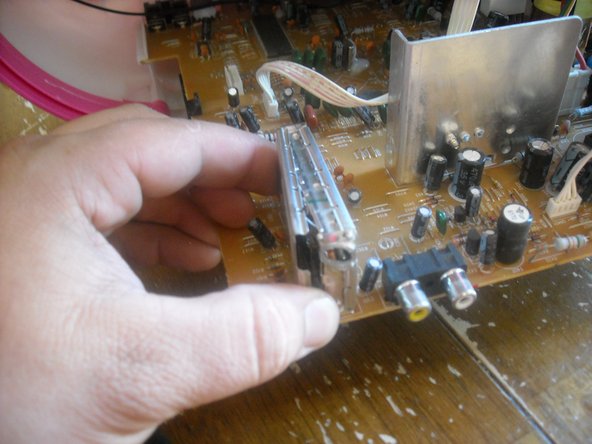
    • Re-seat both covers using needle nose pliers to ensure they're seated properly.

    Demander à FixBot

    Ajouter un commentaire

  10. Television Coaxial Connector Replacement: étape 10, image 1 de 1
    • Carefully reconnect the coax jack.

    Demander à FixBot

    Ajouter un commentaire

  11. Television Coaxial Connector Replacement: étape 11, image 1 de 1
    • Carefully replace the plastic cover. Replace cover screws.

    • Repairing is more environmentally responsible than disposing of a TV in a landfill. You are saving the environment from the Lead (Pb) glass from the rear of the CRT and Barium (Ba) glass in front screen.

    • There is very little danger of the CRT imploding or cracking if you use common sense, they are built for shipping and rough handling. The cadmium in the screen is unlikely to escape even during breakage, and is not much of an environmental hazard.

    Demander à FixBot

    Ajouter un commentaire

Conclusion

To reassemble your device, follow these instructions in reverse order.

Annulation : je n'ai pas terminé ce tutoriel.

11 autres ont terminé cette réparation.

brant

Membre depuis le 08/30/10

282 Réputation

1 tutoriel rédigé

6 commentaires de tutoriel

cara memperbaiki warna

Abdullah Rojai - Réponse Partager

where can i get the connectors?

Dominic Bronson - Réponse Partager

C'est très intéressant, Mais seulement si vous pouvez traduire en français

Mohamed Bouchouit - Réponse Partager

11.11.16 Francais en anglaise= French to english. It's very interesting. I only wish u'd translate into French!

Franchette DuBose-Burgess - Réponse Partager

Nice work, what do use to take great pics?

Matt - Réponse Partager

Ajouter un commentaire

Nombre de vues :

Dernières 24 heures : 0

7 derniers jours : 30

30 derniers jours : 168

Total : 52,074