
Xbox 360 E Front Panel Replacement

Sarah et
Dernière mise à jour le 20 févr. 2023
Vues: 9,7 k
Afficher les statistiques :
- Dernières 24 heures :
- 4
- Sept derniers jours :
- 35
- Trente derniers jours :
- 166
- Total :
- 9 656
Commentaires: 7
6 commentaires d'étapes, 1 commentaire de tutoriel.
Aller aux commentaires de tutorielTerminé: 7 8
7 personnes ont marqué ce tutoriel comme « terminé ». Serez-vous la prochaine ?
8 personnes ont marqué ce tutoriel comme « terminé ». Dont vous — super travail !
Favoris: 9 10
9 personnes ont mis ce tutoriel en favori (et s'y sont abonnées). Serez-vous la prochaine ?
10 personnes ont mis ce tutoriel en favori (et s'y sont abonnées) – dont vous !
Introduction
Allez à l'étape 1 ↓This guide is a prerequisite for replacing other parts of the Xbox 360 E.
Ce dont vous avez besoin
Outils
-
Spudger4.9

-
-
-
In front of the CD drive you will find the Xbox logo. Press on the area left of the Xbox logo, and the disk tray panel will pop off.
 Demander à FixBot
-
-
-
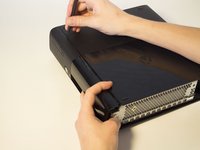
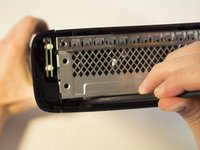
Beginning on the left side without the grate, run the spudger along the crevice until you've reached the grated part, while holding the part that's being separated as you go.
-
-
-
-
Keep holding the partially separated panel open. It's easiest to do this by wedging a spudger into the opening but can also be held open by your hands.
-
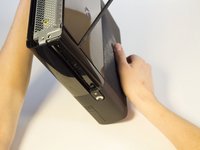
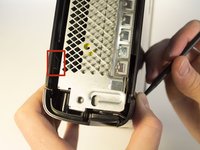
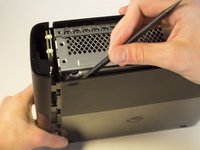
Rotate the Xbox to the left to locate the clip connecting the front panel to the body. Insert the spudger inside the gap to release the clip. This may require wiggling the spudger. The clip will pop off, making the front panel looser.
-
-
-
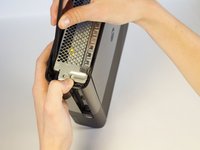
Flip the Xbox so the opposite side is towards you. Make sure to keep the separation open.
-
Locate the other clip and insert the spudger to remove it.
-
-
-
Continue to run the spudger along the crease to release any further clips that may still be attatched.
-
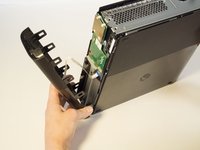
Now that the front panel has been released from its clips you can pull off the front panel.
-
-
-
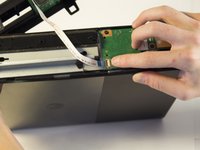
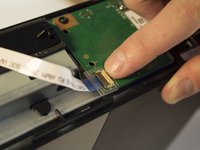
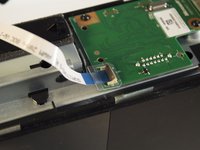
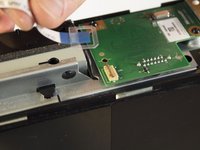
Find the brown section where the ribbon cable enters the green board. Flip the brown part up and pull out the plastic tab at the end of the ribbon.
-
-








To reassemble your device, follow these instructions in reverse order.
Annulation : je n'ai pas terminé ce tutoriel.
7 autres ont terminé cette réparation.

Équipe

Cal Poly, Team 2-11, Amido Winter 2014 Membre de l'équipe Cal Poly, Team 2-11, Amido Winter 2014
CPSU-AMIDO-W14S2G11
4 membres
132 tutoriels rédigés
1 commentaire de tutoriel
Where can I find a new ribbon cable for Xbox 360 e? In addition, can very minuscule damage to cable cause the power button to turn red?
