Aller au contenu principal
Pour réparer ensemble - Je crée un compte

iRobot Roomba 980 Rear Wheels

Ce dont vous avez besoin

    1. iRobot Roomba 980 Rear Wheels, Battery: étape 1, image 1 de 1
      • Flip over the device and remove the two 11.5 mm screws using the Phillips #1 screwdriver.

      Demander à FixBot

      Ajouter un commentaire

    2. iRobot Roomba 980 Rear Wheels: étape 2, image 1 de 2 iRobot Roomba 980 Rear Wheels: étape 2, image 2 de 2
      • Unscrew the back plate using a Phillips #1 screwdriver.

      • Carefully lift the panel up once the screws are removed.

      Demander à FixBot

      Ajouter un commentaire

    3. iRobot Roomba 980 Rear Wheels: étape 3, image 1 de 2 iRobot Roomba 980 Rear Wheels: étape 3, image 2 de 2
      • With both hands, grab the two black tabs on each end of the battery.

      • Pull the tabs upwards to remove the battery.

      Demander à FixBot

      Ajouter un commentaire

    1. iRobot Roomba 980 Rear Wheels, Rear Wheels: étape 4, image 1 de 2 iRobot Roomba 980 Rear Wheels, Rear Wheels: étape 4, image 2 de 2
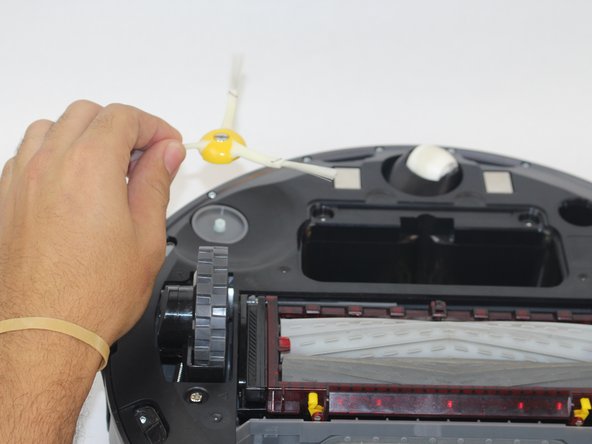
      • Loosen the screw on the side brush.

      • Lift the side brush from the device.

      Demander à FixBot

      Ajouter un commentaire

    2. iRobot Roomba 980 Rear Wheels: étape 5, image 1 de 2 iRobot Roomba 980 Rear Wheels: étape 5, image 2 de 2
      • Unscrew the (2) 11.5mm screws using the Phillips #1 screwdriver.

      • Carefully remove the plate by lifting it off of the device.

      Demander à FixBot

      Ajouter un commentaire

    3. iRobot Roomba 980 Rear Wheels: étape 6, image 1 de 2 iRobot Roomba 980 Rear Wheels: étape 6, image 2 de 2
      • Removing the brush module may ease the removal of the wheel module

      • Locate the (3) 15.8mm gold Phillips #1 screws and unscrew them.

      • Lift the wheel module removing it from the vacuum.

      • Remove the other wheel by repeating these steps.

      Demander à FixBot

      Ajouter un commentaire

Conclusion

To reassemble your device, follow these instructions in reverse order.

Annulation : je n'ai pas terminé ce tutoriel.

5 autres ont terminé cette réparation.

Ernesto Rodriguez Romero

Membre depuis le 09/27/17

1 040 Réputation

4 tutoriels rédigés

Équipe

USF Tampa, Team S14-G2, Boczar Fall 2017 Membre de l'équipe USF Tampa, Team S14-G2, Boczar Fall 2017

USFT-BOCZAR-F17S14G2

4 membres

14 tutoriels rédigés

0 commentaires de tutoriel

Ajouter un commentaire

Nombre de vues :

Dernières 24 heures : 2

7 derniers jours : 17

30 derniers jours : 55

Total : 3,816