Aller au contenu principal
Pour réparer ensemble - Je crée un compte

HP ZBook 15 Hard Drive Replacement

Ce dont vous avez besoin

  1. HP ZBook 15 Hard Drive Replacement, Battery: étape 1, image 1 de 2 HP ZBook 15 Hard Drive Replacement, Battery: étape 1, image 2 de 2
    • Flip the laptop over.

    • Slide the lever with the battery symbol beside it firmly until the battery pops out.

    • Remove the battery from the laptop.

    Demander à FixBot

    Ajouter un commentaire

  2. HP ZBook 15 Hard Drive Replacement, Back Cover: étape 2, image 1 de 1
    • Slide the right lever firmly to the right.

    • Slide the cover towards yourself to remove it.

    Demander à FixBot

    Ajouter un commentaire

  3. HP ZBook 15 Hard Drive Replacement, HP ZBook 15 Hard Drive Disassembly: étape 3, image 1 de 1
    • Unscrew the three captive screws holding the drive in place with a Phillips #0 screwdriver.

    • The screws will remain inside the springs of the hard drive caddy cover.

    Demander à FixBot

    Ajouter un commentaire

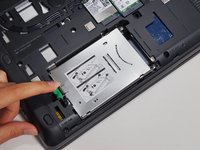
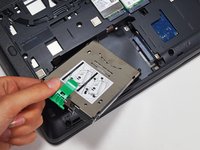
  4. HP ZBook 15 Hard Drive Replacement: étape 4, image 1 de 2 HP ZBook 15 Hard Drive Replacement: étape 4, image 2 de 2
    • Pull the green tab away from the metal casing and lift the drive out.

    Demander à FixBot

    Ajouter un commentaire

  5. HP ZBook 15 Hard Drive Replacement, Hard Drive: étape 5, image 1 de 1
    • Remove the two 3mm screws on either side of the device with a Phillips #0 screwdriver to remove the drive caddy.

    Demander à FixBot

    Ajouter un commentaire

Conclusion

To reassemble your device, follow these instructions in reverse order.

Annulation : je n'ai pas terminé ce tutoriel.

13 autres ont terminé cette réparation.

Grant Terris

Membre depuis le 01/30/15

2 888 Réputation

12 tutoriels rédigés

Équipe

Cal Poly, Team 8-43, Amido Winter 2015 Membre de l'équipe Cal Poly, Team 8-43, Amido Winter 2015

CPSU-AMIDO-W15S8G43

4 membres

19 tutoriels rédigés

3 commentaires de tutoriel

You can use Macrium Reflect (there's a free non-commercial version) to backup your disk to an external drive before swapping the drive.

Paul M - Réponse Partager

There is written 'SSD' on its cover, and I'm confused now. Actually I need to disconnect the HDD and then install new OS on the SSD, and now I'm not sure if the drive that you just removed is SSD or HDD because on mine it say SSD. Please help me out.

Sajid - Réponse Partager

how hard disk i can buy for my zbook 15?

thanks

francesco perego - Réponse Partager

Ajouter un commentaire

Nombre de vues :

Dernières 24 heures : 6

7 derniers jours : 44

30 derniers jours : 149

Total : 31,624