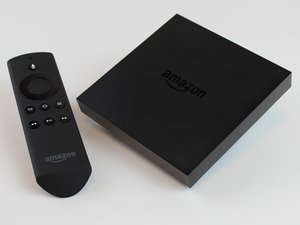
This is the first generation of Amazon Fire TV (model CL1130), released on April 2, 2014. It is a powerful media streaming and gaming device that allows the user to stream digital audio/video content to a high-definition television as well as play video games.
I have a 2nd gen FireTV stick. I accidentally turned off Wi-Fi in my File Explorer app and it froze. I rebooted the stick and now I’m stuck on the screen that says “Home is Currently Unavailable”. I tried using the remote, it wouldn’t respond. Changing the batteries did not work. I used a friend’s remote, nothing. I tried using a remote on a TV with HDMI CEC and that didn’t work. Can’t use the app cause the stick is not connected to Wi-Fi. I can’t even authorize ADB debugging using my computer cause nothing will respond on the screen. It says “device unauthorized”. All the answers I found are very vague. Is there any way to fix this problem?
Faites défiler ce fil pour trouver l'endroit approprié pour y placer ce commentaire. Cliquez ensuite sur « Ajouter un commentaire à cette contribution » pour le déplacer.
For this situation, treat it as two separate problems: network access and input control.
1. Since you already added the Ethernet adapter, leave the Fire TV Stick connected by Ethernet and reboot it again from power. Give it a full minute after the Home screen appears.
2. Try pairing the remote again very close to the Fire TV Stick: hold Home for 10-20 seconds. If that does not work, hold Left + Menu + Back for about 10-15 seconds to reset many Fire TV remotes, remove the batteries for a minute, put them back, then hold Home again.
3. Make sure the remote is the correct Fire TV remote generation. Some Fire TV remotes look similar but will not pair reliably with every Stick generation.
4. If HDMI-CEC from the TV remote did not work, check the TV settings for CEC names like Anynet+, Simplink, Bravia Sync, Viera Link, or CEC Control, then power-cycle both the TV and Fire TV Stick. CEC only works after the TV has it enabled and the Fire TV is fully booted.
5. With Ethernet connected, try the official Fire TV mobile app from a phone on the same network. If the phone is on Wi-Fi and the Fire TV is on Ethernet, they still must be on the same router/subnet. Some guest Wi-Fi networks block discovery.
6. ADB will stay `unauthorized` unless the Fire TV screen can accept the debugging prompt, so I would not rely on ADB until you regain input.
7. If no known-good compatible remote can pair even after the Ethernet/reboot steps, the practical fix may be to borrow/buy the exact compatible Fire TV remote, or factory reset only after you are sure you have a working input method. Resetting without a working remote can leave you stuck at setup.
Faites défiler ce fil pour trouver l'endroit approprié pour y placer ce commentaire. Cliquez ensuite sur « Ajouter un commentaire à cette contribution » pour le déplacer.
Can you try to connect it via Ethernet by using https://smile.amazon.com/dp/B074TC662N/r...?
par Andrew S
@andrewsawesome I bought the Ethernet Adapter, and its connected, now I just need to get the remote working but resetting it doesn’t work.
par T Jr.