
My keyboard is not working
My keyboard is not working except the power button do i need to reset this laptop ?thank you.
Cette question est-elle utile ?
Indice
0

My keyboard is not working except the power button do i need to reset this laptop ?thank you.
Cette question est-elle utile ?

Rep: 25
 2
2
Hello @sherwinundug,
First of all connect an external keyboard with usb and then try to download manually your drivers or delete device from device manager and then restart your laptop. It should be ok. If problem remains, then you should check if the connector is ok and then replace it.
Cette réponse est-elle utile ?

Hey @sherwinundug , i had the same issue twice!
The keyboard is a entire piece with the superior frame, so for fix, you need a replace this piece.
The piece Number in my case the Aspire 3 A315/A515 is AP28Z000300-HA25.
Or you can Jump the board and add a Switch for boot up.
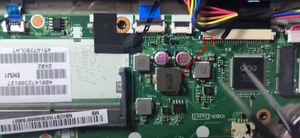
Pins 1 and 2
Cette réponse est-elle utile ?

Rep: 1
3
 1
1
Well I will suggest you to update the keyboard driver some time any outdated keyboard driver can also cause this kind of issue as well.
Cette réponse est-elle utile ?
@gtip a update don't work, i tried!
Is a common issue in this model. My laptop, i replace this entire frame twice, and works like 2 years and fail again, a believe is a programmed obsolecense
Dernières 24 heures : 1
7 derniers jours : 4
30 derniers jours : 31
Total : 330

Sherwin, have you tried plugging in a USB keyboard? That may get you by while you try to fix it.
par Jerry Wheeler