Aller au contenu principal

How To Access the User Library Folder on OS X

Tutoriel Archivé
Ce tutoriel est conservé uniquement à des fins de suivis historiques. Utilisez la version actuelle du tutoriel pour effectuer votre réparation.
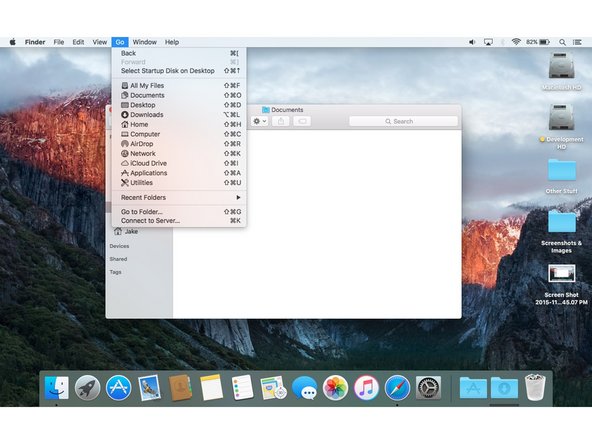
  1. How To Access the User Library Folder on OS X, Method 1: View Through 'Go' Menu: étape 1, image 1 de 2 How To Access the User Library Folder on OS X, Method 1: View Through 'Go' Menu: étape 1, image 2 de 2
    • In the first method, we'll be using a hidden option in the Finder's 'Go' menu.

    • To start, open a new Finder window click the 'Go' menu.

    • While holding the option key, click the option 'Library'.

    • While the library folder is not present in this screenshot, it will appear above the 'Computer' item.

Conclusion

To reassemble your device, follow these instructions in reverse order.

2 autres ont terminé cette réparation.

Jake

Membre depuis le 03/07/15

301 Réputation

2 tutoriels rédigés

0 commentaires de tutoriel

Ajouter un commentaire

Nombre de vues :

Dernières 24 heures : 0

7 derniers jours : 0

30 derniers jours : 0

Total : 145