Introduction
This guide will show you how to replace the fan, heatsink, and thermal paste in a Lenovo ThinkPad T470S laptop. The thermal paste must be cleaned out and replaced from the computer when it is overheating or running more loudly than usual. Thermal paste is a thermally conductive chemical compound. It is commonly used as an interface between heat sinks and heat sources such as high-powered devices. The main role of the thermal paste is to eliminate the gaps of air and space from the interface area in order to maximize heat transfer and dissipation. After awhile, the thermal paste gets worn out, and it needs to be cleaned off and replaced. The device will be running more quietly and won’t be overheating after these steps are completed.
Ce dont vous avez besoin
-
-
Use a Phillips #000 screwdriver to remove the five 7 mm screws from the bottom of the laptop.
-
Lift the bottom panel up and off the laptop.
-
-
-
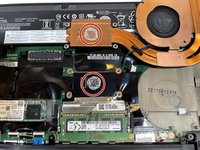
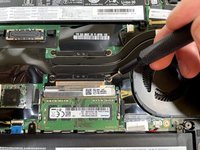
Loosen the four screws from the heatsink with a Phillips #000 screwdriver.
-
-


To reassemble your device, follow these instructions in reverse order.
To reassemble your device, follow these instructions in reverse order.



Équipe

Illinois Wesleyan University, Team S1-G3, Bullock Spring 2021 Membre de l'équipe Illinois Wesleyan University, Team S1-G3, Bullock Spring 2021
IWU-BULLOCK-S21S1G3
4 membres
17 tutoriels rédigés
