Introduction
La batterie ne tient plus la charge ? Remplacez-la.
Ce dont vous avez besoin
-
-
-
Avant d'ouvrir votre iPod, assurez-vous que le commutateur hold est en position verrouillée. La barre orange doit être visible, indiquant que la fonction hold est active.
 Demander à FixBot
-
-
-
Insérez un médiator aussi loin que possible dans la fente entre la façade en plastique et le panneau arrière en métal, sur le bord droit de l'iPod.
-
Utilisez le médiator pour faire levier sur la façade en plastique et détacher cinq languettes de retenue (visibles sur la troisième photo).
-
Faites glisser le médiator le long du bord de l'iPod et continuez à faire levier pour détacher le reste des languettes de retenue.
-
Une fois que les cinq languettes situées le long du côté droit sont détachées, le boîtier devrait s'ouvrir facilement.
-
-
-
Ouvrez le boîtier comme un livre avec le connecteur de dock vers le haut, et posez le panneau arrière à côté de la moitié avant de l'iPod.
-
-
-
-
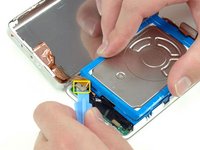
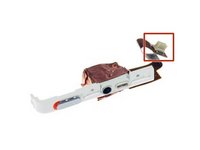
Utilisez un outil en plastique ou vos ongles pour déconnecter délicatement la nappe de la prise jack orange. Veillez à tirer le connecteur bien droit vers le haut, et non sur la nappe elle-même.
-
-
-
-
-
Soulevez le disque dur d'une main et le déconnectez soigneusement la nappe du disque dur de la carte mère..
-
Retirez le disque dur de l'iPod.
-
-
-
Déconnectez avec précaution le connecteur de batterie blanc de la carte mère. Veillez à ne tirez que sur le connecteur même et non sur les nappes.
-
-
-
Retirez la vis noire T6 Torx près du connecteur de batterie sur la carte mère.
-
-
-
Faites passer soigneusement la nappe de la batterie autour de l'extrémité de la carte mère. Veillez à ne pas trop tirer sur la carte mère lorsque vous défaites la nappe de la batterie.
-
-




Pour remonter votre appareil, suivez ces étapes dans l'ordre inverse.
Annulation : je n'ai pas terminé ce tutoriel.
333 autres ont terminé cette réparation.
Merci à ces traducteurs :
100%


Ces traducteurs nous aident réparer le monde ! Vous voulez contribuer ?
Commencez à traduire ›

20 commentaires de tutoriel
If you are real careful you don't have to remove the Torx screw to get the battery out.
I found this quite easy. The tools worked great. I agree with Andy, if you push the tool into the groove, then lift or pry it up so the tip of the tool is down inside the back cover, you should be able to slide it across to pop the clips quite easily. Once you get the first two sides open, it goes quick.
I also did this without having to remove the Torx screw. It helped to lift the battery up a bit to give the wires a little slack, and then just feed them around the corner of the motherboard. Putting the new battery in, I just fed the wires around the corner, and used the opening tool to push them the final bit of the way around the corner.
My old iPod is like new now! Hours and hours of battery life, when it would previously die after 5 minutes.
Very simple and clear guide. I managed to replace the battery in the first try and it worked!
I was able to do it without disconnecting the headphone jack and without removing the Torx screw.
I found the replacement battery to be a little thicker than the original battery but there was no issue resealing the case.
