
Batterie
Cette traduction a été générée automatiquement et n’a pas encore fait l’objet d’une relecture humaine. Vous parlez cette langue ? Relisez-la.
|
3 Réponses Indice de 1 |
My tablet is showing => FASTBOOT MODE on the screen what should I do? |
|
2 Réponses Indice de 1 |
Why is my acer tablet not turning on |
|
2 Réponses Indice de 1 |
My tablet touch screen is cracked what should I do? |
|
1 Réponse Indice de 0 |
Why is my screen touch malfunctioning? |
Voici quelques outils couramment utilisés pour travailler sur cet appareil. Vous ne devriez pas avoir besoin de tous les outils pour chaque procédure.
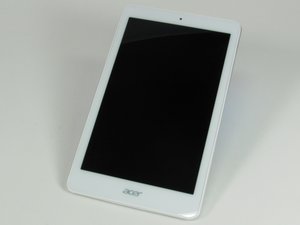
Cette tablette Acer Iconia Tab 8 A1-860 possède un écran 8 pouces avec un châssis blanc autour de l'écran, et un dos gris argenté. Elle pèse 360 grammes et mesure 21,6 par 13 centimètres. Elle dispose d'un petit autocollant carré avec la mention « Intel Inside » au dos. « Acer » apparaît à la fois sur la partie inférieure avant et sur le dos. Il y a un emplacement micro SD sur le côté supérieur gauche du dos. On trouve une prise micro USB et une prise jack sur le dessus de l'appareil.
La tablette Acer Iconia Tab 8 A1-860 peut être identifiée grâce au numéro de modèle et au numéro de série situés sur l'étiquette blanche en bas de l'appareil. Pour obtenir une aide supplémentaire sur l'identification de votre tablette, consultez la page de support Acer.
FIX-SUOVANEN-S16S1G1
3 membres
12 tutoriels rédigés
Dernières 24 heures : 2
7 derniers jours : 6
30 derniers jours : 37
Total : 5,010


