Aller au contenu principal
Pour réparer ensemble - Je crée un compte

IINE Retro Pocket Joystick Replacement

Ce dont vous avez besoin

  1. IINE Retro Pocket Joystick Replacement, Remove the screws: étape 1, image 1 de 3 IINE Retro Pocket Joystick Replacement, Remove the screws: étape 1, image 2 de 3 IINE Retro Pocket Joystick Replacement, Remove the screws: étape 1, image 3 de 3
    • Set the controller down on your working surface.

    • Flip the controller over so the back of the controller is facing up, with the shoulder buttons facing away from you.

    • Use a Phillips #1 screwdriver to remove the four black 7.5mm screws from the corners of the back plate.

    Demander à FixBot

    Ajouter un commentaire

  2. IINE Retro Pocket Joystick Replacement, Remove the back plate: étape 2, image 1 de 3 IINE Retro Pocket Joystick Replacement, Remove the back plate: étape 2, image 2 de 3 IINE Retro Pocket Joystick Replacement, Remove the back plate: étape 2, image 3 de 3
    • Use the tip of an opening pick to separate the back plate. Start at the bottom corner, and pry downwards.

    • As you make your way toward the center, you will eventually disengage the retaining clips located on either side of the status LED array.

    • Be careful not to damage the retaining clips. they're small and thin, and may break easily.

    • Lift the back plate up and away from you, and set it aside.

    Demander à FixBot

    Ajouter un commentaire

  3. IINE Retro Pocket Joystick Replacement: étape 3, image 1 de 1
    • Once the back plate is removed, you now have access to the internals of the controller.

    Demander à FixBot

    Ajouter un commentaire

  4. IINE Retro Pocket Joystick Replacement, Disconnect the battery: étape 4, image 1 de 3 IINE Retro Pocket Joystick Replacement, Disconnect the battery: étape 4, image 2 de 3 IINE Retro Pocket Joystick Replacement, Disconnect the battery: étape 4, image 3 de 3
    • For safety and to prevent damage, disconnect the battery before continuing.

    • Locate the battery connector.

    • Use a pair of tweezers to carefully push on the notches of the battery connector and disconnect it from the socket.

    • Do not pull on the wires!

    Demander à FixBot

    Ajouter un commentaire

  5. IINE Retro Pocket Joystick Replacement, Disconnect the right joystick: étape 5, image 1 de 3 IINE Retro Pocket Joystick Replacement, Disconnect the right joystick: étape 5, image 2 de 3 IINE Retro Pocket Joystick Replacement, Disconnect the right joystick: étape 5, image 3 de 3
    • Locate the ZIF connector of the right joystick.

    • Use a pair of tweezers to flip up the black flap of the ZIF connector and unlock it.

    • Disconnect the joystick cable by carefully pulling it straight out of the connector.

    Demander à FixBot

    Ajouter un commentaire

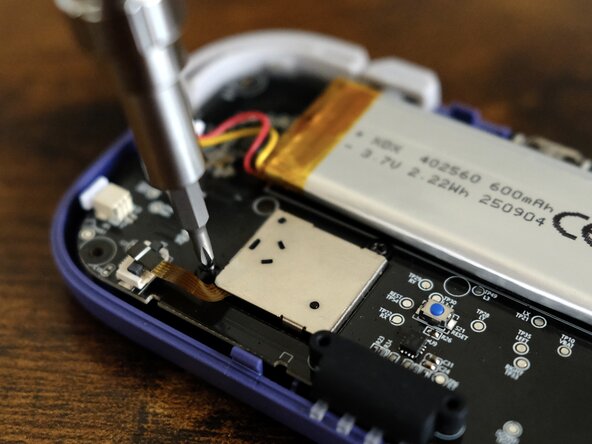
  6. IINE Retro Pocket Joystick Replacement, Unscrew the right joystick: étape 6, image 1 de 2 IINE Retro Pocket Joystick Replacement, Unscrew the right joystick: étape 6, image 2 de 2
    • Use a Phillips #00 screwdriver to remove the two black 3.5mm screws that secure the right joystick.

    Demander à FixBot

    Ajouter un commentaire

  7. IINE Retro Pocket Joystick Replacement, Remove the right joystick: étape 7, image 1 de 2 IINE Retro Pocket Joystick Replacement, Remove the right joystick: étape 7, image 2 de 2
    • Lift up the joystick module and set it aside.

    Demander à FixBot

    Ajouter un commentaire

  8. IINE Retro Pocket Joystick Replacement, Disconnect the left joystick: étape 8, image 1 de 3 IINE Retro Pocket Joystick Replacement, Disconnect the left joystick: étape 8, image 2 de 3 IINE Retro Pocket Joystick Replacement, Disconnect the left joystick: étape 8, image 3 de 3
    • Locate the ZIF connector of the left joystick.

    • Use a pair of tweezers to flip up the black flap of the ZIF connector and unlock it.

    • Disconnect the joystick cable by carefully pulling it straight out of the connector.

    Demander à FixBot

    Ajouter un commentaire

  9. IINE Retro Pocket Joystick Replacement, Unscrew the left joystick: étape 9, image 1 de 2 IINE Retro Pocket Joystick Replacement, Unscrew the left joystick: étape 9, image 2 de 2
    • Use a Phillips #00 screwdriver to remove the two black 3.5mm screws that secure the left joystick.

    Demander à FixBot

    Ajouter un commentaire

  10. IINE Retro Pocket Joystick Replacement, Remove the left joystick: étape 10, image 1 de 2 IINE Retro Pocket Joystick Replacement, Remove the left joystick: étape 10, image 2 de 2
    • Lift up the joystick module and set it aside.

    Demander à FixBot

    Ajouter un commentaire

Conclusion

To reassemble your device, follow these instructions in reverse order.

Once the controller is fully reassembled, connect it to your Nintendo Switch and calibrate the new joystick.

Annulation : je n'ai pas terminé ce tutoriel.

2 autres ont terminé cette réparation.

Aardimus

Membre depuis le 04/30/26

75 Réputation

2 tutoriels rédigés

0 commentaires de tutoriel

Ajouter un commentaire

Nombre de vues :

Dernières 24 heures : 1

7 derniers jours : 19

30 derniers jours : 77

Total : 193