Introduction
Use this guide to remove and replace the loudspeaker in an iPhone 11 Pro Max. The loudspeaker is the speaker at the bottom of an iPhone.
Ce dont vous avez besoin
-
-
Power off your iPhone before beginning disassembly.
-
Remove the two 6.7 mm-long pentalobe screws at the bottom edge of the iPhone.
 Demander à FixBot
-
-
-
Measure 3 mm from the tip and mark the opening pick with a permanent marker.
-
-
-
Lay overlapping strips of clear packing tape over the iPhone's screen until the whole face is covered.
-
If you can't get the suction cup to stick in the next few steps, fold a strong piece of tape (such as duct tape) into a handle and lift the screen with that instead.
-
-
Outil utilisé dans cette étape :Clampy - Anti-Clamp$24.95
-
Pull the blue handle backwards to unlock the Anti-Clamp's arms.
-
Slide the arms over either the left or right edge of your iPhone.
-
Position the suction cups near the bottom edge of the iPhone—one on the front, and one on the back.
-
Squeeze the cups together to apply suction to the desired area.
-
-
-
Pull the blue handle forward to lock the arms.
-
Turn the handle clockwise 360 degrees or until the cups start to stretch.
-
Make sure the suction cups remain aligned with each other. If they begin to slip out of alignment, loosen the suction cups slightly and realign the arms.
-
-
-
Heat an iOpener and thread it through the arms of the Anti-Clamp.
-
Fold the iOpener so it lays on the bottom edge of the iPhone.
-
Wait one minute to give the adhesive a chance to release and present an opening gap.
-
Insert an opening pick into the gap under the screen and the plastic bezel, not the screen itself.
-
Skip the next three steps.
-
-
-
Use a hairdryer or heat gun or prepare an iOpener and apply it to the lower edge of the iPhone for about a minute in order to soften up the adhesive underneath.
-
-
-
If you're using a single suction handle, apply it to the bottom edge of the phone, while avoiding the curved portion of the glass.
-
-
-
Pull up on the suction cup with firm, constant pressure to create a slight gap between the front panel and rear case.
-
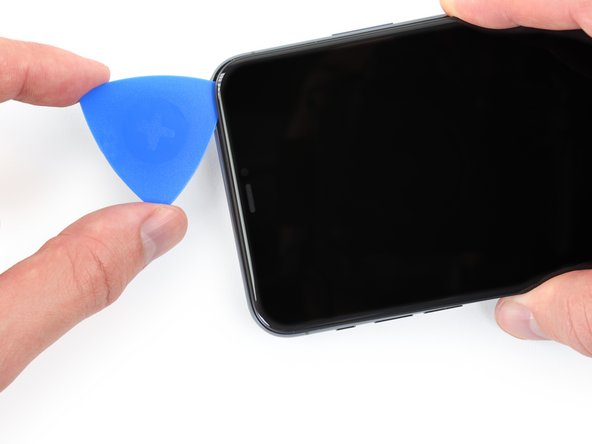
Insert an opening pick into the gap.
-
-
-
Slide the opening pick around the lower left corner and up the left edge of the iPhone, slicing through the adhesive holding the display in place.
-
-
-
-
Re-insert your pick at the bottom edge of the iPhone, and slide it up the right side to continue separating the adhesive.
-
-
-
Gently pull the right edge of the display down slightly (in the direction of the Lightning port).
-
Insert your pick into the top-right corner of the phone.
-
-
-
Continue pulling the display down (toward the Lightning port) as needed in order to make a gap large enough for the pick.
-
Slide the pick to the top left corner and cut any remaining adhesive securing the display.
-
-
-
Pull on the small nub on the suction cup to remove it from the front panel.
-
-
-
Open the iPhone by swinging the display up from the left side, like the back cover of a book.
-
Lean the display against something to keep it propped up while you're working on the phone.
-
-
Outil utilisé dans cette étape :Magnetic Project Mat$19.95
-
Remove two 1.3 mm long Y000 screws securing the battery cover bracket.
-
-
-
Use a spudger or a clean fingernail to pry the battery connector up from its socket on the logic board.
-
Bend the connector slightly away from the logic board to prevent it from accidentally making contact with the socket and providing power to the phone during your repair.
-
-
-
Use a Y000 driver to remove six 1.3 mm screws securing the logic board cover bracket.
-
-
-
Use a spudger or a fingernail to disconnect the OLED panel cable connector.
-
-
-
Use a spudger or a fingernail to disconnect the front sensor assembly cable connector.
-
Use a spudger or a fingernail to disconnect the digitizer cable connector.
-
-
-
Use a Y000 driver to remove the four 1.2 mm screws securing the lower battery connector cover.
-
-
-
Use a spudger to disconnect the lower battery flex cable by prying it straight up from its socket.
-
-
-
Use a Phillips 000 screwdriver to remove the 2.8 mm screw.
-
Use a Phillips 000 screwdriver to remove the 1.4 mm screw.
-
Use a standoff screwdriver to remove the 3.8 mm screw.
-
-
-
Use a small spudger to disconnect the loudspeaker connector.
-
-
-
Use a hair dryer or an iOpener to heat the gasket between the speaker and the frame.
-
-
-
Lift the speaker high enough to clear the battery.
-
Rock the speaker from side to side, then pull it away from the frame from one side.
-




To reassemble your device, follow these instructions in reverse order.

