
Aller au contenu principal
Pour réparer ensemble - Je crée un compte

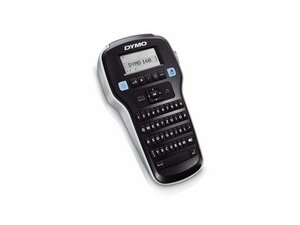
Dymo LabelManager 160 is fast, compact and lightweight, making it easy to label just about anything, anywhere. Type quickly on the computer-style QWERTY keyboard, edit with one-touch fast-formatting keys and print for perfect, professional labels every time.

My display is frozen, how do I reset it?

My dymo label manager is stuck on the screen that you use to change the font and size. I've changed the batteries and tried plugging it in but it wont do anything except switch off and on but it just returns to the same screen. Is the a factory reset I can do?

Répondre à cette question J'ai le même problème

Cette question est-elle utile ?

Indice 0
Ajouter un commentaire

3 Réponses

Réponse la plus utile

To perform a factory reset:

Switch it off, then press and hold backspace button together with '9' and on/off button

Cette réponse est-elle utile ?

Indice 4

5 commentaires:

Mine will not reset I turn it off. the press backspace '9' and power button. Just turns back on. No Reset.

par

Mine is the same. Have you found a way to reset which works? Thanks

par

I have experienced the same issue it will not reset, and keeps going to the same screen, has anyone got a solution?

par

Tried a power refresh and it still returns to the same screen, no reset works, is there not a manual reset I can do?

par

My Dymo 160 would not do a reset.

1. I took out the 6 screws and removed the keypad from the machine.

2. I cleaned all the gold key points with a alcohol wipe.

3. Cleaned the back of the buttons with the wipe.

4. Dried both parts off with a tissue.

5. Put it all back together.

6. Boot it back up using backspace/9/on&off

7. Confirm the Erase

par

Ajouter un commentaire

Hi @tim21354

Try a power refresh and check if that resolves the problem.

Switch off the device (if it is on) and then remove the batteries from the device.

Here's the ifixit Dymo LabelManager 160 Batteries Replacement guide that may help.

Press and hold the power button for 30 seconds and then release.

Reinsert the batteries, reassemble the device and check if it turns on OK

Cette réponse est-elle utile ?

Indice 0

1 commentaire:

This still has not resolved the issue, it still returns to the same screen

par

Ajouter un commentaire

@tim21354 for the LabelManager 160 do a complete reset.

Turn the printer off

important - REMOVE THE TAPE from the printer

Now press and hold "Backspace" button the "9" and the "On/Off" button at the same time

You may need to try this a couple of times due to the awkwardness of pushing those buttons or try the ERASE option by

REMOVE THE TAPE from the printer. then press "9" and "Backspace" simultaneously, THEN the Power button.

That should restore your font options.

Cette réponse est-elle utile ?

Indice 0
Ajouter un commentaire

Ajouter une réponse

alice sera éternellement reconnaissant.
Nombre de vues :

Dernières 24 heures : 0

7 derniers jours : 22

30 derniers jours : 74

Total : 6,395