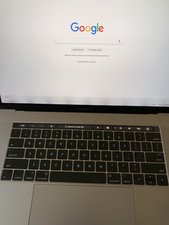
A1708/EMC 3164 —sorti en juin 2017, ce MacBook Pro début de gamme conserve ses touches de fonction classiques (contrairement au Touch Bar avec écran OLED).
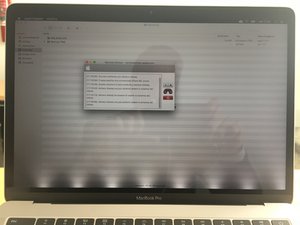
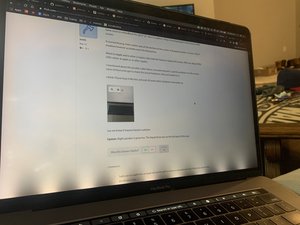
I bought my MacBook Pro 2017 in September and after a month or so of use I got my display like in the photo. I called the support and even after all of the possible "software" actions they can't solve my problem, so it appear to be hardware related.
Anyone has something like that? How they solved your problem?
Faites défiler ce fil pour trouver l'endroit approprié pour y placer ce commentaire. Cliquez ensuite sur « Ajouter un commentaire à cette contribution » pour le déplacer.
51 commentaires
Hi. May I know if you have resolved your issue? I am currently experiencing the same problems with my Macbook Pro with Touch Bar late-2016 model. I am out of warranty by just three months.
Similar issue for 2016 MBP 3 months after warranty. Shame on Apple seems to be an issue with the cable. Ill try and sell it or else order from ifixit and fix it myself.
You need to get your system repaired under warranty! You have a backlight driver failure or the backlight within the display is bad. Did you speak with Apple directly? I find it hard to believe they lead you astray here as this is such a new system.
If you damaged your system some how I would strongly recommend you buy the AppleCare + option. While it won't help you if you got your system wet these newer systems are harder to service as there is just fewer replaceable parts which are expensive if you have to get this service out of warranty or service contract.
Faites défiler ce fil pour trouver l'endroit approprié pour y placer ce commentaire. Cliquez ensuite sur « Ajouter un commentaire à cette contribution » pour le déplacer.
8 commentaires:
They told me I have to take the Mac to an assistance service it is under warranty and I did nothing to damage the system. This problem doesn’t occur every time I restart the computer, sometimes it takes a week to appear again so I will have to give the computer until they see it with their own eyes the screen like in the picture. The guy told me it can take even e month or more! So I’m trying to find more experienced support. It is so frustrating, I work with my mac and to have no concrete support after one month is incredible.
Do you know I can I stress the system to make it appear?
The best thing you can do is take a movie (or pics) using your cellphone place them on on your system on the desktop so they can easily be found. Make sure all of your stuff is copied off (backed up) and remove anything thats too personal.
I hope you have not only your purchase paperwork but all of your visits documented to whomever you spoke to. The more paperwork the better here! Make sure you have copies to give to Apple
Once you have the evidence go to an Apple Store (make a support appointment) and ask to speak with the service manager so you can show them the issue. They should give you a replacement system. As this is a manufacturing defect.
As how to force the system into this state I suspect it maybe heat that will push it. I would first install a good monitoring app like TG Pro you'll need to full version here at you want to enable logging. What you want to do is keep a clock nearby so you can take note of the exact time the event happens then review the log file to see what sensor is running hot.
To push the system you could try blocking the air ducts just don't do it too long here. And, you'll want to run something that pushes the CPU & GPU hard.
Thanks a lot for the time you spent to write me back. I really appreciate. When I called Apple they told me that the system won’t be replaced, but fixed. It is not a problem, the only thing I need is a working computer.
After so many days still I have not received a decent support by Apple. They keep on telling me that I have to wait, or to take the MacBook Pro to a service provider and when I do so they call me back to tell me that the engineers have not reached a final decision and that I have to take the computer back until they decide. This is more than frustrating, never imagined that apple care was like that. I posted a video of my problem: https://www.youtube.com/watch?v=g6cRdY4q...
Wow I just had the exact same issue on my MBP Late 2016 with Touch Bar now. This must be a common hardware issue with some of their Late 2016 batches as the pattern is clearly there. I'm just 2 months out of my warranty and guess how much they quote me to fix it? $600. We already paid top dollars for this supposedly premium hardware. Shame on you Apple! They had battery problem right from the beginning with this model but I decided to stuck around to support them. They would be crazy if they think they'll get more money from me. I'm moving to Dell XPS.
Faites défiler ce fil pour trouver l'endroit approprié pour y placer ce commentaire. Cliquez ensuite sur « Ajouter un commentaire à cette contribution » pour le déplacer.
5 commentaires:
FYI, I just got mine fixed at a Macbook repair shop in Saigon, Vietnam (big shout out to Laptopblue.vn or Applefix.vn). The most amazing thing was they found out that only the display cable was damaged, absolutely nothing was wrong with the LCD screen itself. They did a great job and my screen is working as good as new again. The cost was $50.
Prior to going to this shop, I went to two Apple Authorized Service Providers and they both wanted me to replace the entire display assembly as some of you here had encountered. I suspect this was a strategy employed by Apple to extract more money from their loyal customers. Shame on you Apple!!! I will never buy another device from them ever again.
I know some of you may encounter this issue in the future. You don't need to replace the LCD, you'll just need to fix the display cable. Don't give Apple $600 of your hard earned money. They don't deserve this.
Dan, unfortunately I don't know the exact part number as it was fixed by the tech. I don't want to give you wrong info. I think it used to be called LVDS cable in previous models. Mine is 13'' Macbook Pro 2016. I suspect Apple didn't list it because they wanted everyone to replace the LCD.
I still think this is a design flaw as I've seen other reports of this exact issue in other blog sites in both the 13" & 15" Touch Bar systems.
As to the parts... Apple over the years has been cutting down the number of SKU's they carry for service. Sometimes when a part like a cable tends to be needed as a spare they will add it. So far you can only get the cable as part of the display assembly in both the 13" & 15" Touch Bar systems.
FYI - Apple uses a different signaling method call iDP (internal Display Port) in the Retina models LVDS is used in the lower resolution displays as in the Unibody and Air systems and older.
If you do find out please let us know - Thanks for your follow up!
This is without a doubt a design flaw. Like you said, I've also seen multiple people with these new Touch Bar Macbooks reporting the same issue online, most of them occurring shortly after the warranty was over. I always handle my Macbook with the greatest care and the majority of time it's in my travel bag. I've never ever tried to bend the screen. The tech told me the display cable he found inside was partially ripped. How could that happen I would never know. It's a pity I forgot to ask him to take a picture.
Nobody should be paying Apple $600 to fix a design flaw they had created themselves - they should be paying us instead! What !#^& me off was how Apple Authorized Service Providers were instructed to lie to their customers and insisted on replacing the entire display assembly despite knowing fully well what the problem was. That is borderline scamming. I'm sure we'll be seeing more of these Macbooks popping up soon. I hope others will be able to find this post.
I have a 2016 13” MacBook Pro TouchBar, 4 TB and same issue happened to me last week. I heard Apple products last a long time but I’m not so sure anymore after this.
Faites défiler ce fil pour trouver l'endroit approprié pour y placer ce commentaire. Cliquez ensuite sur « Ajouter un commentaire à cette contribution » pour le déplacer.
2 commentaires:
I've been an Apple-Mac user all my life, since the early 90s despite some issues over the years on diff macs, but now i've had to change the screen of my MBP Touch Bar and paid for it, I'm really upset.
Faites défiler ce fil pour trouver l'endroit approprié pour y placer ce commentaire. Cliquez ensuite sur « Ajouter un commentaire à cette contribution » pour le déplacer.
6 commentaires:
I had same problem, I was not operating MacBook for that much guess I bought it March 2017 and didn’t operate continues 9-10 hours a day. Just last two weeks I start using for 9-10 hours a day basically browsing and trading stuff this issue comes up horizontal lines at bottom and MacBook is too hot, I didn’t use it for week and now it’s gone, it’s been on for almost 10 hours didn’t come that lines at bottom. Any one else has this issue ? Whether is comes back ? Did it cover in this thing ,
Same issue on a MacBook Pro 2017 15'', but I've spilled 1 drop of cleaning liquid in the bottom of the screen.
It started hissing. Had a white spot at the bottom of the screen, it disappeared after 12 hours. The 9 shadows however probably won't fix themselves.
Went to Apple and to other 2 repairs, they told me I have to replace the screen. Will cost about $900 USD, either at apple or at other repairs.
I mentioned about the possible cable failure, everyone denied it, said the problem is in the screen, none of them even got to check the actual hardware, they just looked at it.
I think I'll just keep it like this and wait till some other hardware issue pops up.
Ley me know if anyone found a solution.
Update: Right speaker is gone too. The liquid drop was on the left part of the mac.
Faites défiler ce fil pour trouver l'endroit approprié pour y placer ce commentaire. Cliquez ensuite sur « Ajouter un commentaire à cette contribution » pour le déplacer.
4 commentaires:
Sadly you're caught here as Apple will use the spill to void your extended warranty if they have one for this.
Does anybody have any luck ACTUALLY getting that refund from Apple? I've been sitting on my ass for 2 'office weeks' (Mon-Fri, 1-5pm New Zealand Time) now waiting for additional updates from the CS, which is a Product Supervisor. I can only mail him directly and not call so if there still isn't follow up come friday, I will call up their CS again. >:(
Faites défiler ce fil pour trouver l'endroit approprié pour y placer ce commentaire. Cliquez ensuite sur « Ajouter un commentaire à cette contribution » pour le déplacer.
2 commentaires:
Did you get the repair done at an Apple Store or authorized service center? If you did you should have a paper email record make sure you do! As you'll need it to get the rebate.
Others have, but I'm sure being in NZ adds a bit of complication as I don't think Apple has a management office there.
Did they give you a case number? If they did fire off an email to tcook@apple.com and attach PDF's of your receipts that should speed things up.
Recently had same problem, brought it to apple store in NYC over presidents weekend. They sent it out and it took about a week and a half to get it back. They fixed it for free even though I had no apple care. I suspected my battery is faulty too but they said I did not qualify for battery replacement program. They clearly had to replace the body as well as it looks brand new and old dents and scratches are gone. I have a 2017 MBP with Touch Bar. I have also had the keyboard replaced twice now. Macs just not made like they used to.
Faites défiler ce fil pour trouver l'endroit approprié pour y placer ce commentaire. Cliquez ensuite sur « Ajouter un commentaire à cette contribution » pour le déplacer.
1 commentaire:
kivi - Given your keyboard was serviced twice before for keyboard issues, the tech decided it was time for a new uppercase! Which is the real fix. Now Apple also does a QC so it won't return a system which still has a defect in this case the display backlight cable issue, so you got a free-be! a new display as well.
So the only things from your system carried over was the bottom cover and your logic board, thats it! What a deal!
I had same problem, I was not OS for that much guess I bought it June 2019 and didn’t operate continues 11 hours a day. Just last weeks I start using for 11 hours a day basically browsing and trading stuff this issue comes up horizontal lines at bottom and Laptop is too hot.
Faites défiler ce fil pour trouver l'endroit approprié pour y placer ce commentaire. Cliquez ensuite sur « Ajouter un commentaire à cette contribution » pour le déplacer.
2 commentaires:
Your issue sounds like a failing heat sink or fan. I would strongly recommend you install a good thermal monitoring app like TG Pro it will allow you to see whats overheating and you can boost your fans to get more effective cooling. Then I would look at cleaning the dust build up on the fan blades and the heat sink fin areas.
Guys, I have the same problem! I contact Apple here in Brazil and they gave me the same answer: it is not possible to do a free repair because my MacBook is out of the warranty time. I am very angry with this situation and I am with contact with Specialised Support to find out if they can solve my problem. The guy who helped me said it's VERY IMPORTANT and HE STRONGLY RECOMMEND for everyone who had the same problem to send it to Apple through the link https://www.apple.com/feedback/ . They need to know that the number os cases increases everyday and it's NOT a isolated case!
Faites défiler ce fil pour trouver l'endroit approprié pour y placer ce commentaire. Cliquez ensuite sur « Ajouter un commentaire à cette contribution » pour le déplacer.
51 commentaires
Hi. May I know if you have resolved your issue? I am currently experiencing the same problems with my Macbook Pro with Touch Bar late-2016 model. I am out of warranty by just three months.
par Sherri Low
Same issue. Started having the stage light effect on my Macbook Pro Late 2016 non-touch bar just a few days after the warranty
par skmmanuel
Similar issue for 2016 MBP 3 months after warranty. Shame on Apple seems to be an issue with the cable. Ill try and sell it or else order from ifixit and fix it myself.
par Chinmay
I have the same issue Late 2016 Model touch bar
par ps_khai
I am having the SAME issue. A few months out of warranty. I'm soooo disappointed.
par Sinead Singh
Voir 46 commentaires en plus