MacBook stays at 0% battery life when it is plugged in
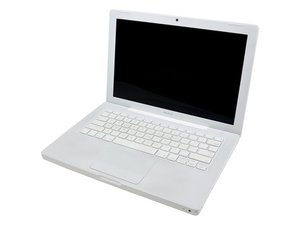
Macbook stays at 0% battery life when it is plugged in. When it is not plugged in it will not come on at all. I dont know anything about model numbers and what kind of stuff my laptop has.. but under the battery it says:
Serial No. W8823UFR0P1
2.4 /2X1G/160/8D-DL:WHITE
EMC No: 2242
How can I fix this and how much will it cost? Also, I have been thinking about selling it. How much can I get for it if it has this damage and minor scratches and wear. Where can I sell it for the best price?
Faites défiler ce fil pour trouver l'endroit approprié pour y placer ce commentaire. Cliquez ensuite sur « Ajouter un commentaire à cette contribution » pour le déplacer.
I recently faced the same problem when my battery was unresponsive to the charger. It could spend hours charging but there was no change despite the battery not being faulty.
I knew there was a problem hence I conducted some extensive internet research.
Have you already tried resetting the SMC and the PRAM?
Remove the battery, and keep the power button pressed for ten seconds.
Reattach battery and cable, and test your machine.
If it still doesn't work, reboot keeping Control+Option+P+R pressed until you feel two boot chime songs. Leave them be and test again.
Failing that, try to boot with a new battery. Test your old one: if it's bulging, distorted or deformed, or System Profiler gives you a maximum charge far less than to 5000mA supposed to be on average, the battery may be busted.
Failing that, check if the battery connector in the battery van is recessed, or damaged.
I've also heard of Macbooks unable to recharge their batteries at all revived by changing the Magsafe cable or the Battery connector, and you may get more references in this question
However, I'd first check the battery itself, and the battery connector's mount.
Failing that, I'd start by checking and fixing the battery connector, that's a fairly inexpensive part.
As for the price, Market is a Fickle Mistress. Here, in my country, I've seen machines as yours sold from a price among 400$ to 500$, but it may depend, and also the price may be in flux, goind down when, with the announcement of new models, the market gets saturated with refurb and "old model" items.
Faites défiler ce fil pour trouver l'endroit approprié pour y placer ce commentaire. Cliquez ensuite sur « Ajouter un commentaire à cette contribution » pour le déplacer.

6 commentaires:
Hi Stefano, I'm having the some what of the same issue, my question is hold the power button for 10 minutes or seconds? I've been doing 5 seconds. Please let me know- thanks!
10 seconds. The guide says 5 seconds, but the machine won't be bothered if you do more and, since everyone counts by mind and not by timer, it compensates for errors.
However, next time, or for other related issues, it's better opening an individual question.
Faites défiler ce fil pour trouver l'endroit approprié pour y placer ce commentaire. Cliquez ensuite sur « Ajouter un commentaire à cette contribution » pour le déplacer.
if you have a iphone charger take out the long extention cord and put in the iphone charger that plugs into the wall and plug that it, then hold the power button for 10.7seconds and boot it back up, worked for my macbook pro 2011/2012
Faites défiler ce fil pour trouver l'endroit approprié pour y placer ce commentaire. Cliquez ensuite sur « Ajouter un commentaire à cette contribution » pour le déplacer.
My macbook pro doesn't charge past one percent. Apple states water damage but no water has touched it. They're charging close to $800 to fix it [I'm under warranty and I bought the protection plan] and I refuse to pay it. They stated the battery itself is fine. It's the pieces that connect to it that has the damage, so any ideas? I was thinking about taking it to a computer repair store
Faites défiler ce fil pour trouver l'endroit approprié pour y placer ce commentaire. Cliquez ensuite sur « Ajouter un commentaire à cette contribution » pour le déplacer.
I had exactly the same problem as that reported by Tony. Apple said the Macbook Pro has water damage... but I am 100% certain that no water came in contact with this machine (which was always sitting on my desk, and never taken anywhere else). Very disappointing that a company like Apple tries to fob off users with tactics like this. After this problem, I had another issue with a Macbook Air failing suddenly. Of course both the Macbook Pro and the Macbook Air have no user-replaceable parts... so I ended up switching my company from Macs to Windows notebooks (with replaceable batteries, memory and disk). Why on earth are people still buying machines that are not repairable?
Faites défiler ce fil pour trouver l'endroit approprié pour y placer ce commentaire. Cliquez ensuite sur « Ajouter un commentaire à cette contribution » pour le déplacer.
1 commentaire:
Thank you so much! Control+Option+P+R worked with me! God bless you.
Faites défiler ce fil pour trouver l'endroit approprié pour y placer ce commentaire. Cliquez ensuite sur « Ajouter un commentaire à cette contribution » pour le déplacer.
2 commentaires
MacBook "Core 2 Duo" 2.4 13" (White-08) 2.4 GHz Core 2 Duo (T8300)
Intro Date: February 26, 2008 Disc Date: October 14, 2008
Order No: MB403LL/A Model No: A1181 (EMC 2242)
Subfamily: Early 2008 Model ID: MacBook4,1
par Stefano Gigante
I recently faced the same problem when my battery was unresponsive to the charger. It could spend hours charging but there was no change despite the battery not being faulty.
I knew there was a problem hence I conducted some extensive internet research.
I had to rely on the link here to solve the issue.: https://bit.ly/3wijBic
This should be helpful
par Wellington Sanders