Aller au contenu principal
Pour réparer ensemble - Je crée un compte

Alienware M17-R1 Screen Lock Assembly Replacement

Ce dont vous avez besoin

  1. Alienware M17-R1 Screen Lock Assembly Replacement, Screen Lock Assembly: étape 1, image 1 de 1
    • Open the screen until it is flat.

    • Ensure that the surface you are working on can support both the screen and the base of the laptop.

    Demander à FixBot
  2. Alienware M17-R1 Screen Lock Assembly Replacement: étape 2, image 1 de 2 Alienware M17-R1 Screen Lock Assembly Replacement: étape 2, image 2 de 2
    • Remove the eight 7 mm screws around the edge of the screen using a Phillips #1 screwdriver.

    • Support the screen from the bottom to make it easier to remove the screws.

    Demander à FixBot
  3. Alienware M17-R1 Screen Lock Assembly Replacement: étape 3, image 1 de 2 Alienware M17-R1 Screen Lock Assembly Replacement: étape 3, image 2 de 2
    • Insert the plastic opening tool and gently slide it around the edge of the screen to lift the face of the screen away from its base.

    • Be careful not to break the face of the screen when lifting it.

    Demander à FixBot
  4. Alienware M17-R1 Screen Lock Assembly Replacement: étape 4, image 1 de 3 Alienware M17-R1 Screen Lock Assembly Replacement: étape 4, image 2 de 3 Alienware M17-R1 Screen Lock Assembly Replacement: étape 4, image 3 de 3
    • Remove the two 3 mm Phillips #1 screws using a Phillips #1 screwdriver.

    • Pull the assembly grip away to remove it.

    • Remove the two 5 mm screws using a Phillips #1 screwdriver.

    Demander à FixBot
  5. Alienware M17-R1 Screen Lock Assembly Replacement: étape 5, image 1 de 2 Alienware M17-R1 Screen Lock Assembly Replacement: étape 5, image 2 de 2
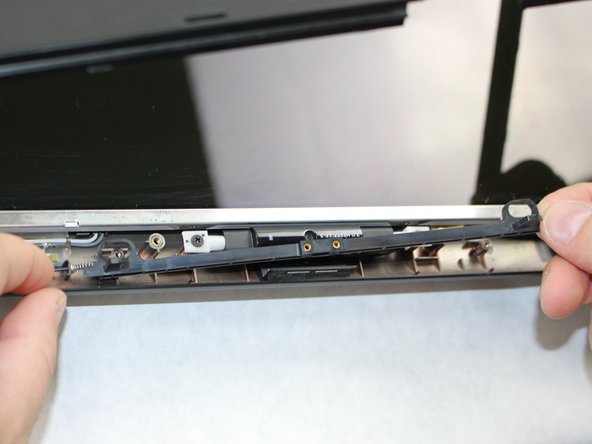
    • Push in the assembly towards the spring.

    • Gently lift the slider from the side opposite to the spring and pull the slider away from the spring.

    • The spring is loosely secured to the slider and may fall off and become lost when removing the slider.

    Demander à FixBot
  6. Alienware M17-R1 Screen Lock Assembly Replacement: étape 6, image 1 de 2 Alienware M17-R1 Screen Lock Assembly Replacement: étape 6, image 2 de 2
    • If the spring is defective, slide it off the end of the assembly and replace it.

    Demander à FixBot
Conclusion

To reassemble your device, follow these instructions in reverse order.

William Davis

Membre depuis le 10/09/18

323 Réputation

2 tutoriels rédigés

Équipe

Sam Houston State, Team S15-G2, Blackburne Fall 2018 Membre de l'équipe Sam Houston State, Team S15-G2, Blackburne Fall 2018

SHSU-BLACKBURNE-F18S15G2

4 membres

5 tutoriels rédigés

0 commentaires de tutoriel

Ajouter un commentaire

Nombre de vues :

Dernières 24 heures : 0

7 derniers jours : 4

30 derniers jours : 47

Total : 669