Aller au contenu principal
Pour réparer ensemble - Je crée un compte

Amazon Fire HD 10 Battery Replacement

Ce dont vous avez besoin

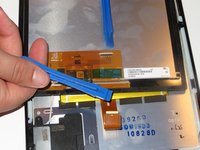
  1. Amazon Fire HD 10 Battery Replacement, Screen: étape 1, image 1 de 3 Amazon Fire HD 10 Battery Replacement, Screen: étape 1, image 2 de 3 Amazon Fire HD 10 Battery Replacement, Screen: étape 1, image 3 de 3
    • Avoid prying near bottom right hand side due to LCD Connector

    • Use a plastic opening tool to pry the screen up in the right hand corner.

    Demander à FixBot
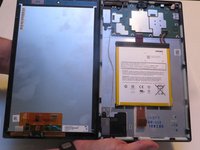
  2. Amazon Fire HD 10 Battery Replacement: étape 2, image 1 de 1
    • Do not completely remove the screen yet as there is a ZIF connector connected.

    • Lift the screen and digitizer from the case.

    • You may need to use some force due to the glue.

    Demander à FixBot
  3. Amazon Fire HD 10 Battery Replacement: étape 3, image 1 de 2 Amazon Fire HD 10 Battery Replacement: étape 3, image 2 de 2
    • Be mindful of the ZIF connector.

    • Disconnect the ribbon connector from the digitizer side using your hands or the plastic opening tool.

    Demander à FixBot
  4. Amazon Fire HD 10 Battery Replacement: étape 4, image 1 de 1
    • Remove the screen and digitizer from the case completely.

    Demander à FixBot
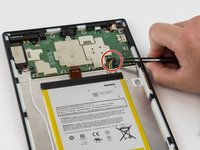
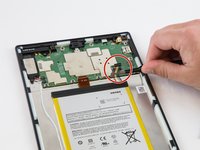
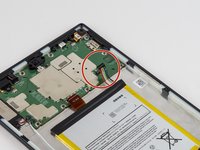
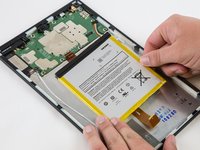
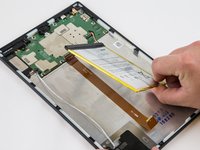
  5. Amazon Fire HD 10 Battery Replacement, Battery: étape 5, image 1 de 3 Amazon Fire HD 10 Battery Replacement, Battery: étape 5, image 2 de 3 Amazon Fire HD 10 Battery Replacement, Battery: étape 5, image 3 de 3
    • Locate the power cable that links the battery to the motherboard.

    • Carefully unplug the battery power cable to disconnect the battery from the motherboard.

    • The third image shows what it should look like with the battery power cable is disconnected.

    Demander à FixBot
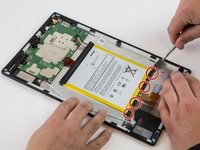
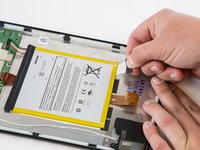
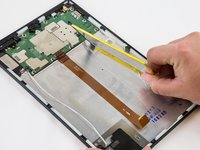
  6. Amazon Fire HD 10 Battery Replacement: étape 6, image 1 de 3 Amazon Fire HD 10 Battery Replacement: étape 6, image 2 de 3 Amazon Fire HD 10 Battery Replacement: étape 6, image 3 de 3
    • Begin by locating the double sided pull tape locations.

    • Do not lift on the battery when doing the following step. You will bend it. It is very pliable.

    • Pull the black soft tabs to release the tape's adhesion.

    • Make sure you pull the tabs slowly and continuously away from the case until the adhesive is completely out.

    • Do this to all 4 tabs until the battery is completely free of adhesion to the device's backing.

    Demander à FixBot
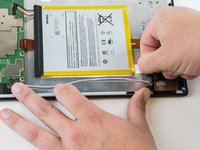
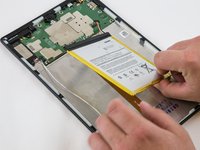
  7. Amazon Fire HD 10 Battery Replacement: étape 7, image 1 de 3 Amazon Fire HD 10 Battery Replacement: étape 7, image 2 de 3 Amazon Fire HD 10 Battery Replacement: étape 7, image 3 de 3
    • Make sure all the adhesive is removed before trying to lift the battery from the case.

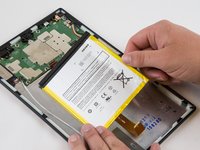
    • After the battery is totally free of any adhesion, simply lift the battery from the case.

    Demander à FixBot
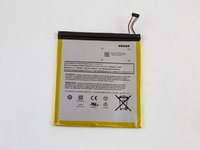
  8. Amazon Fire HD 10 Battery Replacement: étape 8, image 1 de 3 Amazon Fire HD 10 Battery Replacement: étape 8, image 2 de 3 Amazon Fire HD 10 Battery Replacement: étape 8, image 3 de 3
    • Inspect battery for any leakage.

    • Please follow all U.S. regulations and laws when disposing or recycling the battery.

    Demander à FixBot
Conclusion

To reassemble your device, follow these instructions in reverse order.

11 autres ont terminé cette réparation.

Jaie Hillery

Membre depuis le 10/07/14

1 774 Réputation

10 tutoriels rédigés

Équipe

USF Tampa, Team 16-6, Blackwell Winter 2016 Membre de l'équipe USF Tampa, Team 16-6, Blackwell Winter 2016

USFT-BLACKWELL-W16S16G6

3 membres

22 tutoriels rédigés

9 commentaires de tutoriel

why is there so much empty space next to the battery?

echow2001 - Réponse Partager

Big screen, little processor. The screen dictates the space, that’s why the battery has to be secured with adhesive.

ctgblue - Réponse Partager

I’m confused. If it’s a battery replacement issue, why is the battery not listed on the parts list? Is that not necessary once you take the old one out? Where do I get a new battery to replace the one this is teaching me to remove? O.o

tyger.night - Réponse Partager

You’ll have to google one. Amazon does not offer one. They want to sell you a new Kindle instead.

I am buying one with the plastic tools (ebay), even if they suck, they should get through this process once.

ctgblue - Réponse Partager

How do you know if ita battery or charging port? Mine dont do anything whe. Its

Tech Reviews - Réponse Partager

Ajouter un commentaire

Nombre de vues :

Dernières 24 heures : 7

7 derniers jours : 61

30 derniers jours : 252

Total : 52,000