Aller au contenu principal
Pour réparer ensemble - Je crée un compte

Bose Soundlink Flex Driver Replacement

Ce dont vous avez besoin

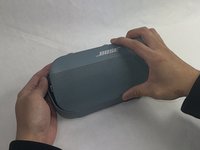
    1. Bose Soundlink Flex Driver Replacement, Grille: étape 1, image 1 de 1
      • Use a heat gun to warm up the device.

      • This will allow for an easier removal of the grille and prevent damage to the device during the replacement. If you do not have access to a heat gun, a hair dryer works as well.

      Demander à FixBot

      Ajouter un commentaire

    2. Bose Soundlink Flex Driver Replacement: étape 2, image 1 de 1
      • Use an iFixit opening tool to pop off the eight clips on the grille.

      • Be patient and do not rush this process as you may otherwise damage the device.

      Demander à FixBot

      Ajouter un commentaire

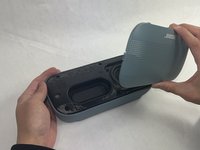
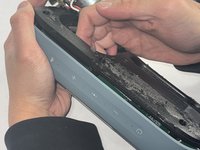
    3. Bose Soundlink Flex Driver Replacement: étape 3, image 1 de 2 Bose Soundlink Flex Driver Replacement: étape 3, image 2 de 2
      • Once the clips have been released, the only thing holding the grille on is glue.

      • Apply minimal force and the grille should pop right off the device.

      • Reheat the device to warm up the glue if there is difficulty in removing.

      Demander à FixBot

      Ajouter un commentaire

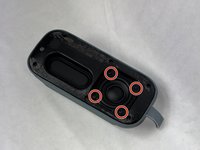
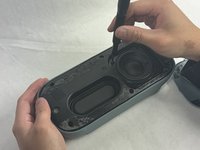
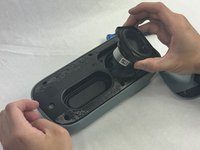
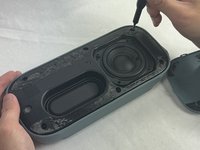
    1. Bose Soundlink Flex Driver Replacement, Driver: étape 4, image 1 de 3 Bose Soundlink Flex Driver Replacement, Driver: étape 4, image 2 de 3 Bose Soundlink Flex Driver Replacement, Driver: étape 4, image 3 de 3
      • Remove the four 2.3 mm screws holding the driver in place using a TR8 Torx screwdriver.

      • Lift the driver out, being cautious of the wires still connected to the device.

      Demander à FixBot

      Ajouter un commentaire

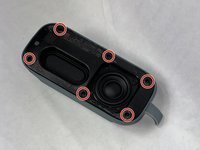
    2. Bose Soundlink Flex Driver Replacement: étape 5, image 1 de 3 Bose Soundlink Flex Driver Replacement: étape 5, image 2 de 3 Bose Soundlink Flex Driver Replacement: étape 5, image 3 de 3
      • Remove the six 2.3 mm screws around the edge with a TR8 Torx screwdriver.

      • Pull the back panel off exposing the motherboard.

      Demander à FixBot

      Ajouter un commentaire

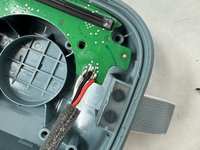
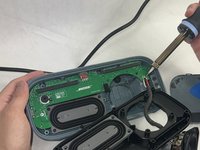
    3. Bose Soundlink Flex Driver Replacement: étape 6, image 1 de 2 Bose Soundlink Flex Driver Replacement: étape 6, image 2 de 2
      • Desolder the joints that are connecting the speaker to the motherboard.

      • Solder the new speaker with the wire color in the same order.

      • Be cautious when removing and adding the solder to not damage the motherboard or burn yourself.

      Demander à FixBot

      Ajouter un commentaire

Conclusion

To reassemble your device, follow these instructions in reverse order.

Annulation : je n'ai pas terminé ce tutoriel.

Kalvin Lee

Membre depuis le 03/19/24

625 Réputation

3 tutoriels rédigés

Équipe

UMass Dartmouth, Team 4-1, Shaddix Spring 2024 Membre de l'équipe UMass Dartmouth, Team 4-1, Shaddix Spring 2024

UMASSD-SHADDIX-S24S4G1

3 membres

21 tutoriels rédigés

0 commentaires de tutoriel

Ajouter un commentaire

Nombre de vues :

Dernières 24 heures : 1

7 derniers jours : 17

30 derniers jours : 99

Total : 1,867