Aller au contenu principal
Pour réparer ensemble - Je crée un compte

Brother PT-1010 Cutter Blade Replacement

  1. Brother PT-1010 Cutter Blade Replacement, Remove Back Cover: étape 1, image 1 de 1
    • Open the back cover of the device by pressing on the indication arrow and pulling it open.

    Demander à FixBot
  2. Brother PT-1010 Cutter Blade Replacement, Locate Cutter Blade Unit: étape 2, image 1 de 1
    • Locate the yellow cutter blade unit as shown in the photo.

    Demander à FixBot
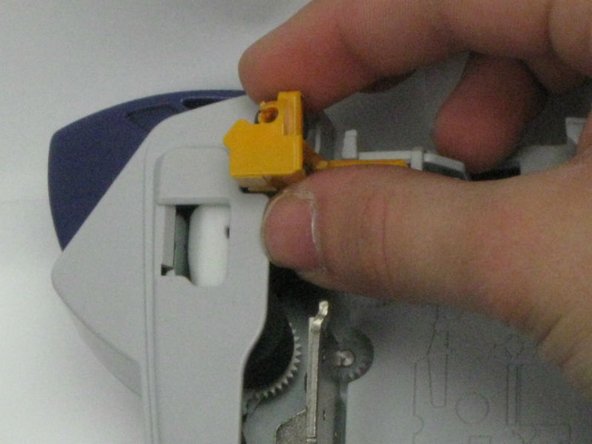
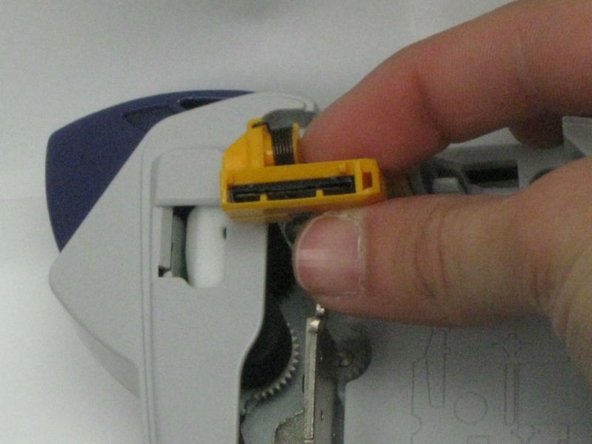
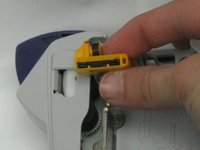
  3. Brother PT-1010 Cutter Blade Replacement, Remove Cutter Blade: étape 3, image 1 de 3 Brother PT-1010 Cutter Blade Replacement, Remove Cutter Blade: étape 3, image 2 de 3 Brother PT-1010 Cutter Blade Replacement, Remove Cutter Blade: étape 3, image 3 de 3
    • Using your thumb and forefinger, pull up, applying a small amount of pressure until the blade loosens and comes out.

    • Be very careful when pulling out the cutter blade, it is very sharp.

    • The Brother no. TL 5 Cutter Blade Unit is required for replacement.

    Demander à FixBot
Conclusion

To reassemble your device, follow these instructions in reverse order.

Une autre personne a terminé cette réparation.

Haley Sweet

Membre depuis le 10/30/14

460 Réputation

4 tutoriels rédigés

Équipe

Baylor, Team 4-4, Williams Fall 2014 Membre de l'équipe Baylor, Team 4-4, Williams Fall 2014

BU-WILLIAMS-F14S4G4

4 membres

4 tutoriels rédigés

0 commentaires de tutoriel

Ajouter un commentaire

Nombre de vues :

Dernières 24 heures : 3

7 derniers jours : 15

30 derniers jours : 59

Total : 1,714