Aller au contenu principal
Pour réparer ensemble - Je crée un compte

Connecting TI-Nspire to a Computer

Ce dont vous avez besoin

  1. Connecting TI-Nspire to a Computer, Connecting TI-Nspire to a Computer: étape 1, image 1 de 1
  2. Connecting TI-Nspire to a Computer: étape 2, image 1 de 3 Connecting TI-Nspire to a Computer: étape 2, image 2 de 3 Connecting TI-Nspire to a Computer: étape 2, image 3 de 3
    • Make sure you have a TI USB cable to connect your calculator and computer

    • The ends of the cable should look like those in this picture

  3. Connecting TI-Nspire to a Computer: étape 3, image 1 de 2 Connecting TI-Nspire to a Computer: étape 3, image 2 de 2
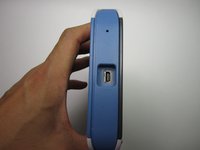
    • Insert the plug into the the slot at the top of the calculator.

  4. Connecting TI-Nspire to a Computer: étape 4, image 1 de 1
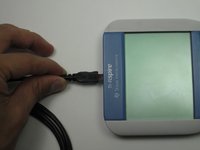
    • Connect the calculator to the computer through the USB port

    • Through the TI connect program you are ready to perform actions such as viewing your calculator display on your computer screen

Ligne d'arrivée

19 autres ont terminé cette réparation.

Rueben Rodriguez

Membre depuis le 09/26/12

421 Réputation

1 tutoriel rédigé

Équipe

Cal Poly, Team 7-52, Forte Fall 2012 Membre de l'équipe Cal Poly, Team 7-52, Forte Fall 2012

CPSU-FORTE-F12S7G52

5 membres

15 tutoriels rédigés

6 commentaires de tutoriel

This didn't work for me. According to the ti download page for the software the NSPIRE is not listed as a supported device. It appears that the software for the NSPIRE is not free.

no way - Réponse Partager

the software link is wrong

here is the correct one

https://education.ti.com/en/software/det...

Maximman101 - Réponse Partager

the link is denied,

Fashion - Réponse Partager

The link is denied

Fashion - Réponse Partager

The link worked, and I can connect! Thanks!!

Octav Mandru - Réponse Partager

Ajouter un commentaire

Nombre de vues :

Dernières 24 heures : 1

7 derniers jours : 29

30 derniers jours : 168

Total : 99,208