Aller au contenu principal
Pour réparer ensemble - Je crée un compte

Garmin GPSmap 60CSx Keypad Buttons Replacement

Ce dont vous avez besoin

    1. Garmin GPSmap 60CSx Keypad Buttons Replacement, Back Cover and AA Batteries: étape 1, image 1 de 1
      • Lift and twist the battery cover release 90 degrees counterclockwise on the back of the device.

      Demander à FixBot

      Ajouter un commentaire

    2. Garmin GPSmap 60CSx Keypad Buttons Replacement: étape 2, image 1 de 1
      • Lift battery release up to remove battery cover.

      Demander à FixBot

      Ajouter un commentaire

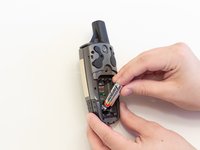
    3. Garmin GPSmap 60CSx Keypad Buttons Replacement: étape 3, image 1 de 2 Garmin GPSmap 60CSx Keypad Buttons Replacement: étape 3, image 2 de 2
      • Pull AA batteries out.

      Demander à FixBot

      Ajouter un commentaire

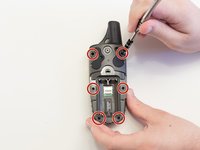
    1. Garmin GPSmap 60CSx Keypad Buttons Replacement, Keypad Buttons: étape 4, image 1 de 2 Garmin GPSmap 60CSx Keypad Buttons Replacement, Keypad Buttons: étape 4, image 2 de 2
      • Remove the six 10 mm screws on the back of the device with a Phillips #0 screwdriver.

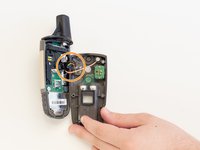
      • Flip the back panel over to view the green electronics board (the PCB) and the PCB covering.

      • Remove the black, yellow, blue, and red wires connected to the PCB with light force.

      Demander à FixBot

      Ajouter un commentaire

    2. Garmin GPSmap 60CSx Keypad Buttons Replacement: étape 5, image 1 de 1
      • Place the spudger in the bottom right corner of the black PCB cover and pry the corner out.

      • The previous step will need to be done to the other three corners.

      • It is best to do the two bottom corners first.

      • Pull the black PCB board out of the GPSMap 60 CSx.

      Demander à FixBot

      Ajouter un commentaire

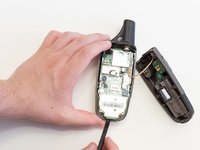
    3. Garmin GPSmap 60CSx Keypad Buttons Replacement: étape 6, image 1 de 2 Garmin GPSmap 60CSx Keypad Buttons Replacement: étape 6, image 2 de 2
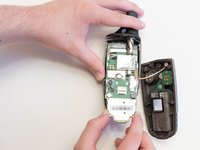
      • Carefully use a spudger to lift the PCB a few centimeters.

      • Pull the PCB out towards the bottom of the GPSMap 60CSx.

      • This will pull out all the main components including the antenna and the screen.

      Demander à FixBot

      Ajouter un commentaire

    4. Garmin GPSmap 60CSx Keypad Buttons Replacement: étape 7, image 1 de 2 Garmin GPSmap 60CSx Keypad Buttons Replacement: étape 7, image 2 de 2
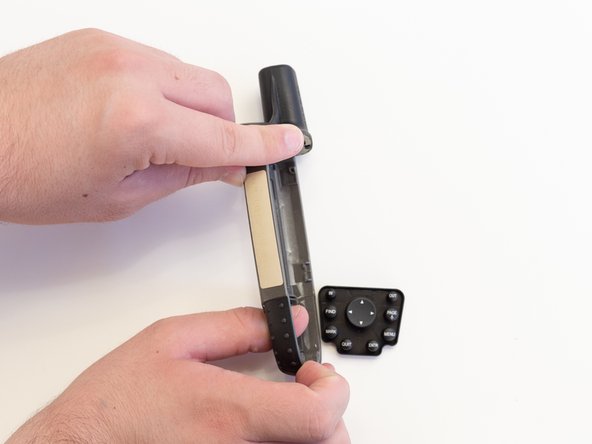
      • Take the front panel and apply light force to the buttons.

      • The buttons are part of one unit and should all pop out at once.

      Demander à FixBot

      Ajouter un commentaire

Conclusion

To reassemble your device, follow these instructions in reverse order.

Annulation : je n'ai pas terminé ce tutoriel.

3 autres ont terminé cette réparation.

0 commentaires de tutoriel

Ajouter un commentaire

Nombre de vues :

Dernières 24 heures : 1

7 derniers jours : 12

30 derniers jours : 33

Total : 3,332