Cette traduction a été générée automatiquement et n’a pas encore fait l’objet d’une relecture humaine. Vous parlez cette langue ? Relisez-la.
Introduction
Si les touches de votre clavier collent ou sont cassées, suivez ce tutoriel de remplacement !
Ce dont vous avez besoin
-
-
-
Retournez l'ordinateur portable.
-
Faites glisser fermement le levier portant le symbole de batterie situé à côté, jusqu'à ce que la batterie (clapet) soit éjectée.
-
Retirez la batterie (clapet) de l'ordinateur portable.
 Demander à FixBot
-
-
-
-
-
Faites glisser fermement le levier droit vers la droite.
-
Faites glisser le cache vers vous pour le retirer.
-
-
-
-
-
-
Retirez les deux vis de 16 mm avec un tournevis cruciforme.
-
-
-
Retournez l’ordinateur portable pour que le clavier soit visible.
-
Insérez la spatule (spudger) sous le côté gauche du clavier.
-
Soulevez délicatement le côté du clavier et tirez fermement sur le coin gauche du clavier jusqu’à ce qu’il se déclipse.
-
Passez vos doigts sous les bords du clavier le long du bord supérieur, de la gauche vers la droite, pour le séparer des clips restants.
-
Faites glisser délicatement le clavier vers l’écran et sortez-le du boîtier.
-
-
-
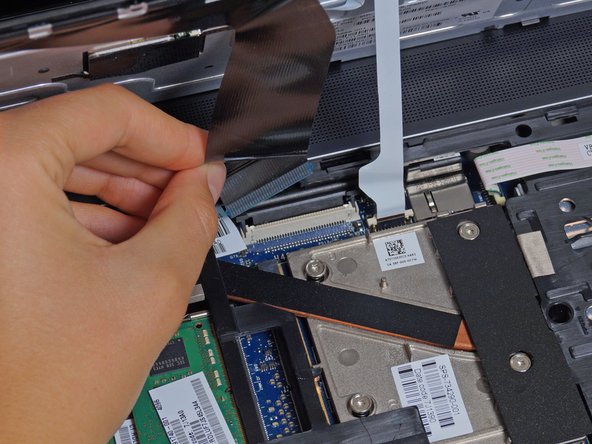
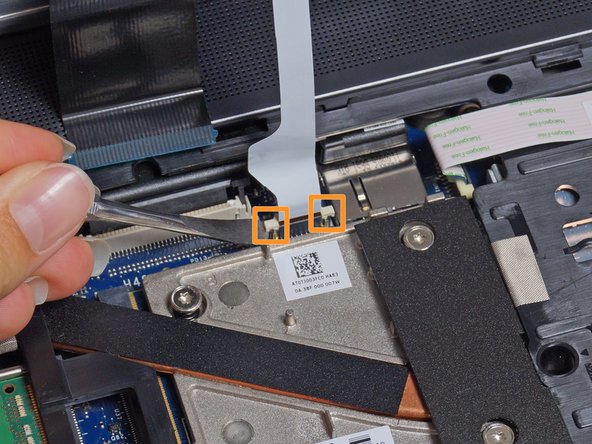
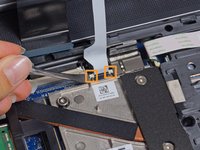
Soulevez délicatement les deux languettes de chaque côté de la nappe noire avec une spatule (spudger) jusqu'à ce que la nappe se détache.
-
Déconnectez la nappe noire en tirant sur la languette d'extraction bleue qui dépasse.
-
Répétez l'opération avec la nappe blanche.
-
-






Pour remonter votre appareil, suivez ces instructions en sens inverse.
Annulation : je n'ai pas terminé ce tutoriel.
34 autres ont terminé cette réparation.

Équipe

Cal Poly, Team 8-43, Amido Winter 2015 Membre de l'équipe Cal Poly, Team 8-43, Amido Winter 2015
CPSU-AMIDO-W15S8G43
4 membres
83 tutoriels rédigés
13 commentaires de tutoriel
I found that if you remove the optical drive, you have access to push the keyboard form the back to disengage the side with the number pad.
In addition to the comments about pushing the keyboard out after removing the optical drive (which is actually the documented way of removing the keyboard) I'd add that the bit about "There are two sets of threads to get past. Once unscrewed from the first thread, lift the screw up until it hits the next set and begin unscrewing again." is incorrect. The screws are deliberately designed to be self retaining. You only need to unscrew it until the screw turns freely (i.e. not fully).
please, will they have the part number of this keyboard ?, it hurt me and I saw the steps that are followed to extract it, and replace it, but I can not find the part number of the keyboard replacement, if someone could have it tell me which is please?
Go to partsurfer.hp.com with the p/n of the machine and you'll get the exact part number of the keyboard you need
