Aller au contenu principal
Pour réparer ensemble - Je crée un compte

How to Install a Hard Drive Sled Adapter for Mac Pro First Generation

Ce dont vous avez besoin

    1. How to Install a Hard Drive Sled Adapter for Mac Pro First Generation, Case Panel: étape 1, image 1 de 1
      • Lift the lever to unlock the case.

      Demander à FixBot

      Ajouter un commentaire

    2. How to Install a Hard Drive Sled Adapter for Mac Pro First Generation: étape 2, image 1 de 1
      Outil utilisé dans cette étape :
      Anti-Static Wrist Strap
      $7.95
      • Remove the side panel of the Mac Pro.

      • Discharge any static electricity by touching a grounded surface prior to working on any internal components. Touching the metal PCI slot covers works great, or any other grounded metal surface. You can also wear a anti-static wrist strap.

      Demander à FixBot

      Ajouter un commentaire

    1. How to Install a Hard Drive Sled Adapter for Mac Pro First Generation, Locate the Hard Drive Bays: étape 3, image 1 de 1
      • Locate the desired hard drive bay after opening the case .

      • This is usually the drive closest to the front of the case.

      Demander à FixBot

      Ajouter un commentaire

    2. How to Install a Hard Drive Sled Adapter for Mac Pro First Generation, Remove the Hard Drive Bay: étape 4, image 1 de 3 How to Install a Hard Drive Sled Adapter for Mac Pro First Generation, Remove the Hard Drive Bay: étape 4, image 2 de 3 How to Install a Hard Drive Sled Adapter for Mac Pro First Generation, Remove the Hard Drive Bay: étape 4, image 3 de 3
      • Make sure that the clip used to release the side panel is open or the Hard Drive bays won't slide out

      • Pull the Hard Drive straight out by grabbing the metal sled from the bottom. It may be hard to pull out at first, but after it gets released the sled shouldn't take a lot of effort to remove.

      Demander à FixBot

      Ajouter un commentaire

    3. How to Install a Hard Drive Sled Adapter for Mac Pro First Generation, Remove metal Hard Drive sled: étape 5, image 1 de 3 How to Install a Hard Drive Sled Adapter for Mac Pro First Generation, Remove metal Hard Drive sled: étape 5, image 2 de 3 How to Install a Hard Drive Sled Adapter for Mac Pro First Generation, Remove metal Hard Drive sled: étape 5, image 3 de 3
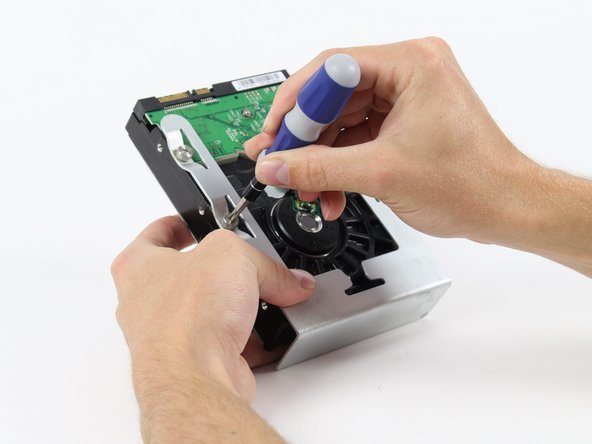
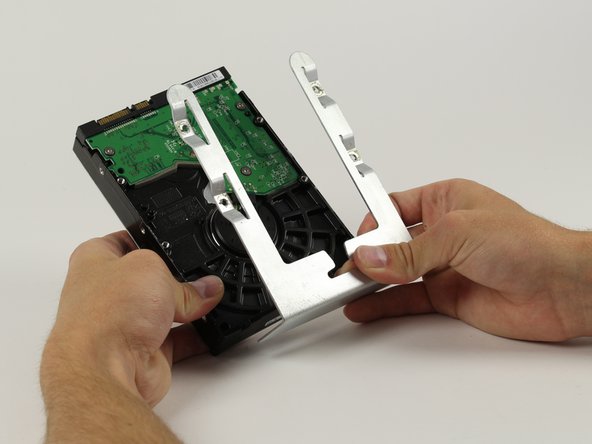
      • When handling the hard drive hold it by the sled or sides be sure not to touch the green circuit board visible in all 3 pictures.

      • Locate the four 6-32 type screws on the Hard Drive sled.

      • Using a Phillips head screw driver remove the four screws and separate the metal sled from the Hard Drive

      Demander à FixBot

      Ajouter un commentaire

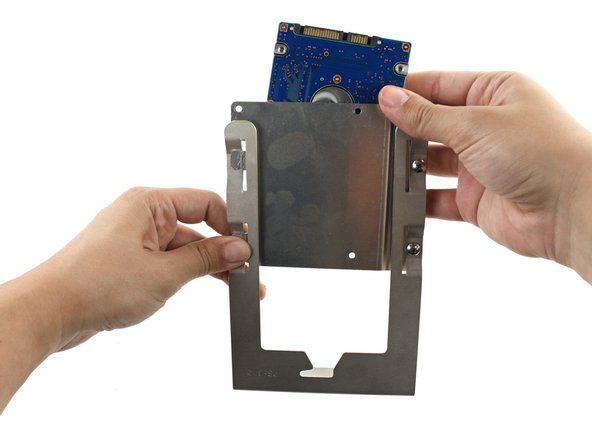
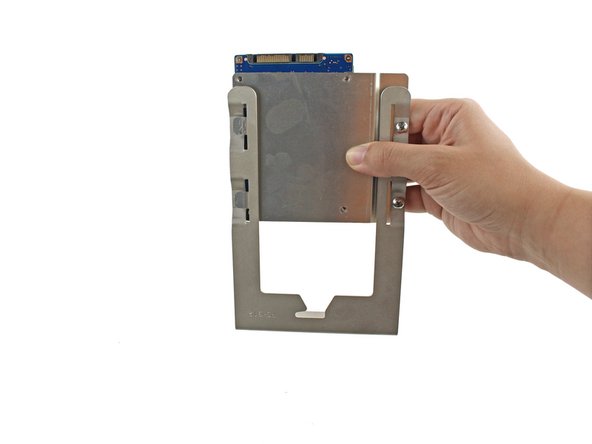
    1. How to Install a Hard Drive Sled Adapter for Mac Pro First Generation, How to Install a Hard Drive Sled Adapter for Mac Pro First Generation: étape 6, image 1 de 3 How to Install a Hard Drive Sled Adapter for Mac Pro First Generation, How to Install a Hard Drive Sled Adapter for Mac Pro First Generation: étape 6, image 2 de 3 How to Install a Hard Drive Sled Adapter for Mac Pro First Generation, How to Install a Hard Drive Sled Adapter for Mac Pro First Generation: étape 6, image 3 de 3
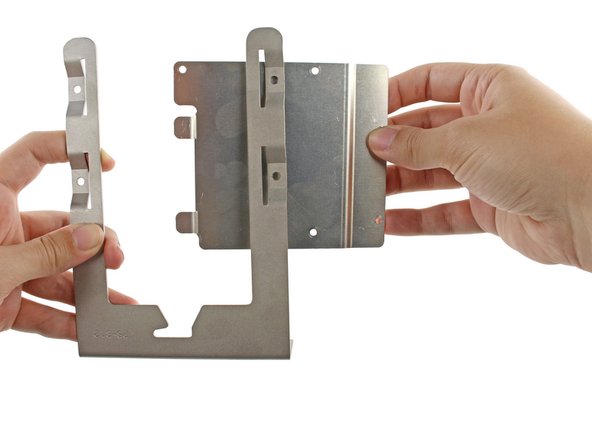
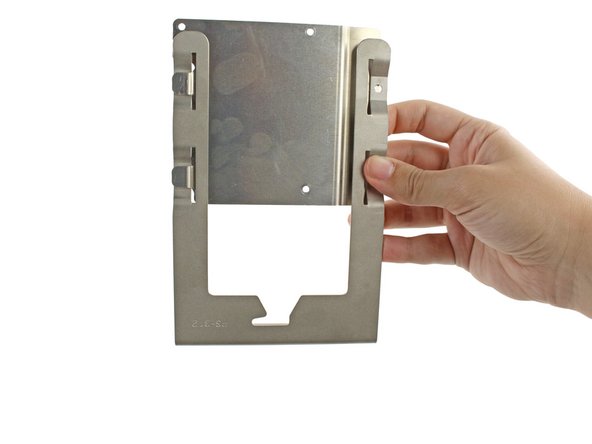
      • Insert the two tabs on the left side of the metal adapter bracket into the slots on the left side of the hard drive bay sled.

      • Align the holes on the right side.

      Demander à FixBot

      Ajouter un commentaire

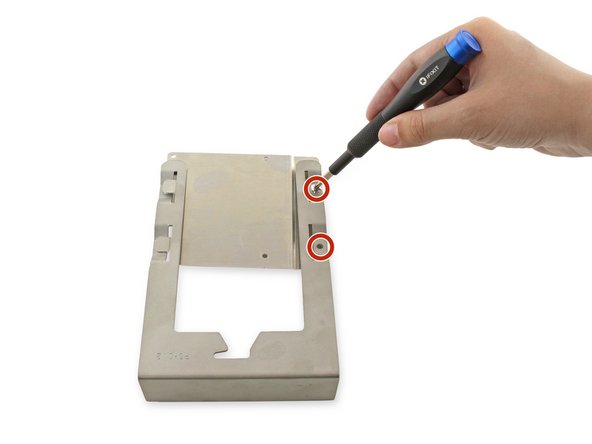
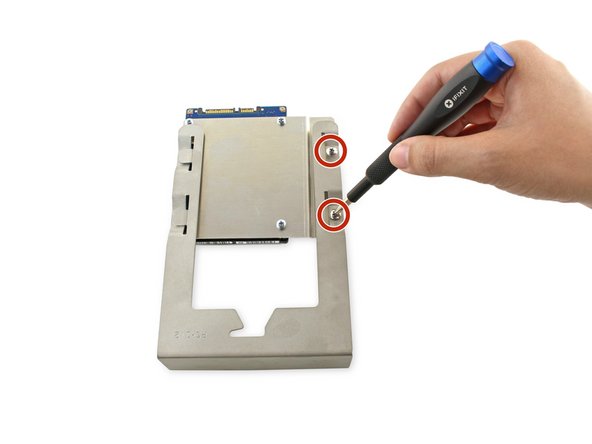
    2. How to Install a Hard Drive Sled Adapter for Mac Pro First Generation: étape 7, image 1 de 1
      • Screw the two 7.8mm PH0 screws into the two holes on the right.

      • Leave these screws slightly loose; they will be tightened once the hard drive is attached.

      Demander à FixBot

      Ajouter un commentaire

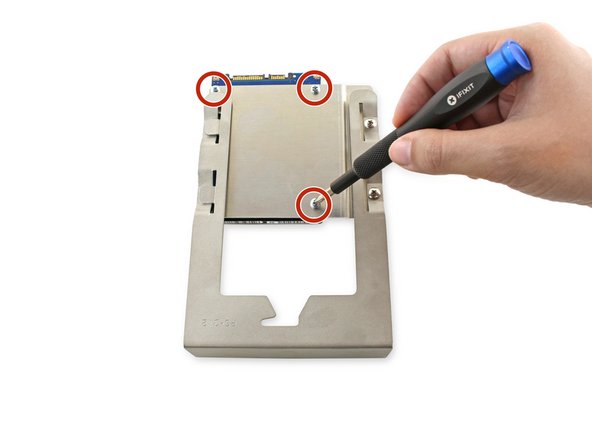
    3. How to Install a Hard Drive Sled Adapter for Mac Pro First Generation: étape 8, image 1 de 3 How to Install a Hard Drive Sled Adapter for Mac Pro First Generation: étape 8, image 2 de 3 How to Install a Hard Drive Sled Adapter for Mac Pro First Generation: étape 8, image 3 de 3
      • Align the holes in the hard drive with the three holes on the bracket.

      • Screw the three 6.1mm PH0 screws into the bracket and hard drive.

      • These screws can be secured tightly.

      Demander à FixBot

      Ajouter un commentaire

    4. How to Install a Hard Drive Sled Adapter for Mac Pro First Generation: étape 9, image 1 de 1
      • Tighten the two 7.8mm PH0 screws on the right side of the bracket.

      Demander à FixBot

      Ajouter un commentaire

Conclusion

To reassemble your device, follow these instructions in reverse order.

Annulation : je n'ai pas terminé ce tutoriel.

5 autres ont terminé cette réparation.

Kristen Gismondi

Membre depuis le 11/12/14

108 458 Réputation

271 tutoriels rédigés

Équipe

iFixit Membre de l'équipe iFixit

Staff

123 membres

70 866 tutoriels rédigés

1 commentaire de tutoriel

Tried installing these on MacPro5,1 today. Very disappointed. Sled does not slide into place correctly, and any attempt to nudge it into place only scratches the carrier.

Going back to OWC sled to mount SSD drives.

tjod - Réponse Partager

Ajouter un commentaire

Nombre de vues :

Dernières 24 heures : 2

7 derniers jours : 19

30 derniers jours : 80

Total : 6,917