Aller au contenu principal
Pour réparer ensemble - Je crée un compte

JBL Pulse 3 LED Light Display Replacement

Ce dont vous avez besoin

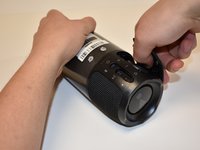
    1. JBL Pulse 3 LED Light Display Replacement, Speaker Grill: étape 1, image 1 de 1
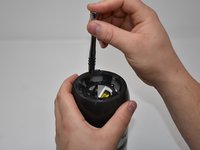
      • Lay the JBL Pulse 3 on its side as shown in the picture.

      • Use a plastic opening tool to lift the top right corner of the speaker grill. A small amount of force is necessary to remove the grill.

      Demander à FixBot

      Ajouter un commentaire

    2. JBL Pulse 3 LED Light Display Replacement: étape 2, image 1 de 1
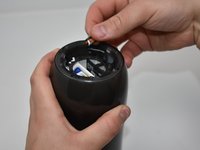
      • Repeat step 1 for bottom right corner of speaker grill.

      Demander à FixBot

      Ajouter un commentaire

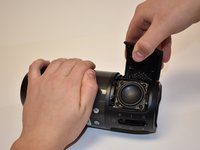
    3. JBL Pulse 3 LED Light Display Replacement: étape 3, image 1 de 2 JBL Pulse 3 LED Light Display Replacement: étape 3, image 2 de 2
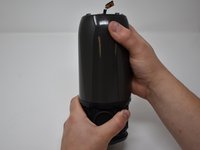
      • After pulling the right side of the grill off, place thumb underneath grill as shown in the picture.

      • Lift and pull straight out to pull grill off the posts.

      Demander à FixBot

      Ajouter un commentaire

      • Repeat steps 1-3 for the left side of the speaker grill on the JBL Pulse 3. The speaker grill should now be completely removed from the JBL Pulse 3.

      Demander à FixBot

      Ajouter un commentaire

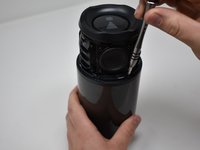
    1. JBL Pulse 3 LED Light Display Replacement, Outside Casing: étape 5, image 1 de 2 JBL Pulse 3 LED Light Display Replacement, Outside Casing: étape 5, image 2 de 2
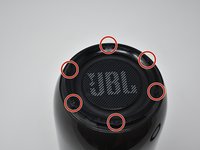
      • Use a Phillips #00 screwdriver to remove the six black 6mm screws on the inside of the top of the bottom section.

      Demander à FixBot

      Ajouter un commentaire

    2. JBL Pulse 3 LED Light Display Replacement: étape 6, image 1 de 2 JBL Pulse 3 LED Light Display Replacement: étape 6, image 2 de 2
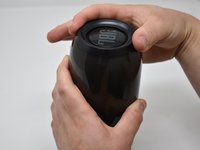
      • Turn the JBL Pulse 3 right-side up and unscrew the top ring of the device. A small amount of force and/or a cotton cloth may be necessary to remove this piece.

      Demander à FixBot

      Ajouter un commentaire

    3. JBL Pulse 3 LED Light Display Replacement: étape 7, image 1 de 2 JBL Pulse 3 LED Light Display Replacement: étape 7, image 2 de 2
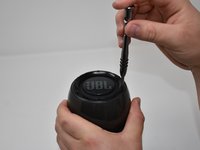
      • Remove the six 5mm screws on top of the JBL Pulse 3 with a Phillips #0 screwdriver.

      Demander à FixBot

      Ajouter un commentaire

    4. JBL Pulse 3 LED Light Display Replacement: étape 8, image 1 de 1
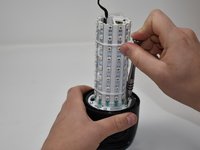
      • Pull off the top disc of the JBL Pulse 3.

      Demander à FixBot

      Ajouter un commentaire

    5. JBL Pulse 3 LED Light Display Replacement: étape 9, image 1 de 2 JBL Pulse 3 LED Light Display Replacement: étape 9, image 2 de 2
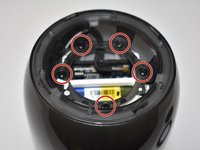
      • Remove the five 7mm screws on the inside of the JBL Pulse 3 with a Phillips #1 screwdriver.

      Demander à FixBot

      Ajouter un commentaire

    6. JBL Pulse 3 LED Light Display Replacement: étape 10, image 1 de 2 JBL Pulse 3 LED Light Display Replacement: étape 10, image 2 de 2
      • Peel off black, taped-on electrical lead from the inside side of the JBL Pulse 3.

      Demander à FixBot

      Ajouter un commentaire

    7. JBL Pulse 3 LED Light Display Replacement: étape 11, image 1 de 1
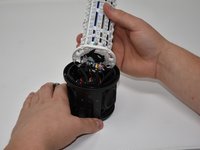
      • Pull the top section of the JBL Pulse 3 up. The outside casing to the JBL Pulse 3 should now be removed.

      Demander à FixBot

      Ajouter un commentaire

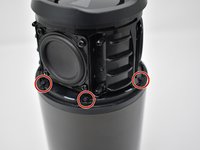
    1. JBL Pulse 3 LED Light Display Replacement, LED Light Display: étape 12, image 1 de 3 JBL Pulse 3 LED Light Display Replacement, LED Light Display: étape 12, image 2 de 3 JBL Pulse 3 LED Light Display Replacement, LED Light Display: étape 12, image 3 de 3
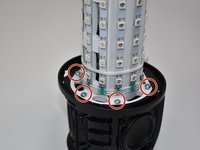
      • Use a Phillips #2 screwdriver to remove the six 11 mm screws that circle the bottom of the LED light display.

      • Pull the LED light display off of the JBL Pulse 3 base.

      Demander à FixBot

      Ajouter un commentaire

    2. JBL Pulse 3 LED Light Display Replacement: étape 13, image 1 de 2 JBL Pulse 3 LED Light Display Replacement: étape 13, image 2 de 2
      Outil utilisé dans cette étape :
      Tweezers
      $4.99
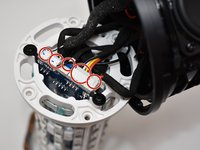
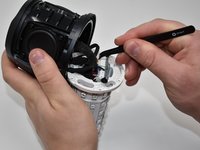
      • Use tweezers to pull the five connections off of the LED light display.

      Demander à FixBot

      Ajouter un commentaire

Conclusion

To reassemble your device, follow these instructions in reverse order.

Annulation : je n'ai pas terminé ce tutoriel.

3 autres ont terminé cette réparation.

Kaitlyn Greenfield

Membre depuis le 09/20/18

1 188 Réputation

6 tutoriels rédigés

4 commentaires de tutoriel

Hello,I really need some code to show me how to initialize and LED display and how to output data from it.Any help is much appreciated.

Osama Siddiq - Réponse Partager
Wow jbl

Gyyzhuahyz8yus

Majd Tom - Réponse Partager
Where to buy the leds?

mj.viana1993 - Réponse Partager

Hello i need an assitance in a LED screen manufacturing

volkanoo - Réponse Partager

Ajouter un commentaire

Nombre de vues :

Dernières 24 heures : 0

7 derniers jours : 6

30 derniers jours : 45

Total : 4,260