Cette traduction a été générée automatiquement et n’a pas encore fait l’objet d’une relecture humaine. Vous parlez cette langue ? Relisez-la.
Introduction
Utilisez ce tutoriel pour changer l'ensemble palettes du Logitech G29 Driving Force. L'ensemble palettes permet de monter ou descendre les vitesses du véhicule en jeu.
Cette réparation peut être nécessaire si les vitesses du véhicule en jeu ne passent plus, ce qui est crucial pour cet appareil. Prévoyez un endroit approprié pour organiser les vis avant de commencer, car il y en a beaucoup à retirer. Assurez-vous que l'appareil est correctement branché et qu'il ne fonctionne toujours pas avant de procéder au démontage.
Ce dont vous avez besoin
-
-
-
Retirez les six vis six pans de 32 mm de la façade du volant.
 Demander à FixBot
-
-
-
Retirez les six vis cruciformes Phillips de 10 mm situées à l'arrière du volant.
-
-
-
-
Débranchez délicatement le connecteur de la carte mère du volant.
-
-
-
Avec un tournevis cruciforme Phillips #1, retirez les trois vis de 30 mm situées derrière le volant.
-
-
-
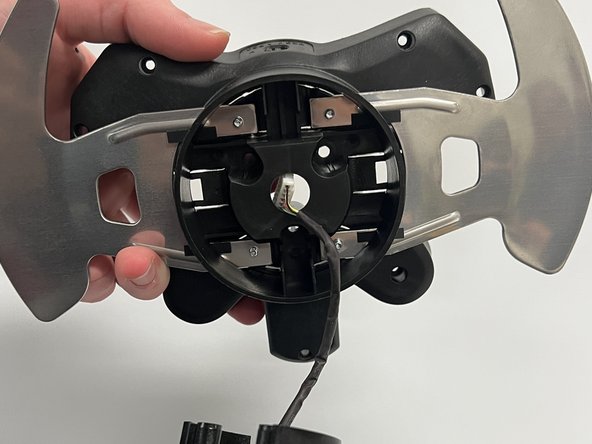
Retirez délicatement l'ensemble de la palette de la base de l'appareil et faites passer prudemment le connecteur à travers l'orifice central.
-
-


Pour remonter votre appareil, suivez ces instructions en sens inverse.
Annulation : je n'ai pas terminé ce tutoriel.
5 autres ont terminé cette réparation.

Équipe

Western Carolina University, Team 1-5, Virtue Fall 2022 Membre de l'équipe Western Carolina University, Team 1-5, Virtue Fall 2022
WCU-VIRTUE-F22S1G5
4 membres
60 tutoriels rédigés
3 commentaires de tutoriel
Where can I buy the paddle assembly
@kevinjungh90689 have you found this out ? my paddle snapped off and I need to get a new one
@fizaanahmed Perhaps eBay?
