Aller au contenu principal
Pour réparer ensemble - Je crée un compte

OPPO N1 Screen Replacement

Ce dont vous avez besoin

  1. OPPO N1 Screen Replacement, Rear Case: étape 1, image 1 de 1
    • Insert the plastic opening tool into the crevice. The back cover is most easily opened by starting at this location.

    Demander à FixBot

    Ajouter un commentaire

  2. OPPO N1 Screen Replacement: étape 2, image 1 de 2 OPPO N1 Screen Replacement: étape 2, image 2 de 2
    • In the photo we rotated the phone ninety degrees counterclockwise.

    • Gently slide the plastic opening tool around the edge of the phone to release the back cover from the phone. You may hear some snapping noises as you release the back cover.

    • The rear case should then come free.

    Demander à FixBot

    Ajouter un commentaire

  3. OPPO N1 Screen Replacement, Battery: étape 3, image 1 de 2 OPPO N1 Screen Replacement, Battery: étape 3, image 2 de 2
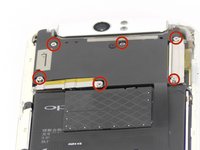
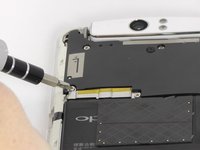
    • Remove the six 4mm long screws holding the motherboard in with the ph0 Phillips head screw driver.

    Demander à FixBot

    Ajouter un commentaire

  4. OPPO N1 Screen Replacement: étape 4, image 1 de 1
    Outil utilisé dans cette étape :
    Tweezers
    $4.99
    • Use the tweezers or your fingers to remove the sliver plates.

    Demander à FixBot

    Ajouter un commentaire

  5. OPPO N1 Screen Replacement: étape 5, image 1 de 1
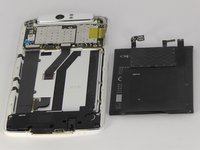
    • Remove the black plate with your fingers.

    Demander à FixBot

    Ajouter un commentaire

  6. OPPO N1 Screen Replacement: étape 6, image 1 de 3 OPPO N1 Screen Replacement: étape 6, image 2 de 3 OPPO N1 Screen Replacement: étape 6, image 3 de 3
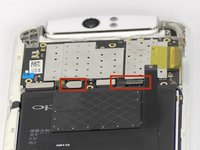
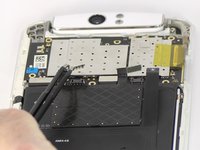
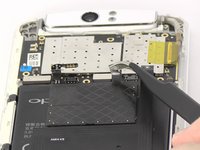
    • Use tweezers or your fingers to pull up the connector tabs.

    Demander à FixBot

    Ajouter un commentaire

  7. OPPO N1 Screen Replacement: étape 7, image 1 de 2 OPPO N1 Screen Replacement: étape 7, image 2 de 2
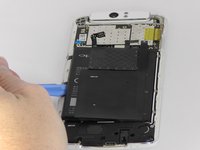
    • Use the blue opening tool to carefully pry the battery from the sticky tape that attaches it to the device.

    Demander à FixBot

    Ajouter un commentaire

  8. OPPO N1 Screen Replacement, Motherboard: étape 8, image 1 de 1
    Outil utilisé dans cette étape :
    Tweezers
    $4.99
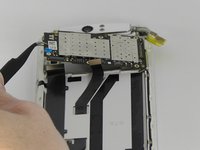
    • Use tweezers or fingers to remove the three connector tabs.

    Demander à FixBot

    Ajouter un commentaire

  9. OPPO N1 Screen Replacement: étape 9, image 1 de 2 OPPO N1 Screen Replacement: étape 9, image 2 de 2
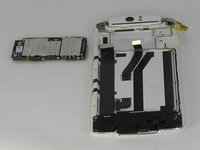
    • Use tweezers or your fingers to remove the motherboard.

    Demander à FixBot

    Ajouter un commentaire

  10. OPPO N1 Screen Replacement, Headphone Jack and Speaker Cover: étape 10, image 1 de 1
    • Remove the two 4mm long screws using the ph0 Phillips head screw driver.

    • Remove the six 3mm long screws using the ph0 Phillips head screw driver.

    Demander à FixBot

    Ajouter un commentaire

  11. OPPO N1 Screen Replacement: étape 11, image 1 de 2 OPPO N1 Screen Replacement: étape 11, image 2 de 2
    Outil utilisé dans cette étape :
    Tweezers
    $4.99
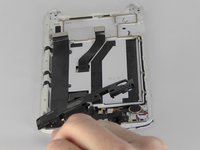
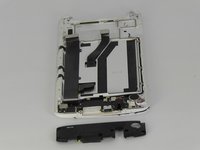
    • Use tweezers or your fingers to remove the plastic cover.

    Demander à FixBot

    Ajouter un commentaire

  12. OPPO N1 Screen Replacement, Screen: étape 12, image 1 de 1
    Outil utilisé dans cette étape :
    Tweezers
    $4.99
    • Use tweezers to disconnect the connector tab.

    Demander à FixBot

    Ajouter un commentaire

  13. OPPO N1 Screen Replacement: étape 13, image 1 de 1
    • Use tweezers to peel the black strip from the sticky tape attached to the phone so that the black strip will slide through the phone once the screen is removed.

    • Be gentle removing the black strip at this stage. It can easily tear and it must be removed in order to remove the screen.

    Demander à FixBot

    Ajouter un commentaire

  14. OPPO N1 Screen Replacement: étape 14, image 1 de 3 OPPO N1 Screen Replacement: étape 14, image 2 de 3 OPPO N1 Screen Replacement: étape 14, image 3 de 3
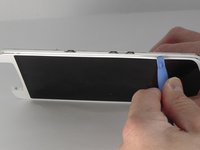
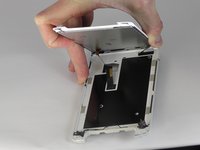
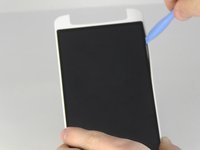
    • Insert the blue opening tool into the crevice between the screen and the main body of the phone. Gently slide the tool around the edge of the phone.

    Demander à FixBot

    Ajouter un commentaire

  15. OPPO N1 Screen Replacement: étape 15, image 1 de 2 OPPO N1 Screen Replacement: étape 15, image 2 de 2
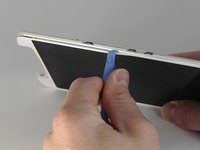
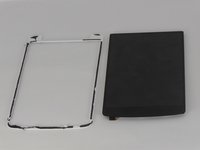
    • Insert the blue opening tool in between the black screen and the white border and slide it around the edge of the black screen.

    Demander à FixBot

    Ajouter un commentaire

Conclusion

To reassemble your device, follow these instructions in reverse order.

Annulation : je n'ai pas terminé ce tutoriel.

10 autres ont terminé cette réparation.

Joshua Stone

Membre depuis le 09/26/14

1 067 Réputation

5 tutoriels rédigés

Équipe

USF Tampa, Team 13-5, Staggers Fall 2014 Membre de l'équipe USF Tampa, Team 13-5, Staggers Fall 2014

USFT-STAGGERS-F14S13G5

3 membres

14 tutoriels rédigés

0 commentaires de tutoriel

Ajouter un commentaire

Nombre de vues :

Dernières 24 heures : 3

7 derniers jours : 6

30 derniers jours : 45

Total : 5,945